
Agent Identity and Least Privilege on PostgreSQL: Roles, Row Security, and Per-User Identity
Content reflects the state as of October 2026. AI tooling and model capabilities in this area change frequently.
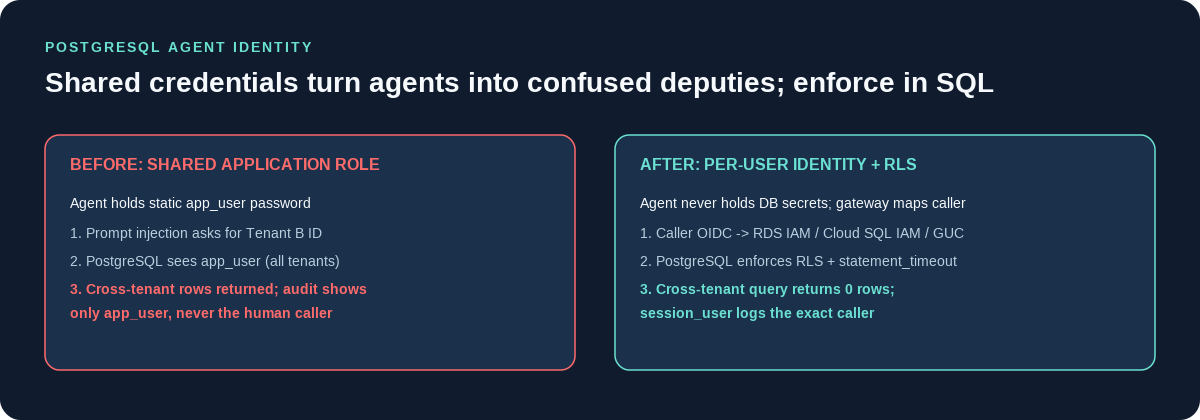
An AI agent should never hold your application’s database credential—per-user identity, a narrow PostgreSQL role, and Row-Level Security make the database engine the enforcement point rather than the prompt.
TL;DR
- Problem: Giving an MCP server or diagnostic agent the primary application role turns every prompt injection into a confused-deputy breach across all tenants and tables, with zero per-caller attribution in audit logs.
- Answer: Eliminate static shared passwords; propagate caller identity via AWS RDS (
rds_iam) or Google Cloud SQL (cloudsqliamuser) IAM authentication, enforceNOBYPASSRLSwithFORCE ROW LEVEL SECURITY, and lock agent roles withdefault_transaction_read_only = onandstatement_timeout.- Watch out: Session-level
SETleaks tenant context across PgBouncer transaction pooling, table owners silently bypass RLS unlessFORCE ROW LEVEL SECURITYis set, and RDS IAM tokens expire after 15 minutes for new pool connections.
Situation
When engineering teams wire an AI agent or MCP server to PostgreSQL, the fastest path to a working prototype is copying the application’s DATABASE_URL into the agent’s environment. That single string usually carries a long-lived password for an application role that owns tables, reads and writes across every tenant, and bypasses Row-Level Security (RLS).
That shortcut collapses three distinct identities into one: the human caller (or upstream job), the agent runtime, and the application service. In Post 1 and Post 3, we saw how indirect prompt injection in retrieved text or poisoned MCP tool metadata can steer an LLM’s next tool call. When the agent connects to PostgreSQL using a broad application role, the database cannot tell whether a SELECT for tenant_id = 42 came from Tenant 42’s engineer or from a prompt injection inside Tenant 9’s support ticket.
PostgreSQL already provides deterministic primitives to solve this: granular ROLE privileges, predefined monitoring roles such as pg_read_all_stats, default_transaction_read_only, statement_timeout, and Row-Level Security. Both AWS RDS and Google Cloud SQL pair those engine primitives with short-lived IAM database authentication so neither the agent nor the MCP gateway needs static database passwords.
The Problem
Placing authorization in the agent’s prompt or MCP tool wrapper while connecting to PostgreSQL as a privileged shared user fails across four concrete database boundaries.
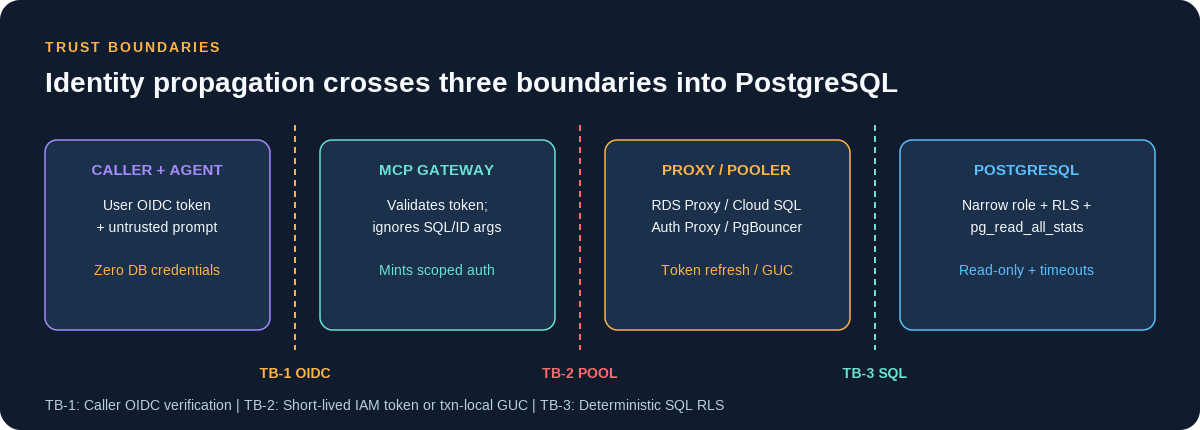
- Shared application roles create an un-auditable confused deputy (TB-2 to TB-3). When every agent request hits PostgreSQL as
app_user,session_userandcurrent_userinpg_stat_activityandpgAuditboth recordapp_user. If an indirect injection exfiltrates rows or runs an expensive cross-join, incident responders cannot attribute the query to the originating human caller or OIDC principal. - Table ownership and
BYPASSRLSsilently disable Row-Level Security (TB-3). Enabling RLS on a table (ALTER TABLE ... ENABLE ROW LEVEL SECURITY) does not apply to the table owner or any role with theBYPASSRLSattribute. If the agent reuses the migration or application-owner role, everyCREATE POLICYfilter is skipped without a warning. - Connection pooling breaks naive
SETsession isolation (TB-2 to TB-3). If a gateway uses PgBouncer or RDS Proxy in transaction-pooling mode and executesSET app.tenant_id = '...'without transaction scoping, that variable persists on the backend PostgreSQL process after the transaction commits—silently leaking Tenant A’s RLS context to Tenant B’s next request on the same pooled connection. - IAM token lifetimes diverge from physical connection lifetimes (TB-2). In AWS RDS PostgreSQL, IAM authentication tokens generated for an
rds_iamrole have a strict, hardcoded 15-minute lifetime that cannot be extended. The token is checked only during the initial connection handshake—existing connections stay open past 15 minutes—but if a pool scales out or replaces a physical connection using a stale cached token, the handshake fails with an authentication error.
How do you let an agent run diagnostics or tenant-scoped queries on PostgreSQL without handing it static credentials or letting one poisoned prompt cross tenant and schema boundaries?
Options Considered
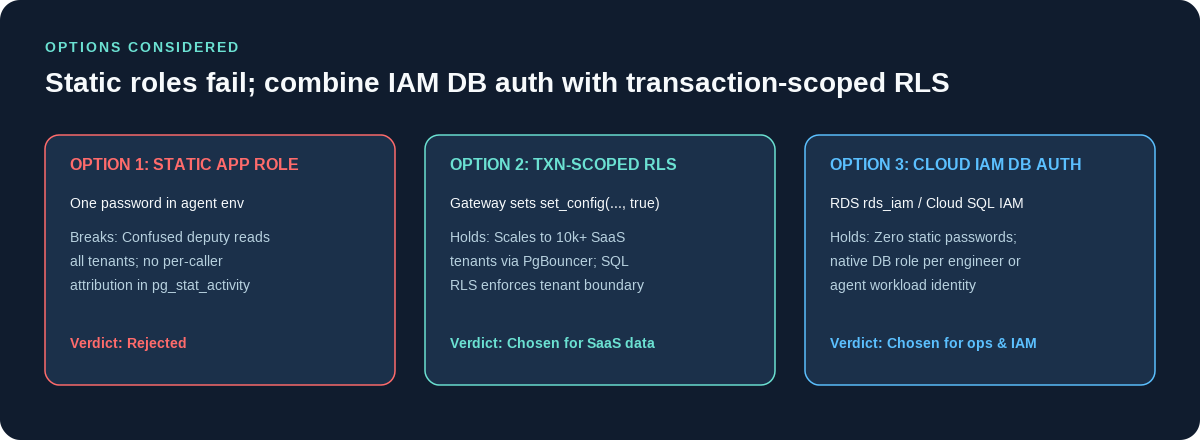
Teams typically evaluate three identity models for PostgreSQL agents.
How the Options Compare
| Option | Identity Mechanism | What It Gets Right | Where It Breaks | Verdict |
|---|---|---|---|---|
Static shared app_user | Single password in env | Zero pool changes; works out of the box | Confused deputy across all tenants; table owner skips RLS; no per-caller audit | Rejected |
Pooled role + txn-local GUC (set_config) | Gateway authenticates via IAM, sets set_config('app.tenant_id', ..., true) inside BEGIN | Scales to 10,000+ SaaS tenants without creating thousands of DB roles; safe with PgBouncer transaction pooling | Requires strict BEGIN + set_config(..., true) wrapper on every query; session_user reflects the gateway role unless application_name or audit headers are attached | Chosen for multi-tenant SaaS data |
| Per-user Cloud IAM DB Auth | Each human or service identity maps to a distinct DB user (rds_iam or cloudsqliamuser) | Zero static passwords; native session_user attribution in pg_stat_activity and pgAudit; ideal for pg_read_all_stats diagnostics | Creating individual PostgreSQL roles does not scale to tens of thousands of external end-users; requires token refresh on new physical connections | Chosen for internal ops, engineers, and service identities |
Using per-user Cloud IAM DB authentication for internal engineers and diagnostic agents, and transaction-scoped set_config + RLS for high-cardinality multi-tenant end-user queries, covers both workloads without ever placing a static password inside the agent runtime. In both models, the MCP Policy Gateway acts as the sole identity broker: it validates the caller’s OIDC token, rejects any tenant or role identifier supplied inside the LLM’s tool arguments, and binds the database session before any SQL executes. That separation guarantees that even if an indirect prompt injection alters the model’s SQL generation, PostgreSQL still enforces the caller’s exact row and schema boundary.
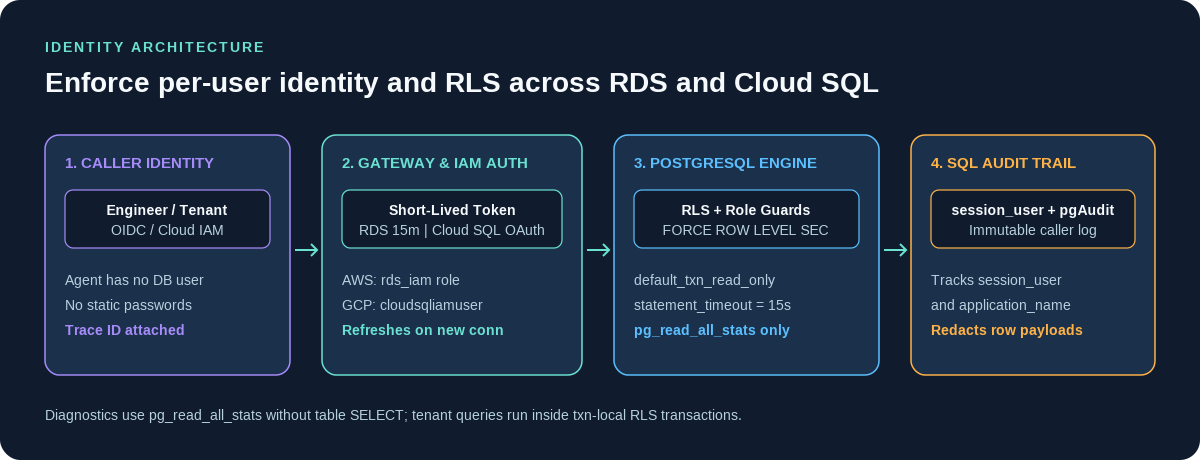
Target PostgreSQL Identity Architecture (RDS vs. Cloud SQL)
The target architecture enforces identity at the MCP Policy Gateway (TB-1), authenticates to PostgreSQL using short-lived cloud IAM tokens (TB-2), and delegates row, schema, and resource limits to the PostgreSQL engine (TB-3).
Comparing AWS RDS and Google Cloud SQL IAM Authentication
Both managed PostgreSQL platforms eliminate static passwords, but they differ in how roles are provisioned, how tokens are refreshed, and how connection proxies behave.
| Dimension | AWS RDS for PostgreSQL | Google Cloud SQL for PostgreSQL |
|---|---|---|
| Instance enablement | Enable IAM DB Authentication on the RDS instance/cluster (iam_database_authentication_enabled = true) | Set instance flag cloudsql.iam_authentication=on |
| PostgreSQL plugin role | Grant rds_iam to the database user (GRANT rds_iam TO ...) | Provision user via Cloud SQL API/CLI as CLOUD_IAM_USER or CLOUD_IAM_SERVICE_ACCOUNT (backed by cloudsqliamuser / cloudsqliamserviceaccount) |
| Username convention | Standard PostgreSQL identifier (e.g., agent_diag_ro or oncall_ops) | Full IAM email or SA name (e.g., "[email protected]"—requires double quotes in SQL grants) |
| Token mechanism & TTL | AWS SigV4 generate-db-auth-token; hardcoded 15-minute lifetime; IAM policy scopes rds-db:connect to DbUser ARN | Google OAuth2 access token (gcloud auth print-access-token or ADC); short-lived token managed by Cloud IAM |
| Proxy / automatic refresh | Application or RDS Proxy refreshes token on new physical connections; IAM auth takes precedence over password for rds_iam users | Cloud SQL Auth Proxy with --auto-iam-authn transparently injects and refreshes IAM tokens |
| Cloud authorization layer | IAM policy condition on rds-db:connect (arn:aws:rds-db:region:acct:dbuser:dbi-.../username) | Project IAM roles roles/cloudsql.instanceUser + roles/cloudsql.client (for Auth Proxy) |
Production SQL: Narrow Roles, Timeouts, and Forced RLS
For PostgreSQL 15+ (compatible with PostgreSQL 14–17), separate diagnostic telemetry access from tenant data access. An agent diagnosing slow queries needs pg_read_all_stats—which lets a role view pg_stat_activity and pg_stat_statements statistics without granting SELECT on any application table (but note it also exposes other sessions’ raw query text in pg_stat_activity.query, literals included, so put it behind a SECURITY DEFINER view that projects only normalized pg_stat_statements columns)—plus default_transaction_read_only and statement_timeout baked directly into the role:
-- 1. Narrow diagnostic role (no table SELECT, read-only, 15s cap).
-- Caution: pg_read_all_stats also lets a role read other sessions' raw query text; see the wrapper-view note.
CREATE ROLE agent_diag_ro WITH LOGIN NOBYPASSRLS NOINHERIT;
GRANT rds_iam TO agent_diag_ro; -- On Cloud SQL, create as CLOUD_IAM_SERVICE_ACCOUNT instead
GRANT pg_read_all_stats TO agent_diag_ro;

ALTER ROLE agent_diag_ro SET default_transaction_read_only = on;
ALTER ROLE agent_diag_ro SET statement_timeout = '15s';
ALTER ROLE agent_diag_ro SET lock_timeout = '2s';

-- 2. Multi-tenant data role with forced RLS (cannot bypass even if owner)
CREATE ROLE agent_tenant_reader WITH LOGIN NOBYPASSRLS;
GRANT USAGE ON SCHEMA app TO agent_tenant_reader;
GRANT SELECT ON app.tickets TO agent_tenant_reader;
ALTER ROLE agent_tenant_reader SET default_transaction_read_only = on;
ALTER ROLE agent_tenant_reader SET statement_timeout = '10s';

ALTER TABLE app.tickets ENABLE ROW LEVEL SECURITY;
ALTER TABLE app.tickets FORCE ROW LEVEL SECURITY;

CREATE POLICY tickets_tenant_isolation ON app.tickets
  FOR SELECT
  TO agent_tenant_reader
  USING (
    tenant_id = NULLIF(current_setting('app.current_tenant_id', true), '')::uuid
  );
Notice two critical details in that SQL:
NULLIF(current_setting('app.current_tenant_id', true), '')::uuidreturnsNULLinstead of throwing an error or matching rows if the GUC is unset—failing closed (zero rows returned) if a caller forgets to initialize the transaction context.- The setting is only trustworthy if the agent cannot run arbitrary SQL: any session that can call
set_configcan choose its own tenant, so the gateway must be the only SQL path and the agent gets typed tools, not a SQL console. FORCE ROW LEVEL SECURITYguarantees that even if a table’s ownership changes or a role inherits elevated table rights, PostgreSQL still evaluatestickets_tenant_isolationon every query.
When your gateway uses SET ROLE for internal engineering sessions rather than distinct physical connections, PostgreSQL maintains a strict distinction between session_user (the original authenticated IAM principal that opened the connection) and current_user (the active role after SET ROLE). Audit columns and pgAudit should always capture session_user alongside application_name so role switching never obscures who initiated the session. In addition, run REVOKE CREATE ON SCHEMA public FROM PUBLIC and ensure any helper views are created with security_invoker = true (available in PostgreSQL 15+) so views execute with the querying agent’s RLS and table permissions rather than the view owner’s privileges.
For connection pooling, AWS RDS Proxy supports IAM authentication directly between the gateway and the proxy, while the proxy maintains a warm pool to the RDS instance—preventing 15-minute token-expiry storms during sudden concurrency spikes, though RDS Proxy pins connections if session-level SET statements are issued instead of set_config(..., true). On Google Cloud SQL, running cloud-sql-proxy --auto-iam-authn as a sidecar next to the MCP Policy Gateway handles OAuth2 token acquisition and automatic TLS tunneling without embedding Google credential logic inside your MCP tool code.
Attacker and Defender Threat Matrix
| Threat Vector | Trust Boundary Crossed | Attacker Objective (OWASP / ATLAS) | Defender Control (Deterministic) | Verification Signal |
|---|---|---|---|---|
| Cross-tenant ID injection | TB-2 → TB-3 (Agent → PostgreSQL) | Read Tenant B rows by passing tenant_id = B in SQL/tool args (LLM01 / Collection) | Ignore prompt tenant_id; derive from OIDC at gateway and bind via set_config(..., true) + RLS | Query for Tenant B under Tenant A’s OIDC token returns 0 rows |
Table owner / BYPASSRLS escalation | TB-3 (Role → Table) | Skip RLS policies by connecting as migration or owner role (Privilege Escalation) | Dedicated NOBYPASSRLS agent role + ALTER TABLE ... FORCE ROW LEVEL SECURITY | SELECT * FROM app.tickets without GUC returns 0 rows |
| PgBouncer session variable leak | TB-2 → TB-3 (Pool → Backend) | Inherit previous tenant’s app.current_tenant_id on a reused pooled connection | Always execute SELECT set_config('app.current_tenant_id', $1, true) inside BEGIN...COMMIT | Sequential pooled requests for Tenant A then unset return 0 rows on request 2 |
| Diagnostic role reads raw query text | TB-2 → TB-3 (Telemetry → Model) | pg_read_all_stats exposes other sessions’ pg_stat_activity.query with literals | Expose normalized pg_stat_statements through a SECURITY DEFINER view; do not hand the agent raw pg_stat_activity | Agent role cannot read another user’s query text |
| Diagnostic agent reads PII tables | TB-3 (Telemetry → Data) | Use EXPLAIN or SELECT on customer tables during latency triage | Grant pg_read_all_stats only; revoke SELECT on app.* schemas | Diagnostic role receives permission denied for table on app.tickets |
| Write or DDL injection via SQL tool | TB-2 → TB-3 (Tool → Engine) | Execute UPDATE, DELETE, or COPY TO PROGRAM via crafted prompt (LLM06) | ALTER ROLE ... SET default_transaction_read_only = on + read replica routing | Any DML/DDL statement fails with cannot execute in a read-only transaction |
| Static credential theft from agent env | TB-1 → TB-2 (Sandbox → DB) | Exfiltrate DATABASE_URL from agent environment or logs (Credential Access) | Zero DB passwords in agent env; gateway uses 15-min RDS IAM or Cloud SQL Auth Proxy | Agent runtime environment dump contains zero DB host passwords |
| Runaway sequential scan DoS | TB-3 (Query → Primary CPU) | Trigger full table scan or lock wait on primary database (Impact) | statement_timeout = '15s', lock_timeout = '2s', and read-replica routing | Long-running test query cancels automatically at 15s |
How It Rolls Out
Combining Cloud IAM authentication with transaction-local RLS ensures every query is authenticated, bounded, and attributable.
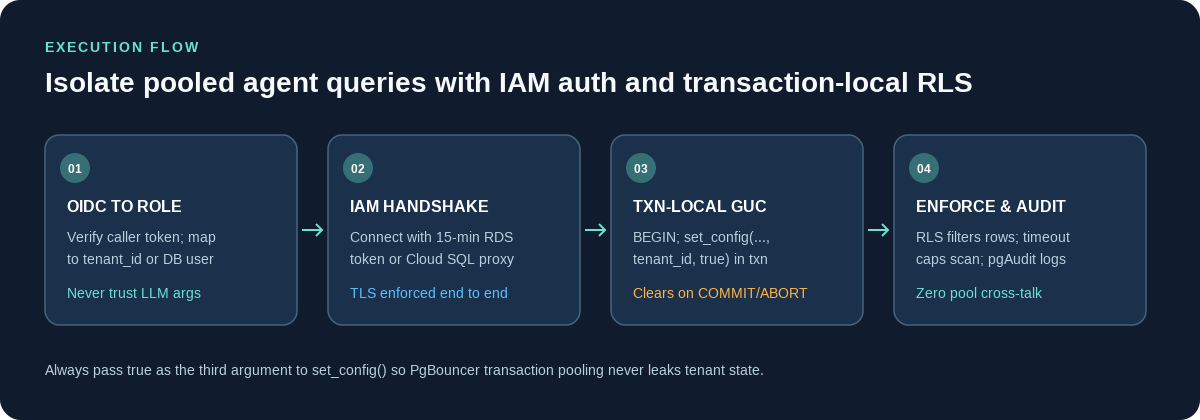
Runtime Execution Flow
- 01 OIDC to Role: The MCP Policy Gateway validates the caller’s OIDC token and extracts either the internal engineer’s IAM identity (for diagnostics) or the authenticated
tenant_id(for SaaS data access). Prompt-supplied tenant IDs are discarded. - 02 IAM Handshake: The gateway connects to PostgreSQL over TLS using a freshly minted IAM token—either an AWS SigV4 token (
rds_iam, valid for 15 minutes at handshake) or via the Google Cloud SQL Auth Proxy (--auto-iam-authnforcloudsqliamuser/cloudsqliamserviceaccount). - 03 Transaction-Local GUC: For multi-tenant queries, the gateway opens a transaction (
BEGIN) and executesSELECT set_config('app.current_tenant_id', $1, true)alongsideSET LOCAL application_name = '<trace_id>'. Passingtruescopes the setting strictly to the current transaction so PgBouncer transaction pooling never leaks context. - 04 Enforce and Audit: PostgreSQL evaluates RLS policies,
default_transaction_read_only, andstatement_timeoutinside the engine.pgAuditand PostgreSQL logs recordsession_user(immutable original login) andapplication_namewhile redacting bind values.
Phased Rollout and Rollback Gates
- Phase 1 — Provision Narrow Roles and Enable IAM Auth: Enable
iam_database_authentication_enabled(RDS) orcloudsql.iam_authentication=on(Cloud SQL). Createagent_diag_ro(pg_read_all_stats) andagent_tenant_reader(NOBYPASSRLS) withdefault_transaction_read_only = onandstatement_timeout. Gate: New roles connect via IAM token and fail onINSERT/UPDATE. Rollback: Drop the new IAM roles; existing application traffic is untouched. - Phase 2 — Enable and Force RLS on Multi-Tenant Tables: Apply
ENABLE ROW LEVEL SECURITY,FORCE ROW LEVEL SECURITY, and fail-closedNULLIF(current_setting(...), '')policies on target tables. Gate: Unset GUC returns 0 rows; Tenant A GUC returns only Tenant A rows. Rollback: Temporarily disable RLS on a specific table only if an un-migrated legacy batch job breaks, while keepingagent_tenant_readerblocked from that table viaREVOKE. - Phase 3 — Migrate MCP Tools to Gateway Identity Exchange: Move database credentials out of the agent runtime into the MCP Policy Gateway. Configure RDS token refresh per new physical connection or deploy Cloud SQL Auth Proxy with
--auto-iam-authn. Gate: 100% of agent queries execute under IAM-authenticated roles with zero static passwords in agent env. Rollback: Temporarily route a specific tool through a scoped read-only password in Secrets Manager if IAM token generation hits cloud API rate limits. - Phase 4 — Replica Pinning and
pgAuditVerification: Point all agent read tools to read replicas and verifypgAuditcapturessession_userandapplication_nametrace IDs. Gate: Zero agent queries hit the primary writer; audit logs correlate every tool call to a caller principal. Rollback: Fail over read tool DNS to another healthy replica.
In Practice
I have not benchmarked every RDS Proxy and Cloud SQL Auth Proxy concurrency limit across all instance sizes personally, so the mechanisms above are grounded in official PostgreSQL, AWS, and Google Cloud documentation:
- PostgreSQL role and RLS mechanics (Pattern A — Official Docs): Per the PostgreSQL documentation,
session_userrecords the immutable original login user whilecurrent_userreflectsSET ROLE,FORCE ROW LEVEL SECURITYis required to subject table owners to RLS, andset_config(name, value, true)scopes GUCs to the current transaction for safe connection pooling.pg_read_all_statsgrants read access to statistics views (pg_stat_activity,pg_stat_statements) without grantingSELECTon user tables. - AWS RDS IAM token lifecycle (Pattern A — AWS Docs): Per AWS RDS IAM Database Authentication documentation,
rds_iamtokens have a fixed 15-minute lifetime checked at connection establishment; active connections remain open past 15 minutes, but connection pools must generate fresh tokens for new physical connections. - Google Cloud SQL IAM authentication (Pattern A — Google Cloud Docs): Per Cloud SQL IAM Database Authentication documentation, enabling
cloudsql.iam_authentication=onmapsCLOUD_IAM_USERandCLOUD_IAM_SERVICE_ACCOUNTprincipals tocloudsqliamuser/cloudsqliamserviceaccount, requiresroles/cloudsql.instanceUserplus explicit SQLGRANTs, and supports automatic token injection viacloud-sql-proxy --auto-iam-authn.
Where It Breaks
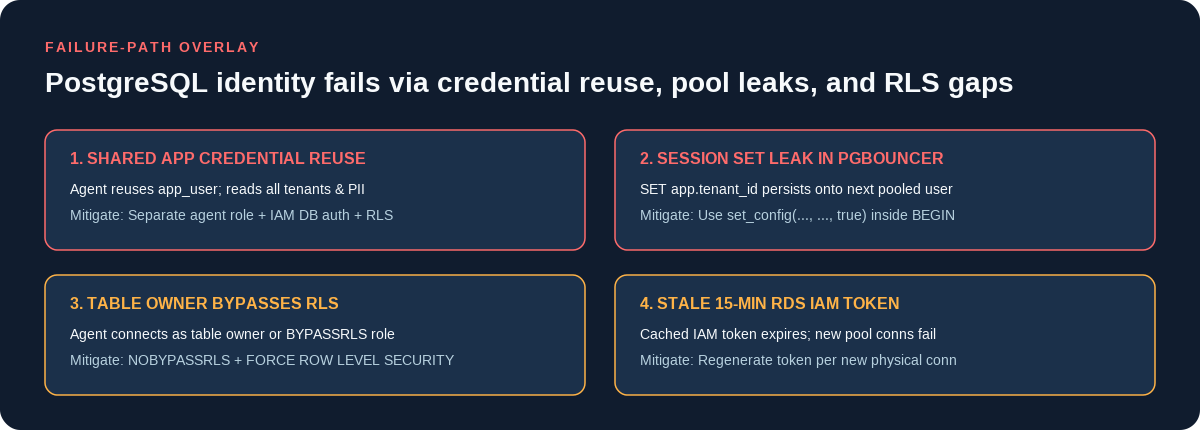
| Condition | Breaks How | Detect | Mitigate |
|---|---|---|---|
| RDS IAM token cached >15 minutes | Pooler or gateway caches token at startup; after 15 minutes, scale-out connections fail auth | Spike in FATAL: PAM authentication failed or password authentication failed logs | Generate a fresh SigV4 token inside the pool’s connect hook for every new physical connection |
Cloud SQL IAM user created without SQL GRANTs | gcloud sql users create succeeds, but queries fail because cloudsqliamuser has no default schema/table rights | ERROR: permission denied for schema/table on first agent call | Automate GRANT USAGE / GRANT SELECT in Terraform or migration scripts for every quoted IAM email |
| RLS policy references non-indexed column | WHERE tenant_id = current_setting(...) triggers sequential scans under RLS evaluation | EXPLAIN (ANALYZE, BUFFERS) shows Seq Scan instead of Index Scan on tenant tables | Index tenant_id on every RLS-protected table and verify query plans under agent_tenant_reader |
Agent calls SECURITY DEFINER function | A SECURITY DEFINER function runs with the creator’s privileges, bypassing the caller’s RLS and read_only expectations | Audit pg_proc for prosecdef = true callable by PUBLIC or agent roles | REVOKE EXECUTE ON ALL FUNCTIONS IN SCHEMA app FROM PUBLIC; allowlist only SECURITY INVOKER functions |
Multi-role SET ROLE inside rds_iam without NOINHERIT | Over-broad role inheritance grants unintended write or admin privileges to the diagnostic role | SELECT * FROM information_schema.applicable_roles shows unexpected parent roles | Create agent roles with NOINHERIT and audit role memberships in CI |
Key Takeaways
- Never put the application’s
DATABASE_URLin an agent runtime: Static shared credentials turn prompt injection into a cross-tenant confused-deputy breach with no caller attribution. - Use Cloud IAM DB auth for zero-password connections: Map internal callers and services via AWS RDS
rds_iam(refreshing 15-minute tokens on new connections) or Cloud SQLcloudsqliamuserwith--auto-iam-authn. - Enforce
FORCE ROW LEVEL SECURITYandNOBYPASSRLS: Never rely on applicationWHEREclauses or table-owner defaults; fail closed withNULLIF(current_setting('app.current_tenant_id', true), '')::uuid. - Scope pool state to the transaction: Always pass
truetoset_config()insideBEGIN...COMMITso PgBouncer transaction pooling never leaks tenant state across requests. - Lock diagnostic roles in SQL: Combine
pg_read_all_stats(for telemetry without tableSELECT),default_transaction_read_only = on, andstatement_timeoutdirectly on the PostgreSQL role.
What to Do Next
- Problem: Agents connecting to PostgreSQL with shared application credentials bypass tenant isolation and leave no per-caller audit trail.
- Solution: Replace static passwords with AWS RDS or Cloud SQL IAM authentication, enforce
FORCE ROW LEVEL SECURITYwith transaction-localset_config, and give diagnostic roles stats access through curated views (pg_read_all_statsalone also exposes other sessions’ raw query text) plusstatement_timeout. - Proof: Connect as
agent_tenant_readerwithout settingapp.current_tenant_id, runSELECT count(*) FROM app.tickets, and verify PostgreSQL returns0rows while anINSERTfails withcannot execute in a read-only transaction. - Action: Audit your PostgreSQL agent roles this week, strip
BYPASSRLSand table ownership from any role used by an MCP server, and enable IAM database authentication on your staging replica.