
Private Database Connectivity on Google Cloud: The Boundaries AWS Engineers Need to See
A private database endpoint can be unreachable to an authorized application and reachable to an application that should never have had access. Both failures begin when the network diagram ends at the word “private.”
TL;DR
- Problem: Treating “private IP” as a complete security and routing design hides non-transitive VPC peering limits, missing Cloud DNS records, blocked Auth Proxy ports, and unverified PostgreSQL privileges.
- Answer: Trace every connection across four independent boundaries—source identity, consumer VPC routing/DNS (preferring PSC over PSA for multi-VPC topologies), connector TLS 1.3/IAM, and PostgreSQL object grants.
- Watch out: Cloud SQL Auth Proxy tunnels over TCP port 3307 (not 5432), does not create a network route for private IP, and AlloyDB PSC outbound calls (such as FDW) require regional Network Attachments.
Situation
An enterprise moving PostgreSQL workloads from AWS to Google Cloud must translate more than instance sizes and backup schedules. An application frequently lives in one Google Cloud project, attaches to a Shared VPC hosted in a second project, and connects to a Cloud SQL or AlloyDB instance managed in a third project. Network engineers, database platform engineers, identity administrators, and application teams each own a distinct slice of that path.
AWS mental models provide helpful starting points, but they diverge on topology and routing rules. A Google Cloud project maps loosely to an AWS account, Shared VPC parallels AWS VPC sharing, and Private Service Connect (PSC) parallels AWS PrivateLink. However, Google Cloud VPC networks are global resources with regional subnets, whereas AWS VPCs are regional. Counting projects tells you nothing about how many VPCs exist, where routing boundaries sit, or whether two workloads on the same Shared VPC can reach each other’s databases.
The Problem
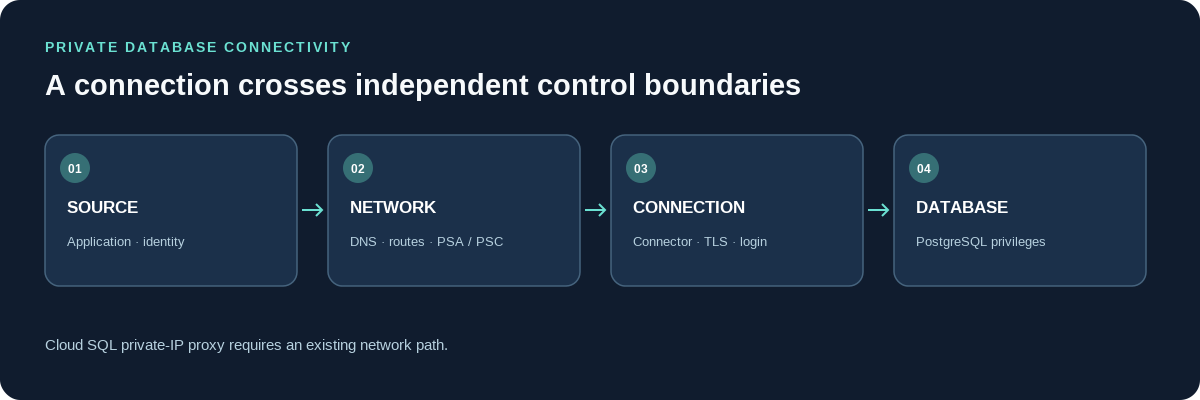
Connectivity reviews frequently stop after confirming that a database has a private IP address and no public IP. That binary check omits four independent failure domains that determine whether a query succeeds or fails—and whether an unauthorized workload can reach production data.
Constraint 1: Non-transitive peering and IP allocation under Private Services Access (PSA). Cloud SQL and AlloyDB PSA rely on VPC Network Peering between your consumer VPC and a Google-managed producer VPC. You must reserve a contiguous private CIDR block in your VPC, and Google forbids overlapping IP ranges. Because VPC Network Peering is strictly non-transitive, a workload in a peered spoke VPC or an on-premises network connected over Cloud VPN or Interconnect cannot natively route through a hub VPC to reach a PSA-peered database without proxies or Network Connectivity Center workarounds.
Constraint 2: Endpoint-per-VPC and DNS scoping under Private Service Connect (PSC). PSC replaces VPC peering with consumer-side forwarding rules targeting a producer Service Attachment. Each consumer endpoint consumes only a single local IP address inside a chosen subnet and permits overlapping CIDR blocks across consumer VPCs. However, the Cloud SQL Auth Proxy and AlloyDB Language Connectors require a Cloud DNS private zone mapping the instance’s pscDnsName to that local endpoint IP; Cloud DNS private zones do not propagate automatically across peered VPCs without explicit DNS peering or forwarding.
Constraint 3: Connector port 3307, TLS 1.3, and IAM token gating. The Cloud SQL Auth Proxy automatically wraps connections in TLS 1.3 using ephemeral certificates and—when started with --auto-iam-authn—exchanges Workload Identity or Application Default Credentials for short-lived OAuth 2.0 tokens. Crucially, the proxy tunnels traffic to the Cloud SQL backend on TCP port 3307 (not PostgreSQL’s native port 5432), requires the cloudsql.instances.connect IAM permission, and explicitly does not create a new network path for private IP: the proxy must run where the private IP or PSC endpoint is already reachable.
Constraint 4: Separation between cloud IAM and PostgreSQL RBAC. Passing VPC firewall rules, PSC project allowlists, and cloudsql.instances.connect IAM checks only lands the client at the PostgreSQL authentication gate. Even with IAM database authentication enabled, PostgreSQL still enforces database CONNECT, schema USAGE, table SELECT/INSERT privileges, and row-level security policies independently.
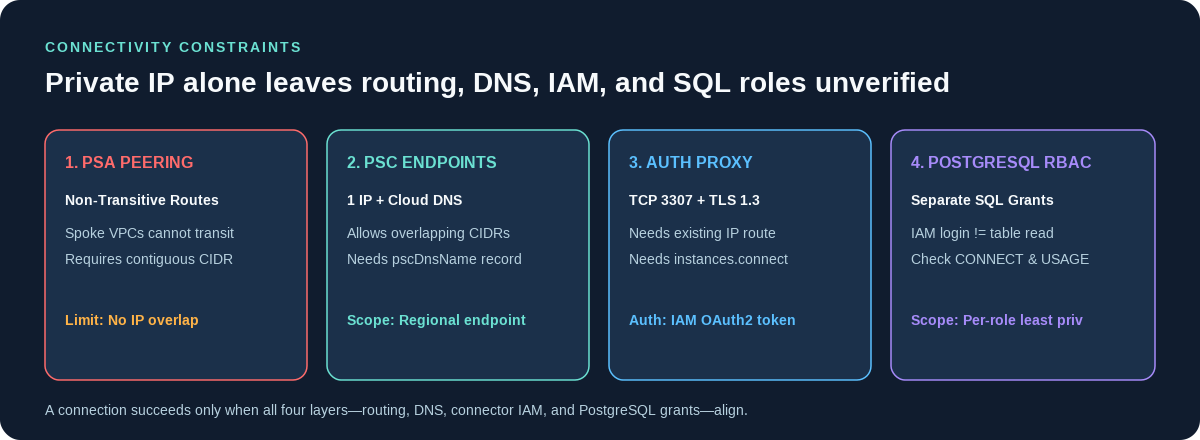
How do you design and test the complete database connection path without conflating network reachability, cloud identity, and PostgreSQL authorization?
Options Considered
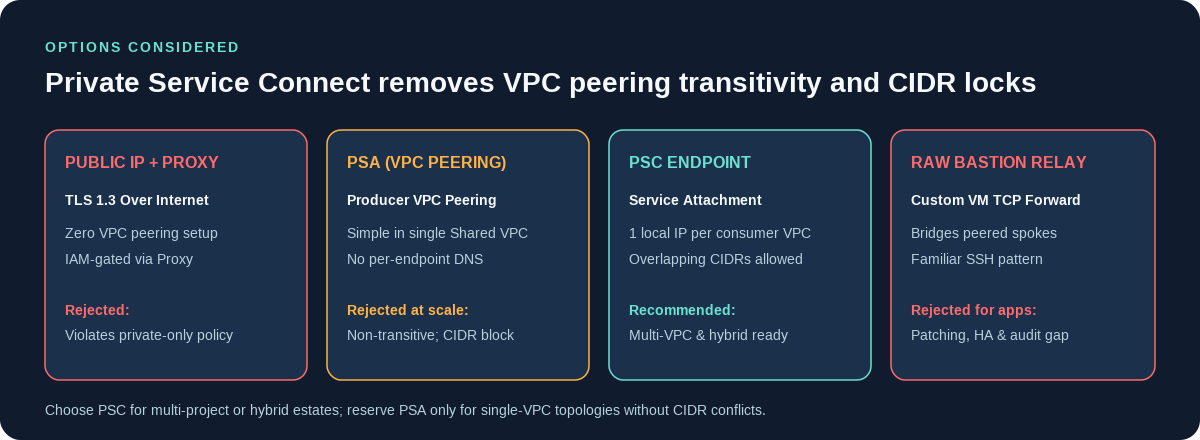
Platform teams designing private database access on Google Cloud typically evaluate four connectivity patterns.
| Option | Routing & IP Cost | Multi-VPC & Hybrid Fit | Security & Audit Posture | Primary Rejection or Selection Reason |
|---|---|---|---|---|
| Public IP + Auth Proxy | Public IP; zero VPC peering | Works anywhere with egress | TLS 1.3 + IAM gated, but public listener | Rejected by organizations enforcing private-only data plane policies |
| Private Services Access (PSA) | Contiguous CIDR block; non-overlapping | Poor for spoke VPCs and on-prem | VPC peering; shared across attached subnets | Rejected for hub-and-spoke or multi-project estates due to non-transitivity |
| Private Service Connect (PSC) | 1 local subnet IP per endpoint; overlap OK | Strong across multi-VPC and hybrid | Consumer allowlist + endpoint + TLS 1.3 | Recommended baseline for multi-project Cloud SQL and AlloyDB fleets |
| Custom Bastion TCP Relay | VM private IP + SSH/IAP tunnel | Bridges spokes via hop | Single point of failure; OS/key patching toil | Rejected for application traffic; reserved for break-glass human access |
Using Public IP exclusively through the Cloud SQL Auth Proxy provides strong cryptographic identity via TLS 1.3 and cloudsql.instances.connect, avoiding VPC peering completely. However, most regulated enterprises enforce organization policies (constraints/sql.restrictPublicIp) that forbid public IP assignment on managed databases, making a private data-plane path mandatory.
Private Services Access (PSA) is simple to provision when all applications live inside a single Shared VPC with plenty of non-overlapping RFC 1918 address space. It breaks down as soon as acquisitions introduce overlapping CIDRs or spoke VPCs need direct database access without hairpinning through custom proxies.
Private Service Connect (PSC) is the recommended baseline for modern Cloud SQL and AlloyDB platforms. By exposing a Service Attachment that maps to a single IP forwarding rule per consumer VPC, PSC eliminates peering transitivity limits, supports overlapping CIDRs, and enforces explicit producer-side project allowlists.
Custom bastion VMs running socat or SSH port forwarding can bridge non-transitive PSA peerings in an emergency, but running application traffic through self-managed relay VMs reintroduces OS patching, high-availability failover, and connection-attribution gaps. Reserve Identity-Aware Proxy (IAP) TCP tunnels to hardened bastions strictly for audited human break-glass sessions.
Follow One Request Across Four Boundaries
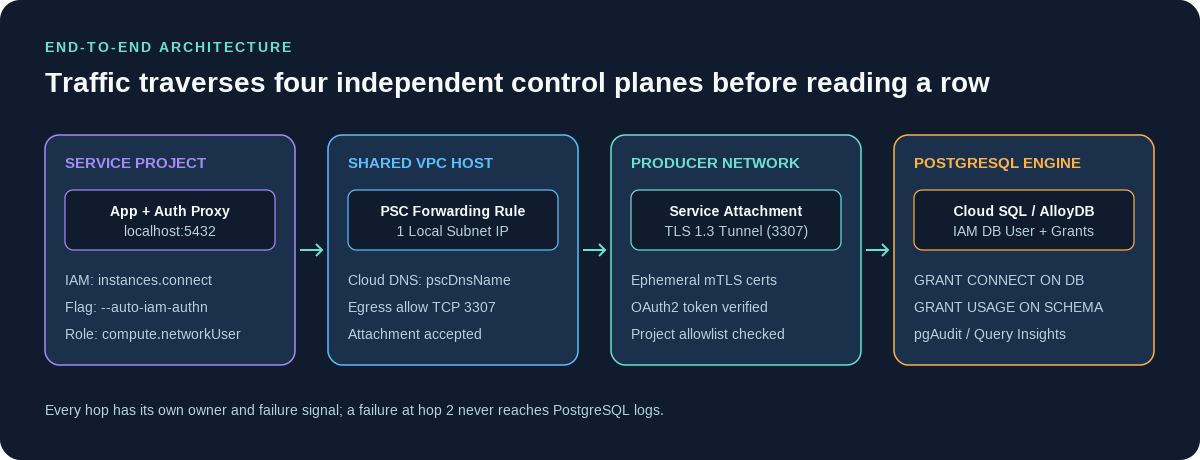
To avoid blind spots, document and verify every database connection across four sequential control planes from client to row.
1. Project ownership and Shared VPC
A Shared VPC host project owns the VPC network, regional subnets, Cloud DNS private zones, and central firewall policies. Attached service projects use delegated subnets via roles/compute.networkUser while keeping application compute, GKE clusters, and workload IAM boundaries isolated. Attaching two service projects to the same Shared VPC does not isolate their workloads at Layer 3 unless explicit firewall rules or hierarchical policies segment subnet traffic.
For every database deployment, record four distinct identifiers in your platform catalog: the application project, the database resource project, the Shared VPC host project, and the VPC network name. Even when two of those coincide today, assuming they are identical breaks Terraform modules and incident escalation the first time a team splits workloads across projects.
2. Private Services Access and Private Service Connect
When provisioning Cloud SQL or AlloyDB with PSC, the producer exposes a regional Service Attachment, and the consumer creates a forwarding rule backed by a single reserved subnet IP. You can configure both PSA and PSC on supported Cloud SQL instances during migration, but having both enabled does not make them equivalent—applications must target the intended endpoint IP or DNS name consistently.
Remember the directional boundary on AlloyDB: inbound client traffic targets AlloyDB’s Service Attachment via your consumer endpoint, whereas outbound traffic from AlloyDB (such as Foreign Data Wrappers or external migrations) requires a consumer-managed Network Attachment in the exact same region as the AlloyDB cluster, along with roles/compute.networkAdmin and roles/dns.admin coordination.
3. Connection authentication and encryption
Deploy the Cloud SQL Auth Proxy (or AlloyDB Auth Proxy) as a Kubernetes sidecar or local process binding to 127.0.0.1:5432, and pass --auto-iam-authn alongside the instance connection name or PSC DNS target:
cloud-sql-proxy "my-project:us-central1:orders-pg16" \
  --private-ip \
  --auto-iam-authn \
  --port=5432
Inside the pod or VM, the application connects to localhost:5432 without managing SSL certificates. The proxy authenticates using the workload’s service account (roles/cloudsql.client / cloudsql.instances.connect) and opens a TLS 1.3 tunnel to port 3307 on the database’s private IP or PSC endpoint. Ensure host-project egress firewall rules explicitly permit TCP 3307 from application subnets to the PSC endpoint IP; allowing only TCP 5432 will cause the Auth Proxy handshake to time out silently.
4. PostgreSQL authorization
Once the Auth Proxy establishes the TLS 1.3 tunnel and passes the IAM token, PostgreSQL verifies the mapped IAM database user and evaluates SQL-level permissions. A common mistake is granting broad database superuser or cloudsqlsuperuser roles to application service accounts. Instead, create a dedicated IAM-mapped role per microservice and grant only the minimum required database, schema, and table privileges:
GRANT CONNECT ON DATABASE orders TO "[email protected]";
GRANT USAGE ON SCHEMA app TO "[email protected]";
GRANT SELECT, INSERT, UPDATE ON ALL TABLES IN SCHEMA app TO "[email protected]";
Separating cloud IAM (cloudsql.instances.connect) from PostgreSQL grants ensures that even if two services share a Shared VPC subnet, neither can query the other’s tables without explicit SQL authorization.
How It Rolls Out
Validating private database connectivity requires testing both authorized paths and deliberate denial paths across four sequential steps before production cutover.
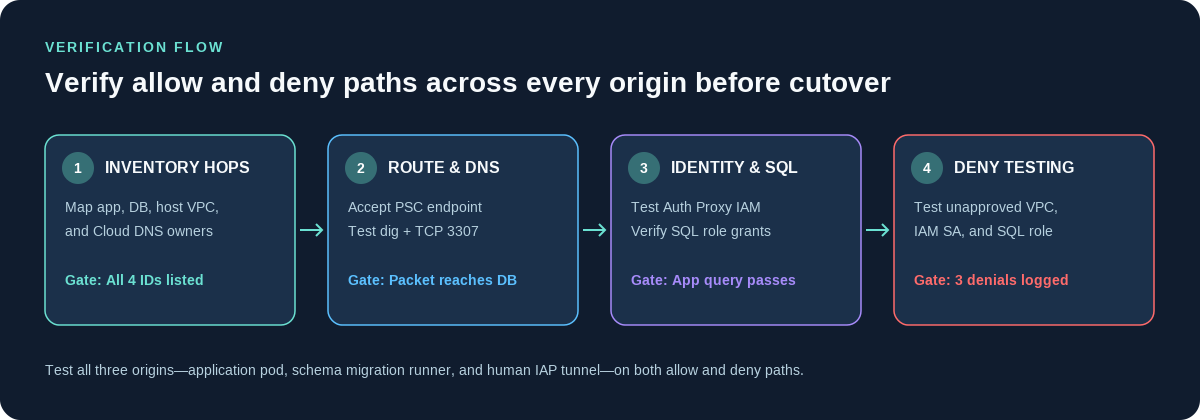
Step 1: Inventory projects, owners, and origins
Document the four project/network identifiers alongside the owners of Cloud DNS, PSC endpoint acceptance, IAM bindings, and PostgreSQL roles. Identify all three connection origins that must function: application pods/VMs, CI/CD schema migration runners, and human break-glass sessions via IAP.
Step 2: Verify routing, PSC acceptance, and DNS resolution
Confirm the PSC endpoint status shows ACCEPTED on the producer Service Attachment. From the exact application subnet or GKE pod namespace, verify that pscDnsName resolves to the local PSC forwarding-rule IP (via dig or nslookup) and that TCP 3307 is reachable. For hybrid on-premises connections over Cloud VPN or Interconnect, verify that Cloud DNS inbound forwarding and on-premises conditional forwarders resolve the private zone accurately.
Step 3: Validate Auth Proxy IAM and PostgreSQL privileges
Start the Auth Proxy with --auto-iam-authn using the workload’s actual service account (not an engineer’s personal gcloud credentials). Confirm the connection succeeds, inspect pg_stat_activity to verify the authenticated role name, and run a representative read/write query against the target schema.
Step 4: Execute negative (denial) tests
Proof of connectivity is incomplete without proof of isolation. Run three negative tests and verify the expected failure layer in logs: connect from an unapproved VPC or subnet (must fail at firewall/PSC allowlist), connect with an IAM identity lacking cloudsql.instances.connect (must fail at Auth Proxy/IAM), and query a restricted schema using an authenticated app role (must fail at PostgreSQL permission denied). Rollback during this validation phase is trivial: keep legacy endpoints active until both allow and deny checks pass for all three origins.
In Practice
Google Cloud’s networking documentation highlights why diagram-level reviews fail in production. Under Private Services Access, Google explicitly documents that VPC Network Peering is non-transitive, meaning an additional spoke VPC or hybrid network cannot automatically traverse a hub VPC’s PSA peering to reach Cloud SQL. Teams migrating from AWS Transit Gateway architectures frequently assume hub-to-spoke routing extends to managed database peerings, only to hit connection timeouts during staging cutover.
Similarly, Google’s Cloud SQL Auth Proxy documentation explicitly warns that enabling --private-ip does not create a network path; it only instructs the proxy to dial the instance’s private IP rather than its public IP, and requires outbound TCP 3307 reachability. On AlloyDB with PSC, Google documents that the Auth Proxy and Language Connectors depend on private Cloud DNS records matching the instance’s pscDnsName, and that outbound connections from AlloyDB require a regional Network Attachment in the consumer VPC.
To apply this systematically, run a single standardized trace across three origins—an application workload, a schema migration runner, and an engineer’s IAP-tunneled session—recording the source project, DNS answer, endpoint IP, connector credential, PostgreSQL role, and denial test outcome without storing production secrets in the test log.
Where It Breaks
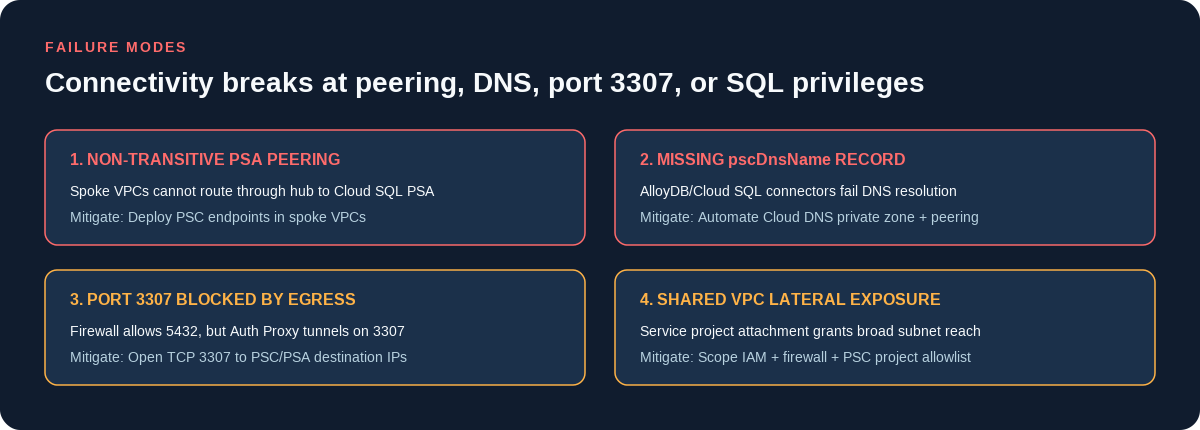
| Condition | Breaks how | Detect | Mitigate |
|---|---|---|---|
| Spoke VPC or on-prem hits Cloud SQL PSA | Non-transitive VPC peering drops packets at hub | Connection timeouts from spoke/on-prem | Switch to PSC endpoints or supported NCC/proxy pattern |
Missing pscDnsName Cloud DNS record | AlloyDB/Cloud SQL connectors fail name lookup | NXDOMAIN or connector startup error | Automate Cloud DNS private zone and DNS peering |
| Firewall opens 5432 but blocks TCP 3307 | Auth Proxy TLS 1.3 tunnel hangs on connect | Proxy logs dial tcp ...:3307: i/o timeout | Permit egress TCP 3307 to PSC/PSA destination IPs |
PSC Service Attachment left PENDING | Forwarding rule exists but drops traffic | Endpoint status != ACCEPTED | Automate consumer project allowlist or approval |
Auth Proxy lacks cloudsql.instances.connect | Network reaches endpoint, IAM token rejected | Proxy 403 error from Cloud SQL Admin API | Bind roles/cloudsql.client to workload SA |
IAM DB user lacks SQL USAGE/SELECT | Auth succeeds, query fails with permission error | PostgreSQL ERROR: permission denied | Run explicit GRANT CONNECT, USAGE, and table grants |
| AlloyDB outbound FDW crosses regions | Network Attachment is strictly regional | Outbound query fails to route | Create regional Network Attachment matching cluster |
| Shared VPC subnet lacks firewall segmentation | Compromised app can reach sibling DB endpoints | Lateral port scan succeeds across projects | Enforce scoped firewall rules and PSC allowlists |
Key Takeaways
- Never treat “has a private IP” as sufficient security or routing proof; trace every database path across source identity, VPC routing/DNS, connector TLS/IAM, and PostgreSQL grants.
- Prefer Private Service Connect (PSC) over Private Services Access (PSA) for multi-project, hub-and-spoke, or overlapping-CIDR estates to avoid non-transitive VPC peering limits.
- Remember that the Cloud SQL Auth Proxy tunnels over TCP port 3307 with TLS 1.3, requires an existing private route, and gates access via
cloudsql.instances.connect. - Map
pscDnsNamein Cloud DNS private zones for AlloyDB and Cloud SQL PSC connectors, and provision regional Network Attachments whenever AlloyDB initiates outbound traffic. - Prove isolation by testing both authorized connections and deliberate denials across application workloads, schema migration runners, and human IAP sessions.
What to Do Next
- Problem: Identify every Cloud SQL and AlloyDB connection origin (application, migration runner, human break-glass) that relies on implicit peering or undocumented firewall rules.
- Solution: Standardize on Private Service Connect endpoints, Cloud DNS private zones for
pscDnsName, Auth Proxy with--auto-iam-authn, and least-privilege PostgreSQL roles. - Proof: Execute one end-to-end allow trace and three negative denial tests (network, IAM, and SQL role) from a staging service project.
- Action: Assign explicit owners for Host VPC firewall rules (TCP 3307), Cloud DNS records, PSC attachment approvals, and PostgreSQL privilege reviews this week.