
Building an Internal DBaaS Broker: Abstracting Exadata, VMs, and Autonomous in OCI
Exposing raw cloud infrastructure primitives directly to application teams creates a structural mismatch between operational requirements, hardware capabilities, and database licensing models.
TL;DR
- Problem: Self-service catalogs that let developers pick between OCI VM DB Systems, Exadata, and Autonomous Database produce defensive over-provisioning, I/O starvation on block volumes, and late-stage failures when legacy apps hit Autonomous OS/SYSDBA restrictions.
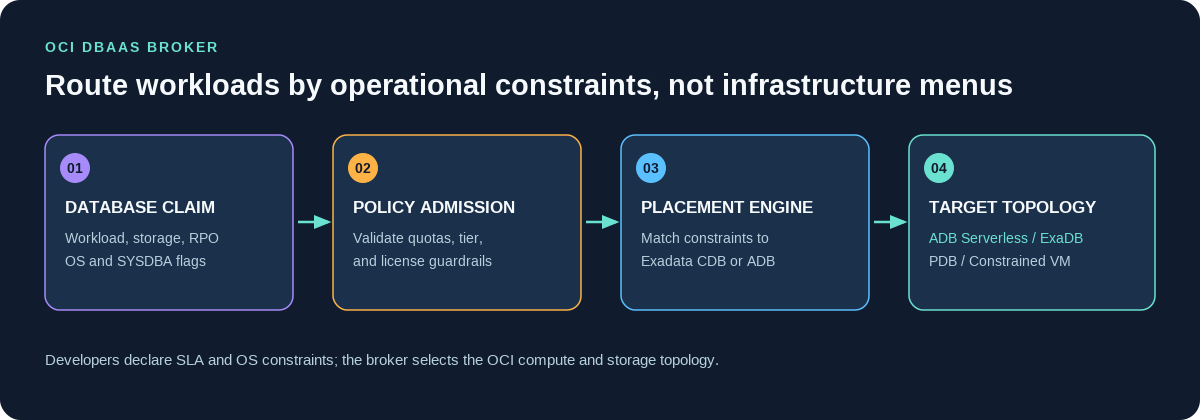
- Answer: Replace raw infrastructure menus with a declarative
DatabaseClaimCRD evaluated by a placement broker that routes workloads deterministically to Autonomous Database Serverless, consolidated Exadata PDBs with CDB Resource Manager isolation, or constrained-core VM DB Systems.- Watch out: Bin-packing PDBs onto shared Exadata CDBs requires
CREATE_CDB_PLAN_DIRECTIVE(sharesandutilization_limit) plus per-PDBPGA_AGGREGATE_LIMIT, and online PDB relocation requiresARCHIVELOG, Local Undo, andCREATE PLUGGABLE DATABASE ... RELOCATE.
Situation
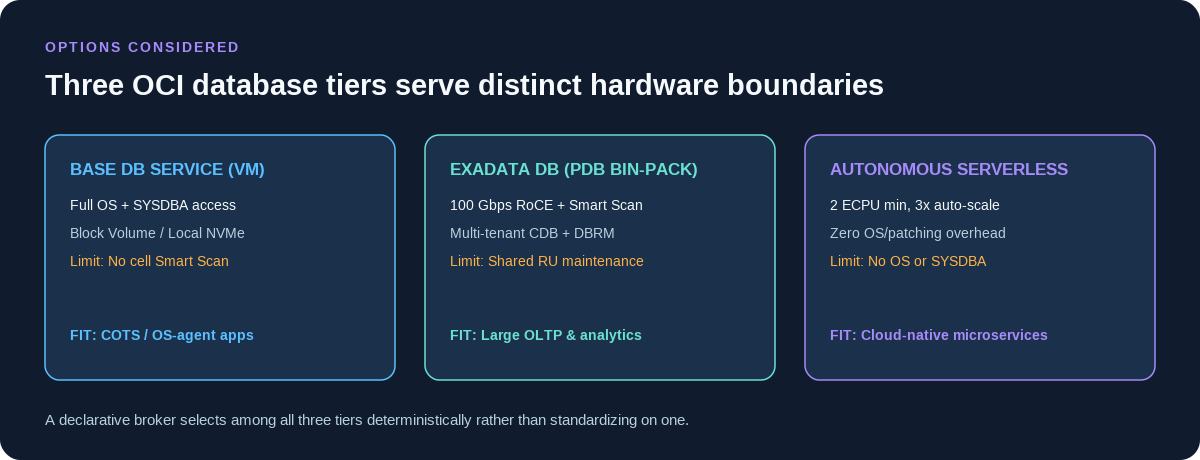
Enterprise platform teams migrating Oracle estates to Oracle Cloud Infrastructure (OCI) manage a wide spectrum of workloads: cloud-native microservices, legacy commercial off-the-shelf (COTS) monoliths with operating-system agents, and multi-terabyte analytical warehouses. OCI offers three primary database hosting primitives:
- OCI Base Database Service (VM DB Systems): Virtual machines on flexible compute shapes backed by OCI Block Volumes or local NVMe storage, supporting single-instance and 2-node Real Application Clusters (RAC). Administrators retain full Linux OS shell and
SYSDBAaccess. - Exadata Database Service (ExaDB-D and ExaDB-C@C): Engineered systems pairing scale-out database servers with intelligent storage cell servers over a 100 Gbps RoCE (RDMA over Converged Ethernet) fabric, enabling storage-tier SQL predicate offload (Smart Scan), Hybrid Columnar Compression (HCC), and Storage Indexes.
- Autonomous Database (Serverless and Dedicated): Managed Oracle Database services (ATP for OLTP, ADW for analytics) that automate patching, backups, and tuning, while locking down the Linux OS, withholding
SYSDBAprivileges, and requiring mutual TLS (mTLS) wallet or TLS authentication.
When platform teams expose these three tiers directly in Backstage, ServiceNow, or Terraform variable forms, application squads are forced to pick compute shapes, cluster topologies, and storage tiers during onboarding.
The Problem
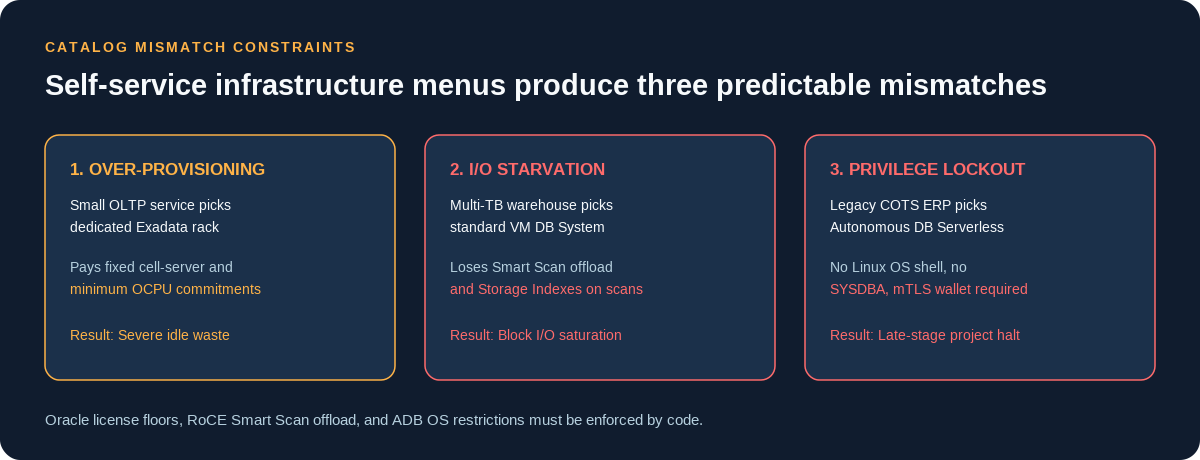
Application engineers understand query latency targets, retention windows, and deployment cadences, not Oracle Processor Core Factor licensing or storage-cell offload mechanics. Exposing raw OCI primitives creates four operational constraints:
- Defensive Over-Provisioning and License Floors: Small transactional services routinely select Exadata because teams equate it with maximum resilience. Exadata requires dedicated infrastructure commitments and minimum OCPU/ECPU allocations, turning a small schema into an expensive, mostly idle footprint. Similarly, selecting unconstrained VM shapes without pinning
cpuCoreCountcreates unnecessary Oracle Enterprise Edition license exposure under Bring Your Own License (BYOL): on x86 OCI shapes, each OCPU represents a physical core with two hardware threads (2 vCPUs), so provisioning an 8-OCPU VM when the application only needs 2 OCPUs of compute—but wants 64 GB of RAM—quadruples the required Enterprise Edition processor licenses unless you explicitly pincpuCoreCounton a flexible shape. - Architectural I/O Starvation: Conversely, teams migrating multi-terabyte reporting databases or warehouses often pick VM DB Systems to minimize nominal compute cost. Without Exadata’s storage-cell Smart Scan predicate filtering, Hybrid Columnar Compression (HCC), and Storage Indexes, full-table scans pull raw, uncompressed blocks across virtualized block storage, saturating network-block IOPS and starving neighboring instances.
- Privilege and OS Compatibility Lockouts: Autonomous Database disables local filesystem access (
UTL_FILEto host paths), blocks custom OS daemons and shared C libraries, and withholdsSYSDBA. Client applications must also authenticate via mutual TLS (mTLS) wallets or configured TLS endpoints rather than unencrypted SQL*Net listeners. When legacy COTS applications are routed to Autonomous Database without checking those hard constraints, teams discover the incompatibility only during late-stage integration testing. - Noisy-Neighbor Consolidation Risk: Packing multiple Pluggable Databases (PDBs) onto a shared Exadata Container Database (CDB) amortizes hardware cost, but without CDB-level CPU shares, utilization caps, and per-PDB memory bounds, one runaway batch query can evict shared buffer cache and exhaust PGA across every colocated tenant. Even worse, because every PDB in a CDB shares a single Oracle binary home and
CDB$ROOT, applying a Quarterly Release Update (RU) restarts or drains connections for every colocated PDB on that CDB simultaneously.
How can platform teams build an internal database broker that hides raw OCI deployment targets and translates declarative application constraints into cost-efficient, license-compliant, and isolated database topologies?
Options Considered
Platform teams standardizing OCI database provisioning typically weigh four approaches:
| Option | Mechanism | What It Gets Right | Where It Breaks | Verdict |
|---|---|---|---|---|
| Raw Catalog Menus | Expose VM, Exadata, and ADB directly in forms | Maximum flexibility for expert DBAs | Severe over-provisioning, license drift, and wrong-tier selections | Rejected |
| Standardize on Autonomous Only | Force all workloads onto ADB Serverless | Zero OS patching and automatic scaling (2 ECPU min, 3x burst) | Blocks legacy COTS apps needing OS agents, SYSDBA, or custom libs | Rejected |
| Dedicated VM Per Service | Provision isolated VM DB System for every app | Strong OS/tenant isolation and simple chargeback | Loses Exadata Smart Scan for analytics and wastes idle compute | Rejected |
| Declarative DBaaS Broker | DatabaseClaim CRD routed to ADB, Exadata PDB, or VM | Enforces OS/size/Smart Scan rules and bin-packs Exadata CDBs | Requires building placement engine, DBRM templates, and drift sync | Chosen |
Standardizing on a single OCI service fails because no single tier covers both locked-down cloud-native microservices and OS-dependent COTS applications. Forcing every team onto Autonomous Database breaks legacy vendor packages that require local file paths, SYSDBA installation scripts, or host monitoring agents. Conversely, giving every microservice a dedicated VM DB System trades away Exadata Smart Scan for large analytical tables and forces platform teams to patch and manage Linux OS images for workloads that do not need host access. A declarative broker preserves all three OCI primitives behind a single DatabaseClaim contract while keeping hardware, consolidation, and licensing decisions in platform-owned code.
The Declarative DBaaS Broker Architecture
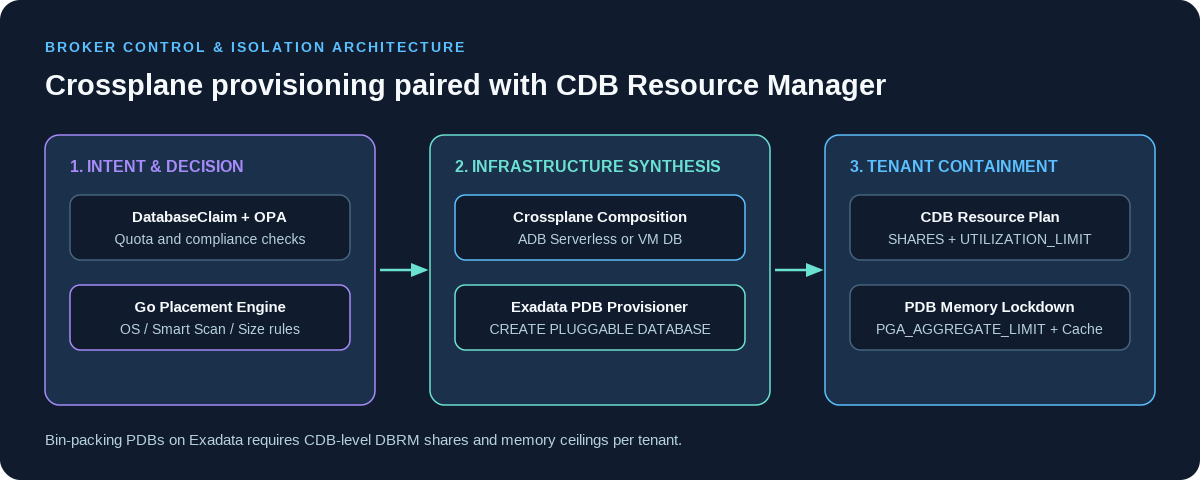
The broker replaces infrastructure selection with a Kubernetes Custom Resource Definition (DatabaseClaim), an OPA Gatekeeper admission layer, a Go placement engine, and a Crossplane / OCI provisioning layer backed by Oracle Database Resource Manager (DBRM) isolation.
1. The Declarative Developer Claim
Application teams submit a DatabaseClaim specifying workload behavior, capacity, and hard OS/privilege requirements—never compute shapes or ASM diskgroups:
apiVersion: database.platform.internal/v1alpha1
kind: DatabaseClaim
metadata:
  name: payment-processing-service
  namespace: billing-prod
spec:
  workloadProfile: transactional      # transactional, analytical, batch
  tier: production                    # production, staging, development
  capacity:
    initialStorageGb: 750
    projectedAnnualGrowthGb: 300
    peakConcurrentSessions: 120
  performanceSla:
    maxQueryLatencyP99Ms: 15
    requiresSmartScan: false
  operationalConstraints:
    requiresOsAccess: false
    requiresSysdbaAccess: false
    requiresCustomSharedLibraries: false
    complianceFramework: pci-dss
  highAvailability:
    rpoMinutes: 0
2. Deterministic Placement Engine
The placement engine evaluates hard compatibility gates first, then storage and Smart Scan thresholds, and defaults clean cloud-native OLTP workloads to Autonomous Database Serverless:
package placement

import (
	"context"
	"fmt"
)

const (
	TargetAutonomousServerless = "AutonomousDatabaseServerless"
	TargetExadataConsolidated  = "ExadataDatabaseServiceConsolidated"
	TargetBaseDbVm             = "BaseDatabaseServiceVM"
)

type DatabaseClaimSpec struct {
	WorkloadProfile      string
	InitialStorageGb     int
	RequiresOsAccess     bool
	RequiresSysdbaAccess bool
	RequiresCustomLibs   bool
	RequiresSmartScan    bool
	RpoMinutes           int
}

type PlacementDecision struct {
	TargetTier          string
	TargetCdbOcId       string
	OcpuOrEcpuBase      int
	StorageAllocationGb int
	RequiresDataGuard   bool
}

func EvaluatePlacement(ctx context.Context, claim DatabaseClaimSpec, fleet FleetCapacityState) (PlacementDecision, error) {
	// Gate 1: Hard OS, SYSDBA, or external shared-library dependencies require VM DB System
	if claim.RequiresOsAccess || claim.RequiresSysdbaAccess || claim.RequiresCustomLibs {
		return PlacementDecision{
			TargetTier:          TargetBaseDbVm,
			OcpuOrEcpuBase:      calculateVmOcpu(claim.InitialStorageGb),
			StorageAllocationGb: claim.InitialStorageGb + 100,
			RequiresDataGuard:   claim.RpoMinutes == 0,
		}, nil
	}

	// Gate 2: Large analytical datasets or explicit Smart Scan need Exadata CDB consolidation
	if claim.RequiresSmartScan || claim.WorkloadProfile == "analytical" || claim.InitialStorageGb >= 2000 {
		cdb, err := fleet.FindBestFitExadataCdb(claim.InitialStorageGb)
		if err != nil {
			return PlacementDecision{}, fmt.Errorf("exadata capacity exhausted: %w", err)
		}
		return PlacementDecision{
			TargetTier:          TargetExadataConsolidated,
			TargetCdbOcId:       cdb.OcId,
			OcpuOrEcpuBase:      2,
			StorageAllocationGb: claim.InitialStorageGb,
			RequiresDataGuard:   claim.RpoMinutes == 0,
		}, nil
	}

	// Gate 3: Standard cloud-native OLTP defaults to Autonomous Database Serverless (2 ECPU minimum)
	return PlacementDecision{
		TargetTier:          TargetAutonomousServerless,
		OcpuOrEcpuBase:      2,
		StorageAllocationGb: claim.InitialStorageGb,
		RequiresDataGuard:   claim.RpoMinutes == 0,
	}, nil
}
3. Crossplane Synthesis & CDB Resource Manager Isolation
For VM DB Systems, the broker compiles the decision into a Crossplane composition that hard-pins cpuCoreCount to match approved BYOL entitlements while sizing flexible memory and OCI Block Volume IOPS independently. When rpoMinutes: 0 is requested, the composition provisions an OCI Data Guard association in Maximum Protection or Maximum Availability mode (SYNC redo transport) across availability domains or regions, rather than relying on single-instance block-volume snapshots. Similarly, the composition selects databaseEdition (STANDARD_EDITION vs ENTERPRISE_EDITION_HIGH_PERFORMANCE) based on whether the claim requires Data Guard, Partitioning, or Advanced Compression, preventing teams from defaulting every dev or staging VM to the highest-cost Enterprise Edition tier.
For consolidated Exadata placements, the broker creates a Pluggable Database (PDB) inside an existing Exadata CDB and binds it to a CDB Resource Plan (DBMS_RESOURCE_MANAGER.CREATE_CDB_PLAN_DIRECTIVE) so shares and utilization_limit prevent noisy neighbors:
CREATE PLUGGABLE DATABASE billing_prod_pdb
  ADMIN USER pdb_admin IDENTIFIED BY "RotateViaVaultSecret#1"
  ROLES = (CONNECT, RESOURCE)
  DEFAULT TABLESPACE users
    DATAFILE '+DATA' SIZE 10G AUTOEXTEND ON NEXT 1G MAXSIZE 750G
  FILE_NAME_CONVERT = ('+DATA/CDB1/PDBSEED/', '+DATA/CDB1/BILLING_PROD_PDB/');

ALTER PLUGGABLE DATABASE billing_prod_pdb OPEN READ WRITE;

BEGIN
  DBMS_RESOURCE_MANAGER.CREATE_PENDING_AREA();
  DBMS_RESOURCE_MANAGER.CREATE_CDB_PLAN_DIRECTIVE(
    plan               => 'ENTERPRISE_CONSOLIDATION_PLAN',
    pluggable_database => 'BILLING_PROD_PDB',
    shares             => 3,
    utilization_limit  => 35
  );
  DBMS_RESOURCE_MANAGER.VALIDATE_PENDING_AREA();
  DBMS_RESOURCE_MANAGER.SUBMIT_PENDING_AREA();
END;
/
Note the distinction in Oracle Multitenant: CREATE_CDB_PLAN_DIRECTIVE governs CPU and Exadata I/O distribution between PDBs at the CDB$ROOT level using shares and utilization_limit (1–100%), whereas CREATE_PLAN_DIRECTIVE governs consumer groups inside a single PDB. Pairing CDB directives with per-PDB PGA_AGGREGATE_LIMIT, SGA_TARGET, and DB_CACHE_SIZE settings (configured inside each PDB via ALTER SYSTEM SET ... SCOPE=SPFILE when NONCDB_COMPATIBLE is false) prevents a single tenant from exhausting shared memory pools or evicting hot blocks belonging to neighboring PDBs. In addition, setting MAXSIZE on the PDB’s default tablespace datafiles stops a runaway ingestion job from filling the shared +DATA ASM diskgroup and stalling sibling tenants with ORA-01653: unable to extend table.
How It Rolls Out
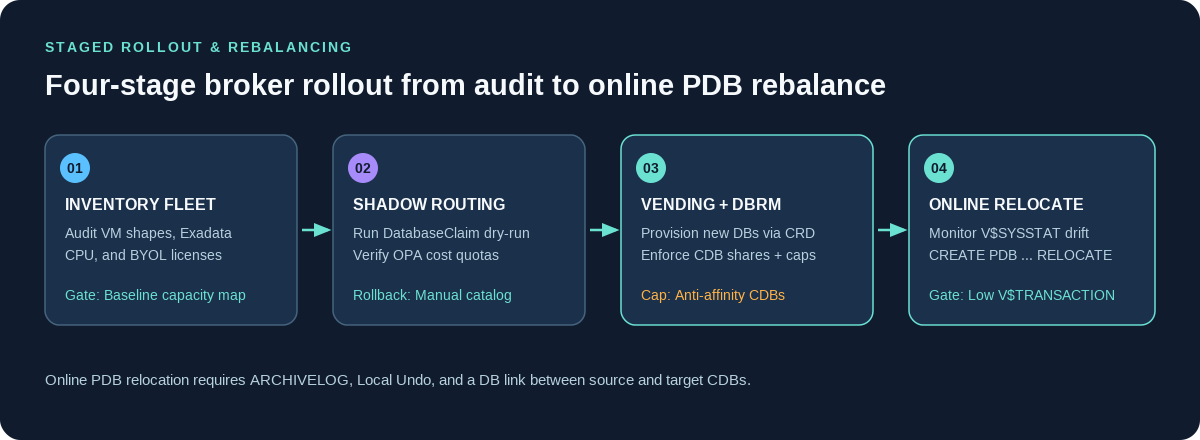
Deploying an internal DBaaS broker across an existing OCI tenancy follows four gated phases:
- Phase 01 — Fleet Inventory and License Baseline: Audit existing VM DB Systems, Exadata CDBs, and Autonomous instances for idle CPU, storage growth, and constrained-core BYOL boundaries. Define CDB density caps and anti-affinity pools so a single CDB Release Update (RU) restart never drains an entire business unit.
- Phase 02 — Shadow Routing and OPA Policy Gate: Deploy
DatabaseClaimand OPA Gatekeeper policies in dry-run mode alongside existing provisioning. Verify that claims requestingrequiresOsAccess: truenever route to Autonomous, and that cost-center quotas block oversized storage requests before provisioning. Rollback: fall back to existing manual Terraform templates. - Phase 03 — Active Vending with DBRM Containment: Enable automated provisioning for new workloads. Every Exadata PDB is created with a
CREATE_CDB_PLAN_DIRECTIVEentry,PGA_AGGREGATE_LIMIT, and automated wallet/credential injection into Kubernetes Secrets. Post-provisioning checks queryDBA_CDB_RSRC_PLAN_DIRECTIVESandV$PDBSto confirm the directive is active in the currentRESOURCE_MANAGER_PLANbefore marking theDatabaseClaimready. Rollback: pause Crossplane composition sync while leaving provisioned databases online. - Phase 04 — Telemetry-Driven Online Rebalancing: Monitor
V$SYSSTAT,V$RSRC_CONSUMER_GROUP, and OCI Performance Hub metrics. When a microservice outgrows its tier or needs Smart Scan, trigger online PDB relocation to an Exadata CDB usingCREATE PLUGGABLE DATABASE <target> FROM <source>@<dblink> RELOCATE AVAILABILITY MAX(requiresARCHIVELOGmode and Local Undo on both CDBs), followed byALTER PLUGGABLE DATABASE <target> OPENduring a low-V$TRANSACTIONwindow.
In Practice
The constraints encoded in this broker reflect documented OCI and Oracle Database system behaviors rather than arbitrary heuristics:
- Autonomous Database Serverless ECPU Elasticity: Per Oracle Autonomous Database documentation, ECPU-based Serverless instances start at a minimum of 2 ECPUs and, with compute auto-scaling enabled, automatically scale up to 3x the base ECPU allocation during workload spikes (for example, 2 ECPUs burst to 6 ECPUs, and 128 ECPUs burst to 384 ECPUs). That built-in elasticity makes Autonomous Serverless a natural default for variable-load microservices that do not require OS shell or
SYSDBAaccess. - Oracle Database 23ai AI Vector Search & Exadata AI Smart Scan: Oracle Database 23ai adds native
VECTORcolumns with HNSW (in-memory, governed byVECTOR_MEMORY_SIZE) and IVF (Inverted File Flat / Neighbor Partition storage-backed) indexes. On Exadata System Software 24.1.0+, AI Smart Scan pushes vector distance calculations and Top-K filtering down to Exadata Storage Servers using XRMEM and Smart Flash Cache, shrinking network traffic back to database nodes. Adding arequiresVectorOffloadflag toDatabaseClaimlets the broker route heavy vector-search workloads onto Exadata or Autonomous 23ai automatically. - Online PDB Relocation Mechanics: Oracle’s documented
CREATE PLUGGABLE DATABASE ... RELOCATEworkflow copies data blocks, redo, and undo online while the source PDB remains open, then cuts over active sessions whenALTER PLUGGABLE DATABASE ... OPENexecutes on the target CDB—provided both CDBs run inARCHIVELOGmode with Local Undo enabled and matching endianness.
Where It Breaks
| Failure Mode | Failure Mechanism | Operational Consequence | Mitigation |
|---|---|---|---|
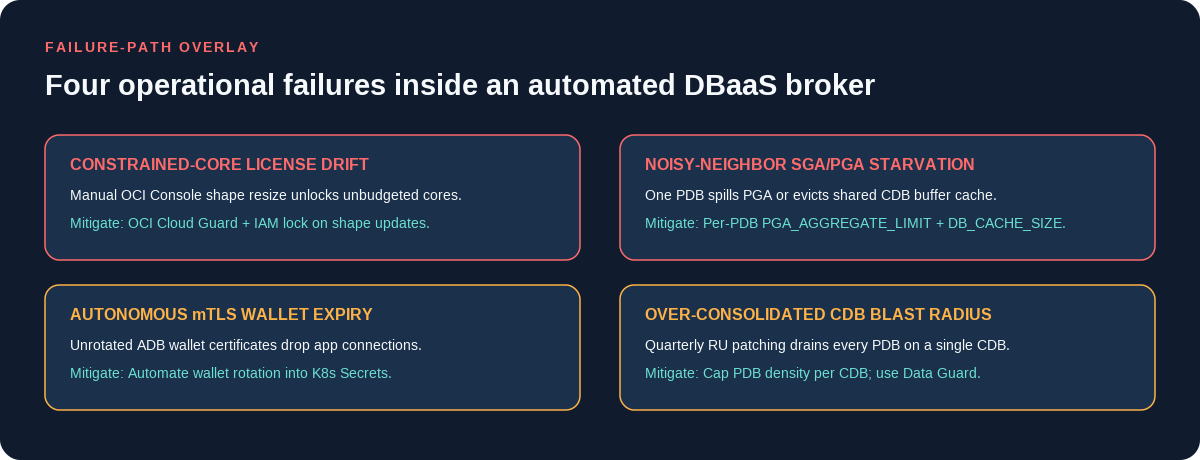
| Admission Quota Deception | Team declares small initialStorageGb then ingests terabytes | Exhausts shared ASM diskgroup (ORA-01653) across colocated PDBs | Enforce tablespace MAXSIZE and alert at 75% quota usage |
| Exadata Noisy Neighbor | Uncapped PDB consumes shared CPU, I/O, or buffer cache | Degrades latency for all sibling PDBs in the same CDB | Enforce CREATE_CDB_PLAN_DIRECTIVE (shares, utilization_limit) + PGA_AGGREGATE_LIMIT |
| Smart Scan Offload Bypass | Queries use PL/SQL UDFs or unsupported predicates in WHERE | Storage cells fall back to host-level reads, saturating RoCE/CPU | Audit SQL plans for cell offload efficiency; refactor predicates |
| Autonomous mTLS Wallet Expiry | Unmonitored ADB wallet certificates expire in app pods | Mass connection failures across microservices | Automate OCI wallet rotation into Kubernetes Secrets via sidecar/controller |
| Constrained-Core License Drift | Admin resizes VM shape in OCI Console outside broker | Unlocks extra physical cores, creating Oracle BYOL audit exposure | Lock manual shape edits with OCI IAM policies and Cloud Guard |
| Over-Consolidated CDB Patching | Too many PDBs packed into one CDB | Quarterly RU rolling restart drains every tenant at once | Cap PDB density per CDB and pair with Data Guard switchover |
| PDB Relocation Lock Timeout | CREATE PDB ... RELOCATE cutover runs during heavy writes | Long-running uncommitted V$TRANSACTION stalls switchover | Gate ALTER PDB OPEN cutover on low active transaction counts |
When validating DatabaseClaim routing in pre-production, verify that every provisioned Autonomous Database Serverless instance enforces ECPU minimum allocations and mTLS wallet rotation schedules, and confirm that Base Database VM Systems reject any Terraform plan diff attempting to unpin cpuCoreCount outside approved license bounds.
Key Takeaways
- Hide OCI primitives behind constraints, not menus: Developers know whether they need OS access,
SYSDBA, Smart Scan, or zero-RPO Data Guard; they should never pick Exadata shapes or ASM diskgroup names. - Enforce multi-tenant isolation at the CDB root: Bin-packing PDBs onto Exadata requires
DBMS_RESOURCE_MANAGER.CREATE_CDB_PLAN_DIRECTIVE(sharesandutilization_limit) paired with per-PDBPGA_AGGREGATE_LIMITandDB_CACHE_SIZE. - Default clean OLTP to Autonomous Serverless: With a 2-ECPU minimum and 3x automatic burst scaling, Autonomous Database Serverless eliminates OS patching and idle VM capacity for apps that do not need host access.
- Pin VM cores and guard console mutations: On Base Database VM Systems, hard-pin
cpuCoreCountin Crossplane/Terraform and block manual OCI Console shape changes via IAM and Cloud Guard to prevent BYOL license drift. - Use
CREATE PLUGGABLE DATABASE ... RELOCATEfor tier graduation: When a workload outgrows its tier, online PDB relocation moves it between CDBs with minimal cutover downtime onceARCHIVELOGand Local Undo are verified.
What to Do Next
- Problem: Self-service catalogs that expose raw OCI VM, Exadata, and Autonomous primitives cause defensive over-provisioning, block-storage I/O starvation, and late-stage OS/SYSDBA incompatibilities.
- Solution: Put a declarative
DatabaseClaimCRD and deterministic placement engine in front of OCI, routing workloads to Autonomous Serverless, DBRM-isolated Exadata PDBs, or constrained-core VMs. - Proof: Inventory your OCI tenancy’s VM DB Systems and Exadata CDBs for idle OCPU allocations, unpinned
cpuCoreCountshapes, and CDBs missingDBA_CDB_RSRC_PLAN_DIRECTIVEScaps. - Action: Define a
DatabaseClaimschema with explicitrequiresOsAccess,requiresSysdbaAccess, andrequiresSmartScanbooleans this week, and test its routing decisions against your last ten database provisioning tickets.
Sources to Verify
- Oracle Cloud Infrastructure Documentation: Base Database Service, Exadata Database Service, and Autonomous Database (
docs.oracle.com/en-us/iaas/Content/Database/Concepts/overview.htm) - Oracle Autonomous Database Documentation: Use Auto Scaling (
docs.oracle.com/en/cloud/paas/autonomous-database/serverless/adbsb/autonomous-auto-scale.html) - Oracle Database Administrator’s Guide: Using Oracle Resource Manager for PDBs (
CREATE_CDB_PLAN_DIRECTIVE) (docs.oracle.com/en/database/oracle/oracle-database/19/admin/using-oracle-resource-manager-for-pdbs-with-sql-plus.html) - Oracle Multitenant Administrator’s Guide: Relocating a PDB (
CREATE PLUGGABLE DATABASE ... RELOCATE) (docs.oracle.com/en/database/oracle/oracle-database/19/multi/relocating-a-pdb.html) - Oracle Exadata Documentation: AI Smart Scan & Oracle Database 23ai AI Vector Search (
docs.oracle.com)