
Building an Oracle Gold Image Factory: Deterministic Artifact Pipelines for Fleet-Scale Patching
Compiling and linking database binaries directly on production servers turns every quarterly patch cycle into an unrepeatable build, guaranteeing configuration drift and turning routine maintenance into relink failures.
TL;DR
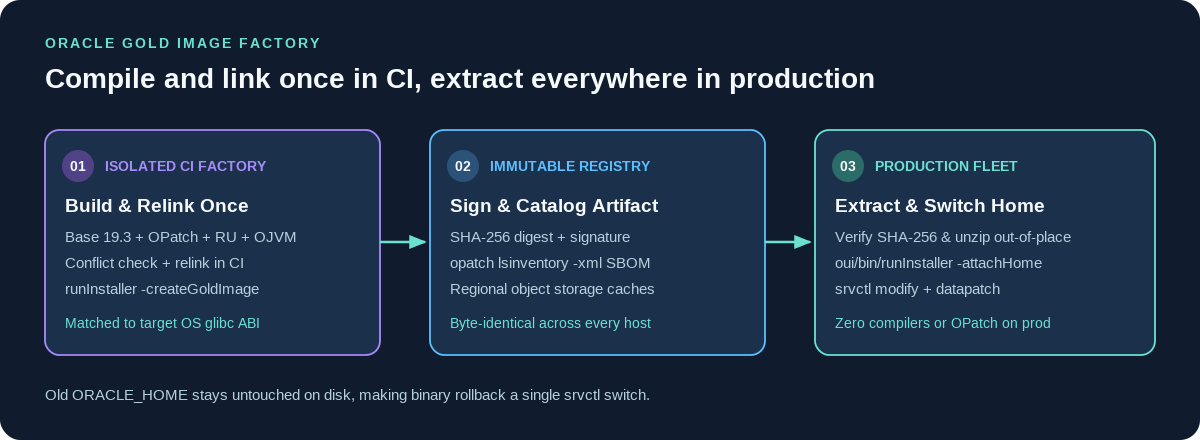
- Problem: Running
opatch applyandmake -f ins_rdbms.mk ioracleon every production host causesglibc/toolchain drift,/tmpand.patch_storagebloat, and unstartable homes when a relink aborts mid-flight.- Answer: Compile, conflict-check, and relink once inside an ephemeral CI runner, package the home with
runInstaller -createGoldImage, and deploy out-of-place across the fleet usingoui/bin/runInstaller -attachHome.- Watch out: Gold images are bound to the target OS
glibcABI (build separately per OS major version),root.shmust run after-attachHometo restore SetUID permissions, and parallel-attachHomeruns require a host-level inventory lock.
Situation
Enterprise database fleets running Oracle Database 19c must apply quarterly Release Updates (RUs), Oracle Java Virtual Machine (OJVM) patches, and occasional one-off diagnostic fixes. In traditional operations, configuration management playbooks (Ansible, SaltStack, or shell scripts) execute the full patching workflow independently on every database server in the fleet.
On each host, the automation copies multi-gigabyte patch archives to local storage, unpacks them into /tmp, upgrades the local OPatch utility, runs opatch prereq CheckConflictAgainstOHWithDetail, executes opatch apply, and invokes make -f ins_rdbms.mk ioracle to relink oracle, tnslsnr, expdp, and impdp against whatever OS libraries and headers happen to reside on that server.
When a fleet spans dozens or hundreds of hosts, target-side compilation repeats the exact same conflict checks, archive extractions, and C-library relinking on every machine. Any minor difference in OS package revisions, umask settings, or /tmp free space turns a uniform quarterly patch into a per-host debugging exercise.
The Problem
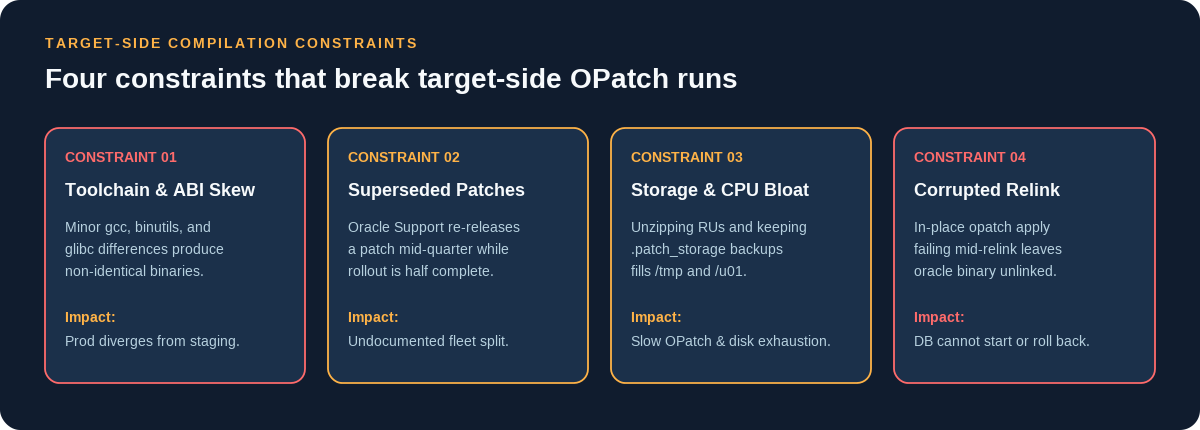
Target-side compilation violates a core reliability principle: production database binaries should be immutable, hermetic, and byte-for-byte identical across every host in an OS tier. Executing OPatch and make locally on production servers fails along four concrete constraints.
First, toolchain and glibc ABI skew. Differences in minor revisions of gcc, binutils, glibc, or libaio across servers cause relink to bind against different system library symbols. A binary linked on a slightly older staging host may behave differently—or fail symbol resolution—compared to a production host patched a month later. Hardened umask settings (027 instead of 022) on a subset of hosts can also strip group/other read and execute bits during relink, breaking local OS clients that load libclntsh.so outside the oinstall group.
Second, mid-rollout superseded patches. Oracle Support periodically re-releases a Release Update or interim patch mid-quarter to fix a regression. If a fleet rollout takes weeks and pulls patches live from a mirror, early hosts receive Revision A while later hosts receive Revision B, splitting the fleet into undocumented patch variants. Auditing which host carries which sub-revision requires scraping opatch lsinventory text output across every server.
Third, storage and .patch_storage bloat. Unpacking multi-gigabyte RU archives on production hosts competes for CPU and disk I/O with live workloads and risks exhausting /tmp inodes or /u01 space. Repeated in-place opatch apply runs also accumulate historical rollback backups inside $ORACLE_HOME/.patch_storage, bloating the home directory and slowing opatch lsinventory scans.
Fourth, corrupted in-place relink. If an in-place opatch apply fails mid-relink due to disk exhaustion or a missing prerequisite, the active $ORACLE_HOME is left partially linked. The database cannot start until an operator repairs the binary tree or executes opatch rollback under outage pressure.
How do platform teams eliminate target-side compilation entirely and turn Oracle Database patching into a deterministic, single-artifact deployment pipeline?
Options Considered
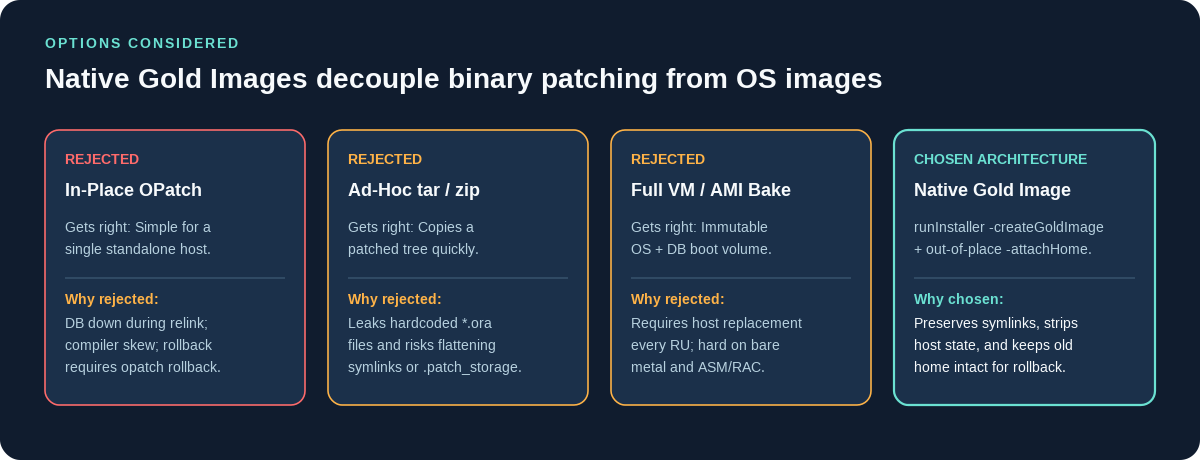
Platform teams typically evaluate four ways to distribute Oracle Database binaries across a fleet before adopting a native Gold Image Factory.
| Option | What It Gets Right | Where It Breaks | Decision |
|---|---|---|---|
In-place opatch apply | Requires no extra disk for a second $ORACLE_HOME. | Long database downtime during relink; toolchain skew; risky rollback if relink aborts. | Rejected |
Ad-hoc tar / zip of $ORACLE_HOME | Captures a pre-linked directory tree without running make on targets. | Risks flattening symbolic links, baking in host *.ora configs, or carrying .patch_storage bloat. | Rejected |
| Full VM / AMI image bake | Guarantees OS and database binary immutability together. | Couples OS and DB patch cycles; requires replacing hosts each quarter, which is disruptive on bare metal and RAC. | Rejected |
runInstaller -createGoldImage + -attachHome | Preserves symlinks, excludes host state, separates OS from DB lifecycle, keeps OLD_HOME for instant rollback. | Requires space on /u01 for two homes during cutover and one build per target OS major version. | Chosen |
Ad-hoc tar or zip archives look deceptively simple, but forgetting zip -y flattens symbolic links into duplicate files, inflating the archive and breaking shared library resolution. Full VM or AMI baking works well for ephemeral stateless tiers, yet replacing persistent database hosts—especially bare-metal servers, ASM configurations, or RAC clusters—every quarter introduces unnecessary storage re-attachment and network reconfiguration. Oracle Fleet Patching and Provisioning (FPP) solves the same problem natively inside Grid Infrastructure ecosystems, but it requires standing up and operating a dedicated FPP Server. For heterogeneous fleets mixing standalone Oracle Restart, single-instance cloud VMs, and RAC, a CI-driven Gold Image Factory using runInstaller -createGoldImage gives every target the same immutable artifact without requiring an FPP control plane.
The Oracle Gold Image Factory Architecture
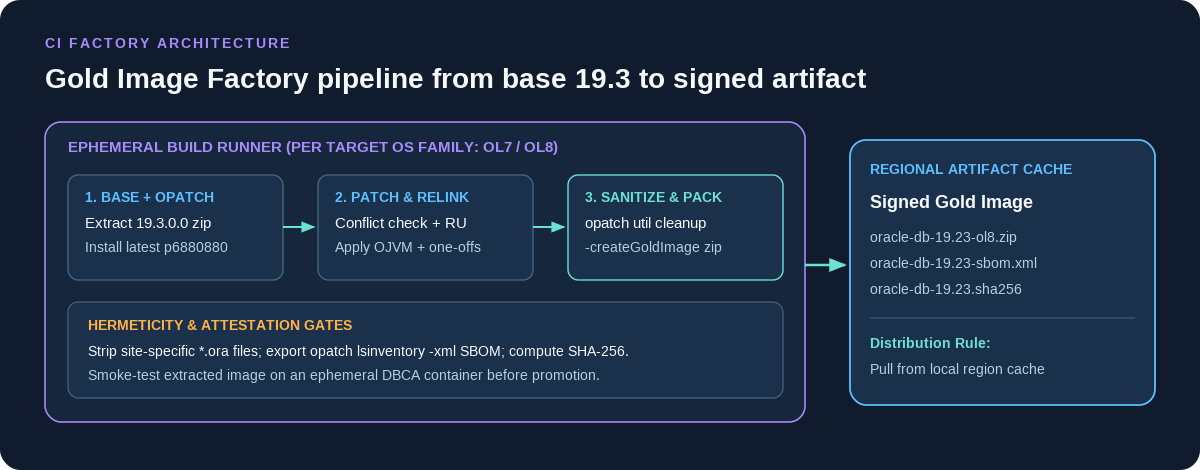
The Gold Image Factory shifts Oracle patching from target-side compilation to build-once, deploy-everywhere immutability. All patch extraction, conflict analysis, and binary relinking happen once inside an isolated, ephemeral CI runner. Production servers never invoke opatch apply or gcc; they verify a cryptographic checksum, unpack the pre-linked Gold Image into a new out-of-place directory, register it in oraInventory, and switch the instance pointer.
Factory Core Mechanics
- Ephemeral OS-Matched Build Runners: Each Gold Image is built inside a throwaway container or VM running the exact target OS major release (for example, Oracle Linux 7 or Oracle Linux 8) with locked toolchain packages. Because compiled Oracle binaries link dynamically against the host’s
glibc, maintaining one build runner per OS major family prevents ABI mismatches at startup. - Pre-Flight Conflict Resolution:
opatch prereq CheckConflictAgainstOHWithDetailruns once in CI against the exact combination of Release Update, OJVM RU, and approved one-off fixes. Any overlay or subset conflict fails the CI pipeline before a single production host is touched. - Storage Sanitization (
cleanupanddeleteinactivepatches): Before packaging, the factory runsopatch util cleanup -silentto purge temporary logs,make.txtartifacts, and scratch directories in$ORACLE_HOME/.patch_storage. For long-lived homes with stacked patch histories, OPatch12.2.0.1.37and later also provideopatch util deleteinactivepatchesto remove superseded RU backup sets safely (never delete.patch_storagemanually withrm -rf, as that corrupts OUI metadata). - Native Image Synthesis (
-createGoldImage): Starting in Oracle 18c/19c (replacing the deprecatedclone.plworkflow),$ORACLE_HOME/runInstaller -silent -createGoldImage -destinationLocation <dir>packages a clean, portable.zipof the patched home, preserving symbolic links and omitting runtime logs or host-specific state. Pairing this with an externalTNS_ADMINdirectory (such as/etc/oracle/network/adminoutside$ORACLE_HOME) ensurestnsnames.ora,sqlnet.ora, andlistener.oranever get overwritten or lost when switching homes. - Cryptographic Attestation and XML SBOM: Every Gold Image is paired with a SHA-256 digest and an XML Software Bill of Materials exported via
opatch lsinventory -xml, giving security and compliance scanners an exact manifest of every bug fix inside the artifact. Storing the.sha256and-sbom.xmlfiles alongside the.zipin the artifact registry lets deployment playbooks reject tampered or truncated downloads before extraction begins.
1. Automated CI Build Script
The CI runner builds a fresh 19c home from the base 19.3.0.0 distribution, upgrades OPatch (p6880880), applies the target RU and OJVM RU (note that -ocmrf is omitted in modern 19c OPatch since Oracle Configuration Manager was retired), cleans scratch storage, and exports the Gold Image alongside its XML SBOM and SHA-256 manifest.
#!/usr/bin/env bash
set -euo pipefail

BUILD_DIR="/tmp/oracle_build_$$"
STAGE_DIR="/opt/oracle/stage"
OUTPUT_NAME="oracle-db-19.23.0.0-ol8"
EXPORT_DIR="/mnt/artifacts/oracle"

mkdir -p "${BUILD_DIR}/db_home" "${EXPORT_DIR}"
export ORACLE_HOME="${BUILD_DIR}/db_home"
export PATH="${ORACLE_HOME}/bin:${ORACLE_HOME}/OPatch:${PATH}"

unzip -q "${STAGE_DIR}/LINUX.X64_193000_db_home.zip" -d "${ORACLE_HOME}"
rm -rf "${ORACLE_HOME}/OPatch"
unzip -q "${STAGE_DIR}/p6880880_190000_Linux-x86-64.zip" -d "${ORACLE_HOME}"

unzip -q "${STAGE_DIR}/p36233263_190000_Linux-x86-64.zip" -d "${BUILD_DIR}/patches"
opatch apply -silent "${BUILD_DIR}/patches/36233263"

unzip -q "${STAGE_DIR}/p36199271_190000_Linux-x86-64.zip" -d "${BUILD_DIR}/patches"
opatch apply -silent "${BUILD_DIR}/patches/36199271"

opatch util cleanup -silent
"${ORACLE_HOME}/runInstaller" -silent -createGoldImage -destinationLocation "${EXPORT_DIR}"

RAW_ZIP=$(ls -t "${EXPORT_DIR}"/db_home_*.zip | head -n 1)
mv "${RAW_ZIP}" "${EXPORT_DIR}/${OUTPUT_NAME}.zip"
opatch lsinventory -xml "${EXPORT_DIR}/${OUTPUT_NAME}-sbom.xml"
sha256sum "${EXPORT_DIR}/${OUTPUT_NAME}.zip" > "${EXPORT_DIR}/${OUTPUT_NAME}.sha256"
2. Fleet Pre-Staging Playbook (Ansible)
Target servers pull the signed archive from a regional object-storage cache while the database remains completely online, verify its SHA-256 checksum, unpack it into the new $ORACLE_HOME, register it with $ORACLE_HOME/oui/bin/runInstaller -silent -attachHome, and execute root.sh to set SetUID permissions on privileged helpers like extjob.
- name: Stage and attach immutable Oracle Gold Image
  hosts: oracle_database_servers
  become: true
  become_user: oracle
  vars:
    artifact_url: "https://artifacts.internal.net/oracle/oracle-db-19.23.0.0-ol8.zip"
    expected_sha256: "8e73c4f5a3b2e1d0987654321fedcba0123456789abcdef0123456789abcdef0"
    target_oracle_home: "/u01/app/oracle/product/19.23.0.0/dbhome_1"
    home_name: "OraDB19Home_1923"

  tasks:
    - name: Create target Oracle Home directory
      ansible.builtin.file:
        path: "{{ target_oracle_home }}"
        state: directory
        owner: oracle
        group: oinstall
        mode: "0755"

    - name: Download and verify Gold Image checksum
      ansible.builtin.get_url:
        url: "{{ artifact_url }}"
        dest: "/tmp/{{ home_name }}.zip"
        checksum: "sha256:{{ expected_sha256 }}"
        mode: "0640"

    - name: Unpack pre-compiled binaries
      ansible.builtin.unarchive:
        src: "/tmp/{{ home_name }}.zip"
        dest: "{{ target_oracle_home }}"
        remote_src: true

    - name: Register home in central oraInventory
      ansible.builtin.command:
        cmd: >
          flock /tmp/orainv.lock
          {{ target_oracle_home }}/oui/bin/runInstaller -silent -attachHome
          ORACLE_HOME="{{ target_oracle_home }}"
          ORACLE_HOME_NAME="{{ home_name }}"
      register: attach_out
      changed_when: "'The inventory has been successfully updated' in attach_out.stdout"

    - name: Run root.sh for SetUID binary permissions
      become_user: root
      ansible.builtin.command:
        cmd: "{{ target_oracle_home }}/root.sh"
      changed_when: true
How It Rolls Out
Deploying a Gold Image across production separates online binary staging from the maintenance-window cutover, keeping database downtime limited to instance restart and datapatch execution.
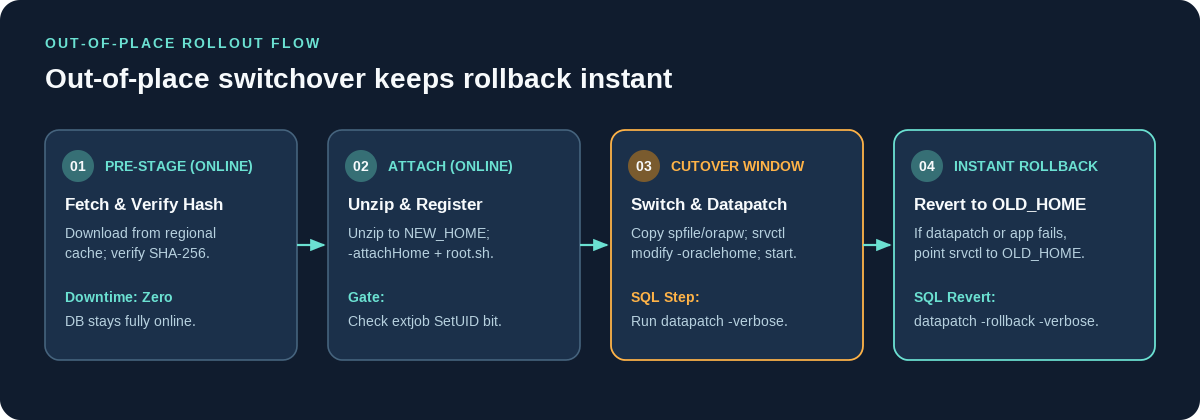
- Stage 1 — Pre-Stage and Verify Online: Distribute the Gold Image
.zipto regional artifact caches and download it to target hosts while databases remain online. Gate on exact SHA-256 verification before unpacking. - Stage 2 — Unpack, Attach, and Verify Permissions Online: Extract the archive into
NEW_HOME, serialize-attachHomewithflockagainst/etc/oraInst.loc, runroot.sh, and verify SetUID permissions on$NEW_HOME/bin/extjobandopatch lsinventoryoutput. Copy or link instance parameter files (spfile,orapw, and externalTNS_ADMINconfigs) if they reside insideOLD_HOME/dbs. - Stage 3 — Maintenance Window Cutover and
datapatch: Stop the instance, update Clusterware/Oracle Restart withsrvctl modify database, start the instance fromNEW_HOME, and rundatapatch -verbose. Becausedatapatchonly updates Pluggable Databases (PDBs) that are open read-write, confirm all PDBs are open before invokingdatapatch, then verifyDBA_REGISTRY_SQLPATCHshowsSUCCESSacrossCDB$ROOTand every PDB. On RAC clusters, attachNEW_HOMEacross all nodes in Stage 2, then switch instances and rundatapatchonce the cluster is running onNEW_HOME. - Stage 4 — Instant Rollback if Needed: If
datapatchor application smoke tests fail, stop the instance, pointsrvctl modify databaseback to the untouchedOLD_HOME, start the database, and rundatapatch -rollback -verbose(ordatapatch -verbosefromOLD_HOME) to revert SQL registry changes. Once all instances are verified onNEW_HOMEafter the bake-in window, decommissionOLD_HOMEwithoui/bin/runInstaller -silent -detachHomebefore deleting the directory soinventory.xmlstays clean.
export OLD_HOME="/u01/app/oracle/product/19.22.0.0/dbhome_1"
export NEW_HOME="/u01/app/oracle/product/19.23.0.0/dbhome_1"

cp "${OLD_HOME}/dbs/spfilePAYMENTSP1.ora" "${OLD_HOME}/dbs/orapwPAYMENTSP1" "${NEW_HOME}/dbs/"
srvctl stop database -d PAYMENTSP1 -stopoption IMMEDIATE
srvctl modify database -d PAYMENTSP1 -oraclehome "${NEW_HOME}"
srvctl start database -d PAYMENTSP1

export ORACLE_HOME="${NEW_HOME}"
export PATH="${ORACLE_HOME}/bin:${PATH}"
datapatch -verbose
In Practice
The Gold Image Factory design relies directly on documented Oracle 19c installer, OPatch, and datapatch mechanics:
- Native Gold Image replacement for
clone.pl: Oracle Database 19c deprecatedclone.plandrunInstaller -clonein favor ofrunInstaller -createGoldImage, which packages a sanitized$ORACLE_HOMEarchive ready for extraction and registration on target nodes. Because the installer excludes local logs and transient state, every target node unpacks the exact same binary tree rather than inheriting build-runner artifacts. - Out-of-place
datapatchrollback metadata: Starting in modern Oracle releases including 19c,datapatchstores SQL rollback scripts inside theSYSTEMtablespace during patch application. Switching back toOLD_HOMEand runningdatapatch -rollback -verbosereverts the SQL dictionary state without needing OPatch to uninstall binaries on the host. Always keepOLD_HOMEintact until application teams sign off on the new Release Update. - OPatch storage hygiene in 19c: In long-lived homes,
.patch_storagegrows with every quarterly Release Update. Oracle’s OPatch12.2.0.1.37(released in April 2023) introducedopatch util listorderedinactivepatchesandopatch util deleteinactivepatchesto remove superseded RU backup sets safely while preserving the active rollback baseline, complementingopatch util cleanupfor scratch files. - Automated inventory verification: Running
opatch lsinventory -xmlproduces a machine-readable XML manifest in CI and on target hosts, enabling fleet compliance checks without scraping unstructured text output. Comparing the target host’s XML output against the CI artifact’s SBOM confirms zero drift after cutover.
Where It Breaks
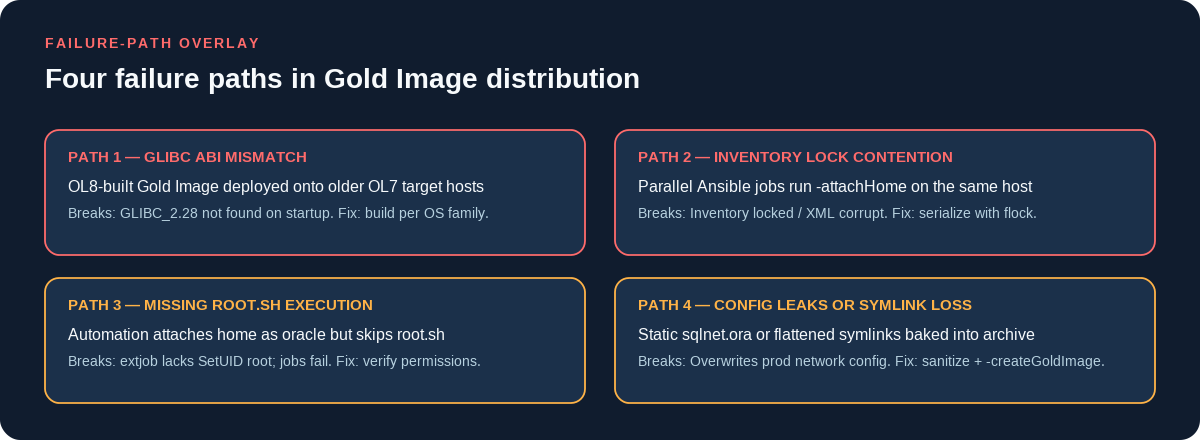
Centralizing binary compilation moves failure modes from per-host compiler errors to ABI compatibility, inventory locking, and filesystem lifecycle management. None of these failures are hard to prevent, but each requires an explicit pipeline gate because target hosts no longer execute opatch prereq locally before extraction.
| Condition | Breaks How | Detect | Mitigate |
|---|---|---|---|
glibc ABI mismatch across OS versions | OL8-built Gold Image fails to launch on OL7 hosts with GLIBC_2.28 not found. | Startup failure or ldd $ORACLE_HOME/bin/oracle missing symbol errors. | Maintain separate CI build runners and artifact tags per OS major release (ol7, ol8). |
| Fleet-wide simultaneous image pull | Hundreds of hosts pull multi-GB .zip files over a shared WAN link at once. | Network saturation and Ansible get_url timeouts. | Pre-stage artifacts in regional object storage caches and deploy in canary waves. |
Concurrent -attachHome runs | Two automation jobs write to /etc/oraInst.loc inventory simultaneously. | Inventory is locked by another process or corrupted inventory.xml. | Serialize -attachHome per host using flock or Ansible serial / mutex controls. |
root.sh skipped after -attachHome | Privileged binaries lack SetUID root ownership; external jobs and metrics fail. | ls -l $ORACLE_HOME/bin/extjob missing -rwsr-s--- root permissions. | Make root.sh and SetUID permission assertion mandatory pipeline gates. |
Static sqlnet.ora baked into image | Build-host network config overwrites target server settings on extraction. | Unexpected TNS resolution errors or tracing paths after cutover. | Strip *.ora and host-specific files before -createGoldImage; keep TNS_ADMIN external. |
| Old homes never decommissioned | Accumulating four+ quarterly homes exhausts /u01 space or inodes. | /u01 capacity or df -i inode alerts prior to staging. | Retain only Active_Home and Previous_Home; decommission older homes via -detachHome. |
Key Takeaways
- Never run
opatch applyormakedirectly on production database servers; build, conflict-check, and relink once in an ephemeral CI runner matched to the target OSglibcABI. - Use Oracle’s native
runInstaller -silent -createGoldImagerather than ad-hoctarorzipcommands so symbolic links stay intact and host-specific state is excluded. - Pair
opatch util cleanup -silent(andopatch util deleteinactivepatcheson OPatch12.2.0.1.37+for stacked homes) withopatch lsinventory -xmlto keep artifacts lean and auditable. - On target hosts, unpack out-of-place, serialize
oui/bin/runInstaller -silent -attachHomewithflock, and always runroot.shbefore cutover. - Keep
OLD_HOMEuntouched on disk during the maintenance window so binary and SQL rollback (srvctl modify database+datapatch -rollback -verbose) remains deterministic.
What to Do Next
- Problem: Target-side
opatch applyand binary relinking introduceglibcdrift, bloat.patch_storage, and turn failed patch runs into unstartable production homes. - Solution: Build an ephemeral CI Gold Image Factory per OS major version using
runInstaller -createGoldImage, sign the archive with SHA-256 and an XML SBOM, and deploy out-of-place viaoui/bin/runInstaller -attachHomeandroot.sh. - Proof: Validate the pipeline in staging by extracting the Gold Image onto a clean host, verifying
opatch lsinventoryandextjobSetUID permissions, switching withsrvctl modify database, and testing a round-trip rollback toOLD_HOMEwithdatapatch -rollback -verbose. - Action: Audit your current patching playbooks this week; wherever automation invokes
opatch applyon database hosts, replace it with an out-of-place Gold Image staging job in non-production first.
Interactive tools for this topic