
Storage Latency Topologies: Abstracting I/O Performance Across AWS, Azure, and Exadata
Expecting cloud virtual machine block storage to perform identically to engineered database hardware is an operational fallacy; bridging the performance divide across AWS, Azure, and Exadata requires designing storage topologies around physical I/O boundaries.
TL;DR
- Problem: Cloud VMs fetch every 8 KB block over virtualized storage networks and enforce separate VM-level and volume-level bandwidth ceilings, breaking workloads migrated from Exadata Smart Scan.
- Answer: Replace manual disk selection with a declarative Storage Compiler that segregates
+RECOontoio2Block Express or Azure Ultra Disk, stripes+DATAacross fourgp3or Premium SSD v2 volumes in ASM, and routes heavy analytical scans to Exadata.- Watch out: Provisioning fast disks on an undersized VM shape triggers silent hypervisor throttling, and enabling host caching on Azure ASM disks risks silent block corruption.
Situation
Heterogeneous database estates rarely live on a single cloud provider. Analytical data warehouses often run on Oracle Cloud Infrastructure (OCI) Exadata Database Service, transactional payment services on Amazon Web Services (AWS) EC2, and enterprise resource planning (ERP) workloads on Microsoft Azure Virtual Machines.
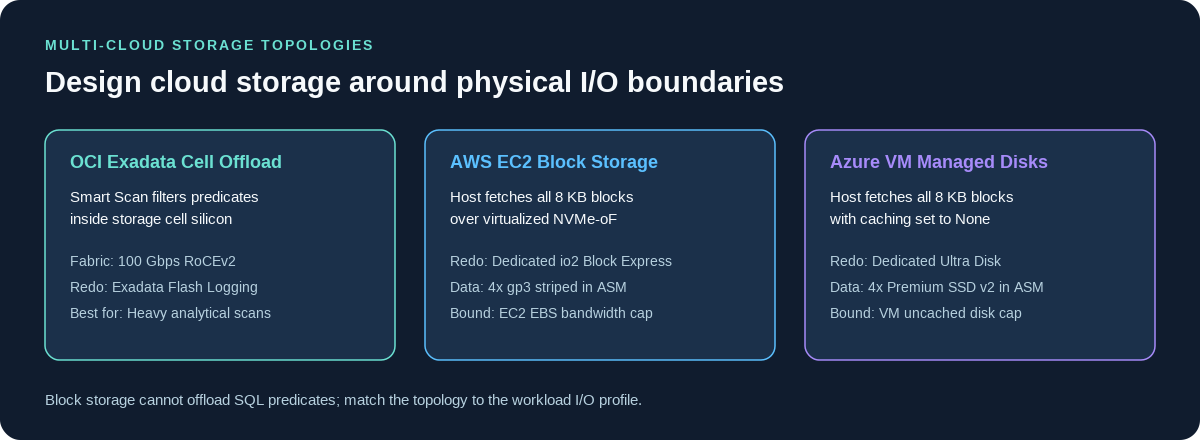
In an on-premises data center, storage performance was governed by dedicated Storage Area Network (SAN) administrators carving Fibre Channel LUNs from shared all-flash arrays. In the public cloud, storage architectures diverge across three distinct physical models:
- OCI Exadata Cloud Service: Combines scale-out database compute nodes with intelligent storage cell servers over a 100 Gbps RDMA over Converged Ethernet (RoCEv2) fabric. Exadata pushes SQL predicates, column projections, Storage Index lookups, and Hybrid Columnar Compression (HCC) decompression down to the storage cell processors (Smart Scan), returning only matching rows rather than raw 8 KB database blocks.
- AWS EC2 with Amazon EBS: Attaches network-backed block volumes over AWS Nitro NVMe-over-Fabrics. General Purpose SSD (
gp3) provides a flat baseline of 3,000 IOPS and 125 MiB/s with independent scaling up to 80,000 IOPS and 2,000 MiB/s per volume. Provisioned IOPS SSD (io2Block Express) scales up to 256,000 IOPS and 4,000 MiB/s with 99.999% durability. - Microsoft Azure Virtual Machines: Attaches Azure Managed Disks over a virtualized storage plane. Premium SSD v2 provides a free baseline of 3,000 IOPS and 125 MB/s and scales independently up to 80,000 IOPS and 2,000 MB/s. Azure Ultra Disk scales up to 400,000 IOPS and 10,000 MB/s for latency-sensitive transaction logging.
| Provider & Tier | Architecture Model | Single-Disk Max IOPS | Single-Disk Max Throughput | Query Processing Model |
|---|---|---|---|---|
| OCI Exadata Storage Cells | Distributed Storage Silicon | Millions across cell bus | RoCEv2 fabric bound | Cell Smart Scan Offload |
AWS EBS io2 Block Express | Network NVMe-oF | 256,000 IOPS | 4,000 MiB/s | Host-Level Block Fetch |
AWS EBS gp3 Volumes | Network NVMe-oF | 80,000 IOPS | 2,000 MiB/s | Host-Level Block Fetch |
| Azure Premium SSD v2 | Software-Defined Disk | 80,000 IOPS | 2,000 MB/s | Host-Level Block Fetch |
| Azure Ultra Disk | Low-Latency NVMe LUN | 400,000 IOPS | 10,000 MB/s | Host-Level Block Fetch |
When platform teams expose raw cloud disk APIs to application engineers without guardrails, teams size storage by capacity alone and ignore physical I/O boundaries.
The Problem
Application engineers reason in SQL semantics and business transaction rates, not hypervisor queue depths, NVMe packetization overhead, or storage cell offloading. Without an abstraction layer enforcing physical constraints, three operational failure patterns emerge.
Constraint 1: Host-Level Block Fetch vs. Cell Offload. Exadata evaluates WHERE predicates inside the storage cell servers (cell smart table scan). If a 10 TB table scan filters down to 200 GB of matching rows, Exadata transfers 200 GB across the RoCEv2 fabric. On AWS EC2 or an Azure VM, there is no storage-tier SQL offload; the database host must pull all 10 TB of raw 8 KB blocks over the virtualized network interface. On an Azure Standard_E32-8s_v5 VM, whose sustained uncached disk throughput ceiling is 865 MB/s, transferring 10 TB (10,000,000 MB / 865 MB/s) requires at least 11,560 seconds—roughly 3.2 hours—of pure disk transfer before accounting for CPU evaluation or concurrent queries.
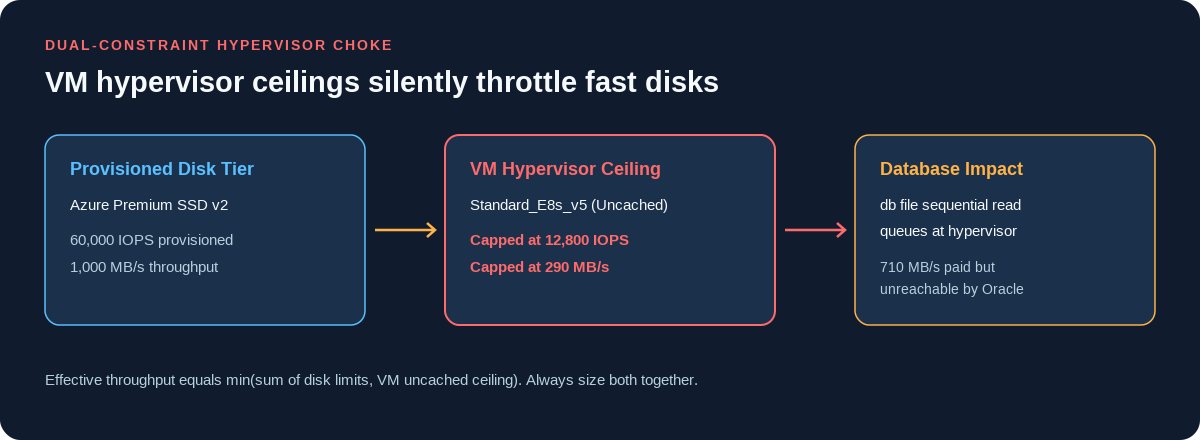
Constraint 2: Dual-Constraint Hypervisor Ceilings. Cloud hypervisors enforce two independent storage limits: the volume limit and the VM instance limit. Effective throughput is always min(sum of attached disk limits, VM uncached limit). An engineer can attach an Azure Premium SSD v2 volume provisioned for 60,000 IOPS and 1,000 MB/s to a Standard_E8s_v5 VM. Because Standard_E8s_v5 caps sustained uncached disk performance at 12,800 IOPS and 290 MB/s, the hypervisor throttles every read above 290 MB/s. Oracle sessions stall on db file sequential read while the organization pays for 710 MB/s of disk throughput the VM cannot physically consume.
Constraint 3: Redo Log Commit Queue Contention (log file sync). Oracle transactional commit latency depends on the Log Writer (LGWR) flushing sequential redo entries via log file parallel write. When +RECO (redo logs) shares a single gp3 or Premium SSD v2 volume with +DATA (random-access table and index blocks), checkpoint flushes and parallel queries saturate the shared disk queue. Redo writes queue behind bulk reads, causing log file sync waits to climb and upstream application connection pools to exhaust.
How can platform teams build an automated storage vending plane that maps application SLAs to cloud-native topologies without violating VM ceilings or mixing I/O profiles?
Options Considered
Platform teams typically evaluate four storage architectures when standardizing Oracle deployments across AWS, Azure, and OCI.
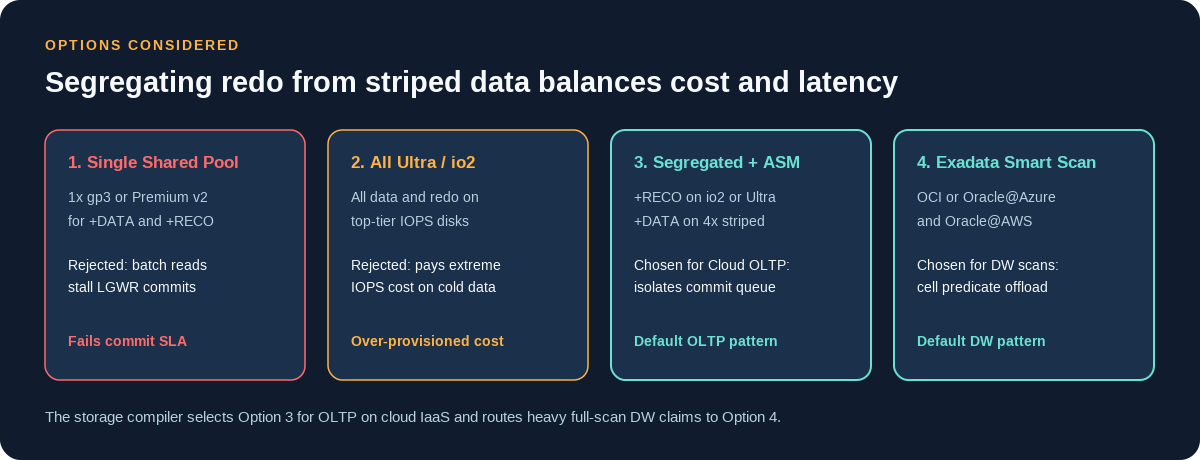
| Option | Redo Isolation | Scan Bandwidth | Cost Profile | Verdict |
|---|---|---|---|---|
1. Single shared gp3 or Premium SSD v2 | None (+DATA and +RECO share queue) | Bounded by single disk and VM | Lowest | Rejected: batch I/O stalls LGWR commits |
2. All-io2 or All-Ultra Disk topology | Isolated only if separate volumes used | High, up to VM ceiling | Highest | Rejected: overpays for cold datafile IOPS |
3. Segregated +RECO + 4x ASM-striped +DATA | Dedicated io2 or Ultra Disk | Scales linearly across 4 LUNs to VM cap | Balanced | Chosen for Cloud IaaS OLTP |
| 4. OCI Exadata or Oracle Database@Azure/AWS | Exadata Smart Flash Logging | Cell Smart Scan offload | Premium | Chosen for DW-Throughput-Heavy SLAs |
Option 1 (Single Shared Pool) minimizes Terraform complexity by attaching one large volume for all ASM diskgroups. It fails under mixed workloads because Oracle’s sequential LGWR writes compete with random DBWn flushes and full table scans on the same NVMe queue.
Option 2 (All-Ultra / All-io2) places both +DATA and +RECO on top-tier provisioned IOPS volumes. While latency is predictable, paying Ultra Disk or io2 per-IOPS rates for multi-terabyte historical tables that only require sequential throughput inflates monthly storage spend without improving OLTP commit times.
Option 3 (Segregated Redo + ASM-Striped Data) isolates +RECO on a small, dedicated io2 Block Express or Azure Ultra Disk volume and stripes +DATA across four gp3 or Premium SSD v2 volumes using Oracle Automatic Storage Management (ASM). This matches each volume tier to its exact I/O pattern.
Option 4 (Exadata Smart Scan) routes analytical workloads with multi-terabyte scan requirements to OCI Exadata Database Service or native Exadata deployments inside Azure and AWS (Oracle Database@Azure and Oracle AI Database@AWS), avoiding the host-level block-shipping bottleneck altogether.
The Storage Vending Abstraction Architecture
To enforce these choices consistently, the platform exposes a declarative Database Vending Control Plane implemented with Terraform modules and policy checks (via Open Policy Agent or Crossplane compositions). Application teams never pick EBS volume types, Azure LUN caching flags, or ASM allocation units. Instead, they submit a declarative storage claim containing capacity and one of three I/O SLAs:
OLTP-Latency-Critical: Prioritizes sub-millisecondLGWRcommit latency and high random-read concurrency.DW-Throughput-Heavy: Prioritizes multi-gigabyte-per-second sequential scan bandwidth and predicate offload.Balanced-Standard: Cost-optimized baseline for non-production or low-concurrency transactional services.
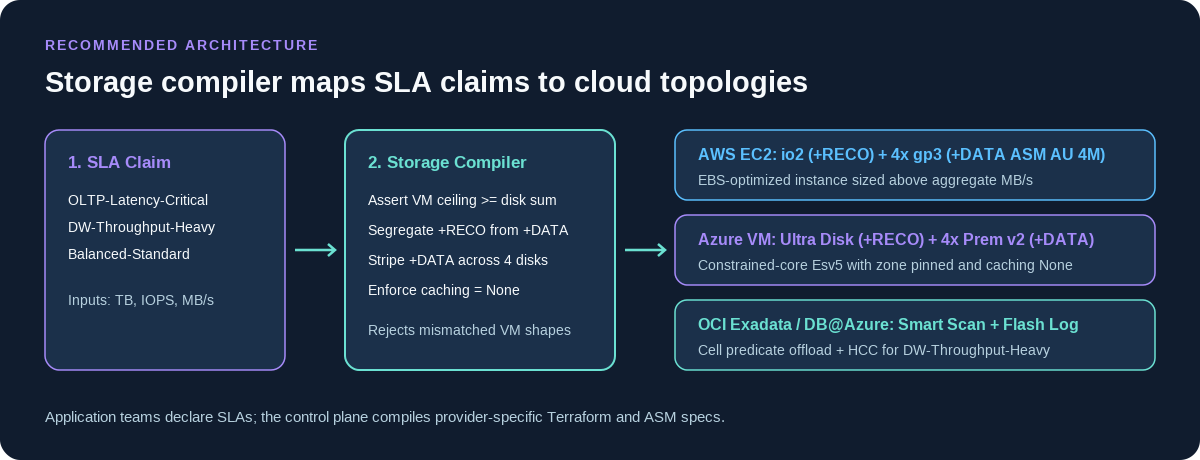
flowchart TD
    subgraph Developer Self-Service Tier
        A[Developer Manifest: Storage Claim — 5TB, SLA=OLTP-Latency-Critical]
    end

    subgraph DBaaS Control Plane — Storage Compiler
        A --> B[Platform Storage Compiler API]
        B --> C{Evaluate Target Cloud Environment}
    end

    subgraph AWS Storage Plane Topology
        C -->|Target AWS| D[Provision EC2 Memory-Optimized Shape]
        D --> E[Isolate Redo: io2 Block Express 10K IOPS]
        D --> F[Stripe Data: 4x gp3 Volumes across ASM +DATA]
        D --> G[Assert VM EBS Throughput > 1500 MB/s]
    end

    subgraph Azure Storage Plane Topology
        C -->|Target Azure| H[Provision Constrained-Core E32-8s VM]
        H --> I[Isolate Redo: Azure Ultra Disk Sub-Millisecond]
        H --> J[Stripe Data: 4x Premium SSD v2 across ASM +DATA]
        H --> K[Assert VM Uncached Cap >= 865 MB/s]
    end

    subgraph OCI Engineered Systems Topology
        C -->|Target OCI| L[Provision Exadata Database Service]
        L --> M[Enable Cell Smart Scan Offloading]
        L --> N[Configure Smart Flash Logging for Redo]
        L --> O[Enable Hybrid Columnar Compression]
    end
Core Storage Compiler Rules
- Strict I/O Profile Segregation: The compiler never colocates
+RECOand+DATAon the same physical disk tier in production cloud IaaS. Redo logs receive dedicatedio2Block Express (AWS) or Ultra Disk (Azure) LUNs with independent queue depths. - Algorithmic ASM Striping: Striping
+DATAacross fourgp3or Premium SSD v2 volumes distributes I/O across multiple virtualized controller queues and allows the control plane to scale aggregate IOPS and bandwidth cleanly up to the VM’s ceiling. Settingau_size = 4MwithCOARSEstriping places one 4 MB Allocation Unit per LUN in round-robin order, keeping single-block OLTP reads on one volume while spreading multi-block sequential scans and RMAN backups across all four volumes. By contrast,FINEstriping splits each 1 MB unit into 128 KB chunks across every disk, which is reserved for latency-sensitive redo logs when striping is used. - Hypervisor Capacity Assertions: Before running
terraform apply, the compiler validates that the target compute shape’s sustained EBS bandwidth (AWS) or uncached disk limit (Azure) exceeds the aggregate provisioned throughput of all attached disks. On AWS, anr6i.16xlargeprovides 20 Gbps of dedicated EBS bandwidth, 80,000 IOPS (at 16 KiB), and 2,500 MB/s (roughly 2,384 MiB/s) of throughput—enough to absorb a 2,000 MiB/s striped+DATApool plus a 10,000 IOPS+RECOvolume without instance-level queuing. On Azure, constrained-vCPU shapes such asStandard_E32-8s_v5provide 256 GiB of memory and 51,200 uncached IOPS (865 MB/s sustained, 2,000 MB/s burst) while keeping active vCPUs at 8 for Oracle processor licensing. - Smart Scan Routing for Analytical SLAs: When a claim specifies
DW-Throughput-Heavyand exceeds single-VM block-fetch thresholds, the compiler routes placement to OCI Exadata Database Service or native Exadata racks in Azure/AWS.
| Target Cloud & Tier | Redo Storage (+RECO) | Data Storage (+DATA) | VM & Striping Guardrail |
|---|---|---|---|
AWS EC2 (OLTP-Latency-Critical) | io2 Block Express (10,000 IOPS) | 4x gp3 striped (2,000 MB/s agg.) | ASM au_size = 4M; EBS-optimized r6i shape |
Azure VM (OLTP-Latency-Critical) | Azure Ultra Disk (15,000 IOPS) | 4x Premium SSD v2 (1,600 MB/s agg.) | Standard_E32-8s_v5 or larger; caching = "None" |
OCI Exadata (DW-Throughput-Heavy) | Exadata Smart Flash Logging | High Capacity Storage Cells | Smart Scan + HCC enabled |
AWS / Azure (Balanced-Standard) | Dedicated baseline gp3 / Prem v2 | Single or 2x gp3 / Prem v2 | Non-production baseline with TTL |
How It Rolls Out
Deploying a storage topology through the vending plane follows four sequential gates, each with an explicit validation check and rollback point before application traffic reaches the database.
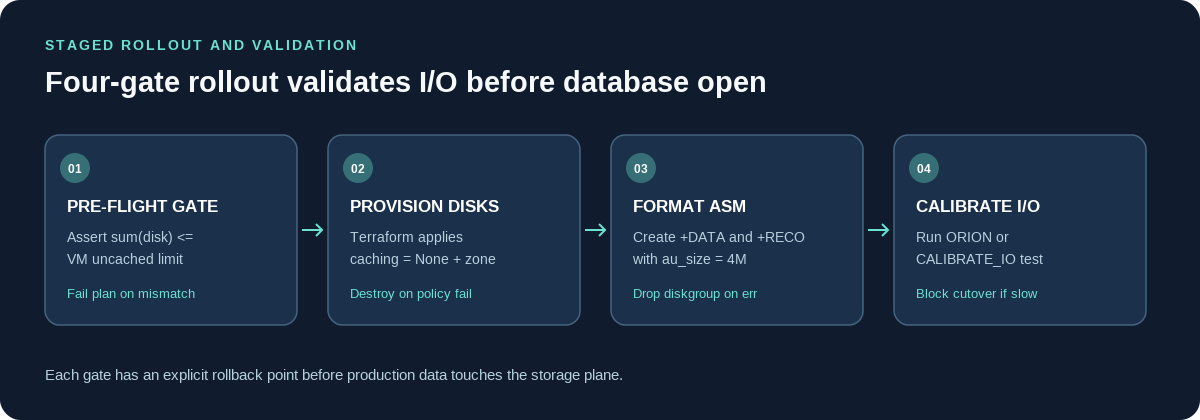
- Gate 1 — Pre-Flight Quota & Shape Assertion: The compiler evaluates
sum(disk_iops) <= vm_uncached_iopsandsum(disk_mbps) <= vm_uncached_mbps, and verifies availability zone alignment (UltraSSD_LRSandPremiumV2_LRSrequire an explicit zone). Rollback: fail CI pipeline before any cloud API call. - Gate 2 — Declarative Disk Provisioning: Terraform provisions the VM, the dedicated
+RECOvolume, and the four+DATAvolumes, enforcingcaching = "None"on all Azure ASM attachments and KMS encryption on AWS EBS volumes. Rollback:terraform destroycleans up unformatted volumes. - Gate 3 — ASM Diskgroup Initialization: The host bootstrap playbook maps persistent device paths (via udev rules or LUN symlinks) and executes
CREATE DISKGROUPwithEXTERNAL REDUNDANCYand'au_size' = '4M', keeping cloud-native triple replication at the block layer rather than double-mirroring in ASM. Rollback:DROP DISKGROUP ... INCLUDING CONTENTS. - Gate 4 — Synthetic I/O Calibration: Before opening the database to application workloads, the pipeline runs Oracle ORION (against raw ASM LUNs prior to database creation) or
DBMS_RESOURCE_MANAGER.CALIBRATE_IO(inside the opened instance) to measure sustained IOPS, MB/s, and single-block read latency against the SLA claim. BecauseCALIBRATE_IOissues asynchronous random 8 KB reads and sequential 1 MB reads across all datafiles, any mismatch between provisioned disk limits and the VM hypervisor ceiling surfaces immediately as a plateau below the expected aggregate MB/s. Rollback: quarantine the instance and resize the VM shape if hypervisor throttling is detected.
In Practice
Based on documented AWS EBS, Azure Managed Disks, and Oracle ASM behavior, the storage compiler codifies these rules directly in Terraform and asmcmd templates. Notice that on Azure, both UltraSSD_LRS and PremiumV2_LRS require an availability zone and caching = "None" on the attachment.
1. AWS Striped EBS Storage Module
# modules/aws_oracle_storage/main.tf
resource "aws_ebs_volume" "oracle_redo_volume" {
  availability_zone = "us-east-1a"
  size              = 250
  type              = "io2"
  iops              = 10000
  encrypted         = true
  kms_key_id        = var.kms_key_arn
  tags              = { Name = "vol-oracle-reco-01", Diskgroup = "RECO" }
}

resource "aws_ebs_volume" "oracle_data_volumes" {
  count             = 4
  availability_zone = "us-east-1a"
  size              = 1250 # 4 x 1,250 GiB = 5,000 GiB (+DATA)
  type              = "gp3"
  iops              = 12000
  throughput        = 500  # 4 x 500 = 2,000 MiB/s aggregate
  encrypted         = true
  kms_key_id        = var.kms_key_arn
  tags              = { Name = "vol-oracle-data-${count.index + 1}", Diskgroup = "DATA" }
}
2. Azure Decoupled Premium SSD v2 and Ultra Disk Module
# modules/azure_oracle_storage/main.tf
resource "azurerm_managed_disk" "oracle_ultra_redo" {
  name                 = "disk-oracle-reco-ultra-01"
  location             = var.location
  resource_group_name  = var.resource_group_name
  zone                 = "1"
  storage_account_type = "UltraSSD_LRS"
  create_option        = "Empty"
  disk_size_gb         = 256
  disk_iops_read_write = 15000
  disk_mbps_read_write = 500
}

resource "azurerm_managed_disk" "oracle_data_v2" {
  count                = 4
  name                 = "disk-oracle-data-v2-${count.index + 1}"
  location             = var.location
  resource_group_name  = var.resource_group_name
  zone                 = "1"
  storage_account_type = "PremiumV2_LRS"
  create_option        = "Empty"
  disk_size_gb         = 1250
  disk_iops_read_write = 20000
  disk_mbps_read_write = 400 # Size VM uncached limit >= aggregate target
}

resource "azurerm_virtual_machine_data_disk_attachment" "data_attach" {
  count              = 4
  managed_disk_id    = azurerm_managed_disk.oracle_data_v2[count.index].id
  virtual_machine_id = var.vm_id
  lun                = 20 + count.index
  caching            = "None" # Required to prevent ASM direct I/O bypass
}
3. Oracle ASM Diskgroup Creation
-- Executed via SQL*Plus as SYSASM
CREATE DISKGROUP DATA EXTERNAL REDUNDANCY
  DISK
    '/dev/oracleasm/by-lun/lun-20',
    '/dev/oracleasm/by-lun/lun-21',
    '/dev/oracleasm/by-lun/lun-22',
    '/dev/oracleasm/by-lun/lun-23'
  ATTRIBUTE
    'au_size' = '4M',
    'compatible.asm' = '19.0.0.0.0',
    'compatible.rdbms' = '19.0.0.0.0';

CREATE DISKGROUP RECO EXTERNAL REDUNDANCY
  DISK '/dev/oracleasm/by-lun/lun-10'
  ATTRIBUTE
    'au_size' = '4M',
    'compatible.asm' = '19.0.0.0.0',
    'compatible.rdbms' = '19.0.0.0.0';
4. Kernel-Level Block Tracing with eBPF
When AWR reports show elevated db file sequential read or log file parallel write times, operators can attach eBPF block-layer tracers such as biolatency or biosnoop (from the BCC / bpftrace toolset) on Linux database hosts to measure latency between block-device submission and completion, separating internal Oracle latch contention from cloud hypervisor throttling.
Where It Breaks
Abstracting storage across multiple clouds introduces failure modes at the hypervisor boundary, the ASM layer, and the query-offload layer.
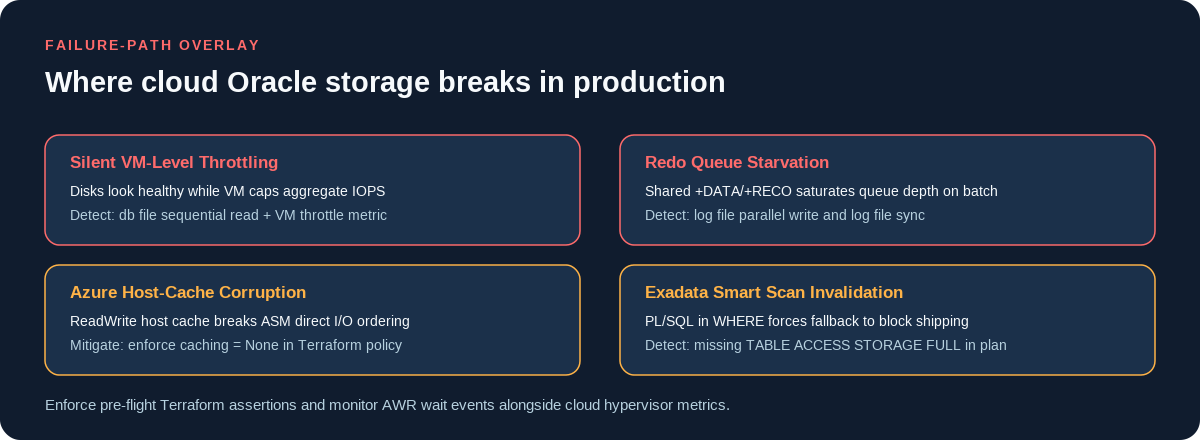
| Failure Mode | Breaks How | Detect | Mitigate |
|---|---|---|---|
| Silent VM-Level Throttling | Sum of disk IOPS or MB/s exceeds VM uncached ceiling; hypervisor queues I/O. | db file sequential read spikes while disk metrics look idle; VM IOPS cap metric hits 100%. | Pre-flight Terraform assertion: sum(disk) <= vm_uncached_limit. |
| Shared Redo Queue Saturation | Batch writes on shared gp3 or Premium v2 exhaust baseline 3,000 IOPS or queue depth. | log file sync and log file parallel write top AWR wait events. | Isolate +RECO on dedicated io2 Block Express or Azure Ultra Disk. |
| Azure Host-Cache Corruption | ReadOnly or ReadWrite caching on ASM disks breaks direct I/O write ordering on crash. | Block corruption errors (ORA-01578) after VM host reboot. | Enforce caching = "None" via OPA/Sentinel policy on all ASM LUNs. |
| ASM Rebalance IOPS Storm | Disk replacement triggers ASM rebalance at high power, starving OLTP queries. | Elevated V$ASM_OPERATION I/O alongside OLTP latency spikes. | Throttle with ALTER DISKGROUP DATA REBALANCE POWER 3 off-peak. |
| Exadata Smart Scan Invalidation | Unoffloadable PL/SQL functions in WHERE force fallback to block shipping. | Execution plan lacks TABLE ACCESS STORAGE FULL; cell offload bytes drop. | Audit plans and rewrite predicates to use offload-eligible SQL. |
| EBS Volume Detachment Latching | Failover script reattaches EBS volume before dead instance releases it. | Cloud API returns VolumeInUseError during automated recovery. | Poll detachment state with exponential backoff before attach_volume. |
Key Takeaways
- Cloud block storage cannot offload SQL predicates; full table scans on AWS EC2 or Azure VMs must ship every 8 KB block over the virtualized network, bounded by the VM’s sustained disk ceiling.
- Effective cloud storage performance is
min(sum of attached disk limits, VM uncached limit); sizing disks without sizing the compute shape wastes provisioned IOPS. - Isolating
+RECOonto dedicatedio2Block Express or Azure Ultra Disk eliminateslog file syncstalls caused by bulk+DATAcheckpoints and scans. - Striping
+DATAacross fourgp3or Premium SSD v2 volumes in ASM withau_size = 4MandEXTERNAL REDUNDANCYscales throughput cleanly without double-mirroring cloud-replicated storage. - Azure
UltraSSD_LRSandPremiumV2_LRSdisks require an explicit availabilityzoneandcaching = "None"on every ASM attachment to prevent direct I/O ordering bugs.
What to Do Next
- Problem: Treating cloud VM block storage as equivalent to Exadata storage cells causes full-table-scan bottlenecks, silent hypervisor throttling, and
log file synccommit stalls. - Solution: Build a Storage Compiler module in Terraform that enforces VM-to-disk bandwidth assertions, isolates
+RECOontoio2or Ultra Disk, stripes+DATAacross four ASM LUNs, and routes heavy scan workloads to Exadata. - Proof: After provisioning, run
DBMS_RESOURCE_MANAGER.CALIBRATE_IOand check AWRlog file parallel writeanddb file sequential readwait histograms to confirm measured throughput matches the VM’s uncached ceiling without throttling. - Action: Audit your production cloud Oracle AWR reports this week; if
log file syncordb file sequential readappears in the top five timed events, verify that+RECOis isolated from+DATAand thatsum(disk_mbps)does not exceed your VM shape’s uncached disk limit.
Interactive tools for this topic