
Agentic Database Operations: Building a Secure MCP Gateway for Oracle Fleet Intelligence
Content reflects the state as of August 2026. AI tooling and model capabilities in this area change frequently.
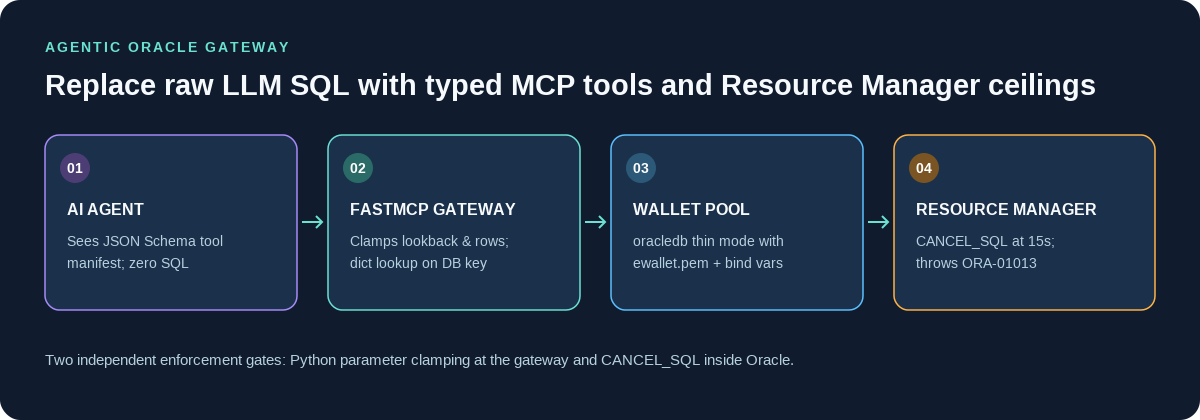
Giving an LLM agent raw SQL execution against a production Oracle database turns prompt reasoning into unbounded dictionary scans; safe agentic diagnostics require an MCP gateway that exposes only parameterized, pre-tuned queries backed by Oracle Resource Manager CANCEL_SQL ceilings.
TL;DR
- Problem: Even a read-only SQL interface lets an LLM run unindexed
DBA_HIST_ACTIVE_SESS_HISTORYscans withoutDBIDorsnap_idpredicates, thrashing the buffer cache and burning context-window tokens onORA-00942retries.- Answer: Put a curated FastMCP gateway in front of
oracledbthin-mode pools (ewallet.pem), clamp lookback and row limits in Python, use delta AWR queries (ELAPSED_TIME_DELTA), and bind the diagnostic user to an Oracle Resource Manager plan withSWITCH_GROUP => 'CANCEL_SQL'andSWITCH_TIME => 15.- Watch out: Oracle SQLcl’s native MCP server (
sql -mcp) arrived in SQLcl 25.2 (not 24.3) and still allows arbitrary SQL on saved connections;python-oracledbthin mode ignoressqlnet.oraand requiresewallet.pem; and queryingELAPSED_TIME_TOTALinstead ofELAPSED_TIME_DELTAreturns instance-lifetime totals rather than the requested lookback window.
Situation
The Model Context Protocol (MCP), introduced by Anthropic in late 2024 and updated through the 2025 specification revisions, standardizes how AI clients discover and invoke external tools over JSON-RPC 2.0. An MCP server publishes a manifest of typed functions with JSON Schema parameters. The AI client sees only the tool signatures and descriptions—not the backing database credentials, TNS aliases, or SQL templates.
In parallel, Oracle shipped native MCP server support in Oracle SQLcl 25.2 (requiring Java 17 or 21), invoked via sql -mcp against pre-saved connections (conn -save ... -savepwd ...). SQLcl -mcp is convenient for local development and controlled sandboxes because it avoids embedding raw passwords in client configs. On production OLTP fleets, however, a generic SQL execution tool still leaves the LLM responsible for choosing the right Oracle dictionary view, joining on DBID and INSTANCE_NUMBER, and bounding partition scans—tasks where a single mistake creates a production incident.
The distinction between Oracle’s in-memory V$ views and disk-backed DBA_HIST_* AWR views illustrates why view selection matters. V$ACTIVE_SESSION_HISTORY reads a bounded circular buffer in the SGA; DBA_HIST_ACTIVE_SESS_HISTORY reads persisted 1-in-10 second samples stored in SYSAUX partitions across days or weeks of AWR retention. When an LLM confuses the two or omits DBID and SNAP_ID bounds, a query that looks identical in syntax shifts from a millisecond SGA read to a multi-gigabyte SYSAUX tablespace scan. Similarly, querying V$LOCK and V$SESSION on an Oracle RAC cluster only inspects the single instance the connection landed on—missing a blocker sitting on Node 2 unless the query uses GV$LOCK and GV$SESSION joined on INST_ID.
The Problem
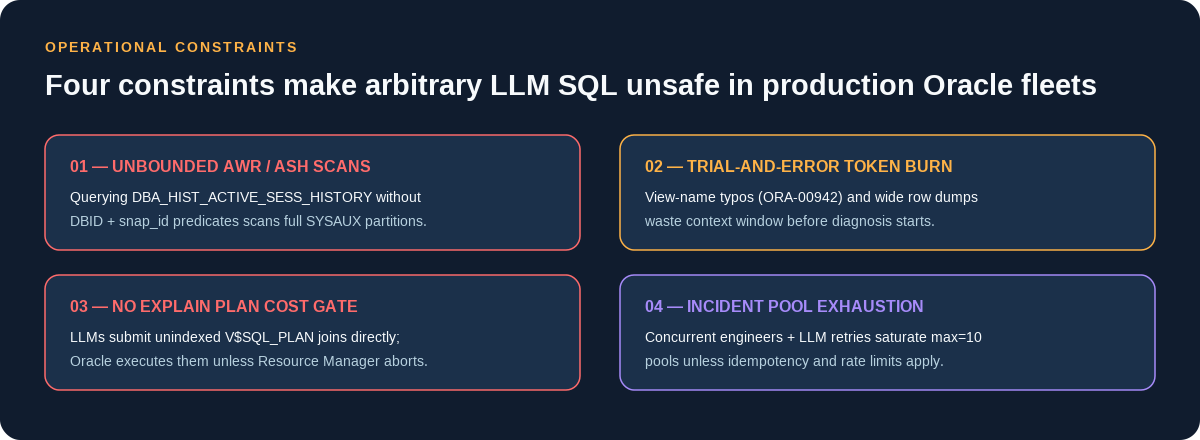
Allowing an LLM to author arbitrary SELECT statements against Oracle’s V$ and DBA_HIST_* views fails against four concrete operational constraints:
- Unbounded AWR and ASH partition scans:
DBA_HIST_ACTIVE_SESS_HISTORYandDBA_HIST_SQLSTATare range-partitioned byDBIDandSNAP_IDinsideSYSAUX. If an LLM omitsDBIDorSNAP_IDpredicates—or joinsV$SQL_PLANwithoutPLAN_HASH_VALUE—Oracle scans historical partitions across every snapshot retained inSYSAUX. A single unindexed ASH scan can saturate physical I/O and evict hot OLTP blocks from the buffer cache. - Context-window exhaustion from trial-and-error SQL: LLMs frequently hallucinate Oracle view names (for example,
DBA_HIST_SQL_STATinstead ofDBA_HIST_SQLSTAT), triggeringORA-00942: table or view does not exist. If an agent also dumps wide diagnostic rows withoutSUBSTRtruncation, just 15 unfiltered rows with 2 KB SQL text and explain plans consume15 * 2,000 bytes ≈ 30 KB(~7,500 tokens) in a single turn—pushing earlier incident context out of the window. - No
EXPLAIN PLANfeedback gate: A human DBA checks cardinality estimates orSNAP_IDbounds before running an unfamiliar query against production. An LLM with raw SQL access submits queries directly; without Oracle Resource Manager intervention, a read-only user can still hold CPU and I/O indefinitely. - Incident-storm connection pool exhaustion: During a Sev-1 outage, if 30 engineers query the assistant concurrently and each slow AWR call triggers 3 automatic client retries,
30 * 3 = 90concurrent requests hit a database pool capped atmax=10. Without per-agent rate limits and call deduplication,pool.acquire()blocks and times out across the entire gateway.
How do you let AI agents investigate live Oracle performance and locking incidents across a 1,000+ database fleet without exposing raw SQL execution, leaking TNS/wallet credentials, or letting runaway queries degrade production OLTP?
Options Considered
| Integration Architecture | SQL Flexibility | Credential Isolation | Blast Radius Ceiling | Why Chosen / Rejected |
|---|---|---|---|---|
Raw JDBC / sqlplus Tool | Full DDL / DML / OS | None (client holds creds) | Unbounded | Rejected: One prompt injection or hallucinated ALTER SYSTEM / DROP causes immediate data loss. |
Oracle SQLcl 25.2 (sql -mcp) | Arbitrary SQL on saved conns | High (conn -save) | Depends on DB user grants | Dev / Sandbox Only: Great for ad-hoc DBA workstations, but still lets an LLM write unindexed DBA_HIST_* scans. |
| OEM REST APIs | Fixed OEM endpoints | High | High | Limited: Strong governance, but coarse polling granularity lags live V$LOCK / ASH triage. |
| Curated FastMCP Gateway + Resource Manager | Pre-tuned parameterized templates only | Gateway-isolated (ewallet.pem) | Python clamp + CANCEL_SQL (15s) | Chosen: Eliminates arbitrary SQL structurally and backs every query with an engine-level timeout. |
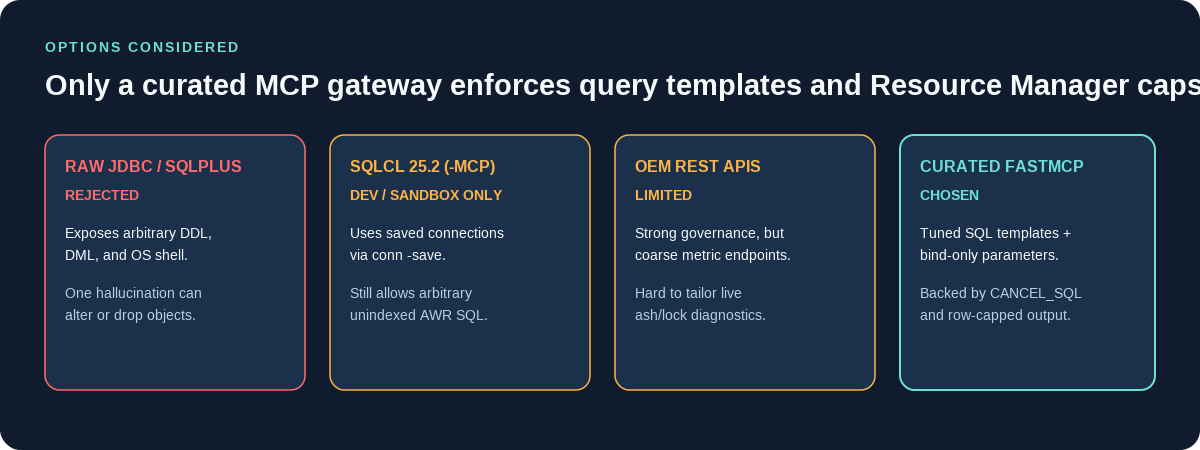
Using Oracle SQLcl 25.2 -mcp is the fastest way to prototype an AI DBA workflow on non-production databases because it ships out of the box with connection-store isolation. Its boundary is query authorship: SQLcl -mcp executes whatever SQL the model generates (subject to the database user’s privileges). When the target is a tier-1 production OLTP fleet, replacing free-form SQL generation with typed diagnostic tools removes ORA-00942 guesswork and guarantees every query hits indexed SNAP_ID and DBID paths.
Transport choice also separates prototypes from production fleets. Running an MCP server over stdio works well for a single DBA’s local IDE session, but distributes Oracle wallet files and tnsnames.ora to every engineer’s laptop. A shared Streamable HTTP gateway behind corporate SSO and mTLS keeps ewallet.pem inside a locked-down VPC service while giving every engineer the same audited tool catalog.
The Oracle Fleet MCP Gateway Architecture
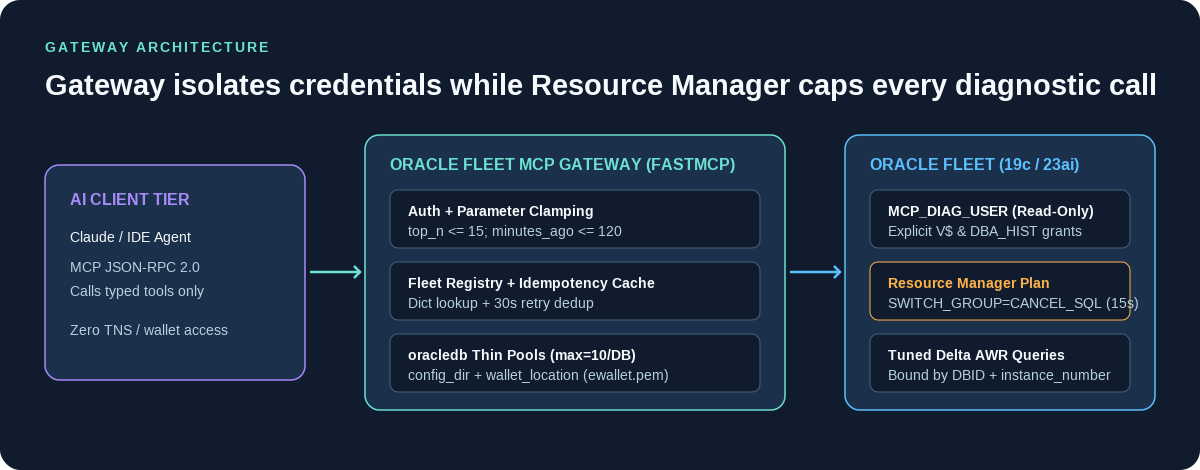
The gateway sits between the AI client and the Oracle fleet as a stateless Python FastMCP service. The agent never sees a hostname, port, TNS alias, or wallet password; it passes a logical db_identifier (validated by dictionary lookup) and bounded integer parameters.
1. Thin-Mode python-oracledb Pool Initialization
In python-oracledb Thin mode (the default when init_oracle_client() is not called), the driver does not read sqlnet.ora or binary cwallet.sso files. Instead, config_dir points to tnsnames.ora, while wallet_location points to the directory containing the PEM-encoded ewallet.pem (plus wallet_password if encrypted).
import logging
from dataclasses import dataclass
from typing import Dict
import oracledb
from mcp.server.fastmcp import FastMCP

mcp = FastMCP("OracleFleetMCPGateway")
logger = logging.getLogger("oracle_mcp")

@dataclass
class DatabaseEntry:
    tns_alias: str
    config_dir: str       # contains tnsnames.ora
    wallet_dir: str       # contains ewallet.pem
    wallet_pwd: str
    display_name: str
    region: str

FLEET_REGISTRY: Dict[str, DatabaseEntry] = {}  # loaded from Vault / Secrets Manager
DB_POOLS: Dict[str, oracledb.ConnectionPool] = {}

def init_pools() -> None:
    for db_id, entry in FLEET_REGISTRY.items():
        DB_POOLS[db_id] = oracledb.create_pool(
            user="MCP_DIAG_USER",
            dsn=entry.tns_alias,
            config_dir=entry.config_dir,
            wallet_location=entry.wallet_dir,
            wallet_password=entry.wallet_pwd,
            min=2,
            max=10,
            increment=1,
            timeout=20,
            getmode=oracledb.POOL_GETMODE_WAIT,
        )
2. Tuned Delta AWR and Blocking-Session Tools
A common AWR bug is selecting elapsed_time_total from DBA_HIST_SQLSTAT—which returns cumulative elapsed time since instance startup rather than activity during the requested lookback window. Production tools must aggregate SUM(s.elapsed_time_delta) and SUM(s.executions_delta) and join DBA_HIST_SNAPSHOT on snap_id, dbid, and instance_number so RAC clusters do not double-count snapshots:
MAX_ROWS = 15
MAX_MINUTES = 120

@mcp.tool()
def get_awr_top_sql(db_identifier: str, minutes_ago: int = 60, top_n: int = 10) -> str:
    """Return top SQL by delta elapsed time within the last 5-120 minutes."""
    if db_identifier not in DB_POOLS:
        return f"Unknown database: {db_identifier}. Valid options: {list(DB_POOLS.keys())}"
    minutes_ago = max(5, min(minutes_ago, MAX_MINUTES))
    top_n = max(1, min(top_n, MAX_ROWS))

    sql = """
        SELECT s.sql_id,
               ROUND(SUM(s.elapsed_time_delta) / 1e6, 2) AS window_elapsed_sec,
               SUM(s.executions_delta)                   AS window_executions,
               ROUND(SUM(s.elapsed_time_delta) / NULLIF(SUM(s.executions_delta), 0) / 1e6, 4) AS avg_sec,
               SUBSTR(MAX(DBMS_LOB.SUBSTR(t.sql_text, 100, 1)), 1, 100) AS sql_preview
        FROM   dba_hist_sqlstat s
        JOIN   dba_hist_snapshot sn
               ON  sn.snap_id = s.snap_id
               AND sn.dbid = s.dbid
               AND sn.instance_number = s.instance_number
        JOIN   dba_hist_sqltext t
               ON  t.sql_id = s.sql_id
               AND t.dbid = s.dbid
        WHERE  s.dbid = (SELECT dbid FROM v$database)
          AND  sn.begin_interval_time > SYSTIMESTAMP - NUMTODSINTERVAL(:minutes_ago, 'MINUTE')
        GROUP BY s.sql_id
        HAVING SUM(s.elapsed_time_delta) > 0
        ORDER BY window_elapsed_sec DESC
        FETCH FIRST :top_n ROWS ONLY
    """
    with DB_POOLS[db_identifier].acquire() as conn:
        rows = conn.cursor().execute(sql, minutes_ago=minutes_ago, top_n=top_n).fetchall()
    return _md_table(["SQL ID", "Window Elapsed (s)", "Executions", "Avg (s)", "SQL Preview"], rows)
3. Defense in Depth: Prompt Injection, Idempotency, and RAC Awareness
A curated MCP gateway also closes two failure modes that raw SQL tools leave wide open:
- Prompt injection and parameter tampering: Suppose an engineer pastes an error log containing adversarial text (
"check database PROD; DROP TABLE orders;") into an AI chat, and the model passes that string asdb_identifier. Because the gateway routesdb_identifierexclusively through a Python dictionary lookup (if db_identifier not in DB_POOLS) and passes numeric parameters (:minutes_ago,:top_n) strictly asoracledbbind variables, string concatenation is absent from the codebase. Even if an attacker compromises the gateway host itself,MCP_DIAG_USERholds onlyCREATE SESSIONand explicitSELECTgrants on whitelistedV$/GV$/DBA_HIST_*views—noINSERT,UPDATE,DELETE,ALTER SYSTEM, orDBArole. - In-flight call deduplication and rate limiting: When a database is already under heavy CPU load and an AWR query takes 8–10 seconds, MCP clients often time out and retry automatically. Tracking an in-flight cache keyed by
(tool_name, db_identifier, normalized_args)with a 30-second TTL returns the first call’s result (or joins the pending future) instead of launching three parallel scans against a struggling primary. - RAC-aware locking (
GV$LOCK/GV$SESSION): On multi-node RAC clusters, queryingV$LOCKmisses cross-instance blockers. Curated tools should queryGV$LOCKandGV$SESSION(filteringl1.block > 0 AND l2.request > 0acrossinst_id) so the agent sees the real cluster-wide blocker on the first call without needing follow-up prompts.
4. Oracle Resource Manager CANCEL_SQL Ceiling
Application-layer clamping (MAX_MINUTES = 120, MAX_ROWS = 15) is the first gate. The second, independent gate lives inside Oracle itself using DBMS_RESOURCE_MANAGER.CREATE_PLAN_DIRECTIVE with SWITCH_GROUP => 'CANCEL_SQL' and SWITCH_TIME => 15. When MCP_DIAG_USER runs a statement exceeding 15 seconds of execution time, Oracle automatically cancels the SQL call with ORA-01013: user requested cancel of current operation while keeping the pooled session alive:
BEGIN
  DBMS_RESOURCE_MANAGER.CREATE_PENDING_AREA();

  DBMS_RESOURCE_MANAGER.CREATE_CONSUMER_GROUP(
    consumer_group => 'MCP_GATEWAY_GROUP',
    comment        => 'AI diagnostic MCP gateway — cancel SQL calls past 15s'
  );
  DBMS_RESOURCE_MANAGER.SET_CONSUMER_GROUP_MAPPING(
    attribute      => DBMS_RESOURCE_MANAGER.ORACLE_USER,
    value          => 'MCP_DIAG_USER',
    consumer_group => 'MCP_GATEWAY_GROUP'
  );
  DBMS_RESOURCE_MANAGER.CREATE_PLAN(
    plan    => 'MCP_DIAG_PLAN',
    comment => 'Resource plan capping MCP diagnostic calls'
  );
  DBMS_RESOURCE_MANAGER.CREATE_PLAN_DIRECTIVE(
    plan                  => 'MCP_DIAG_PLAN',
    group_or_subplan      => 'MCP_GATEWAY_GROUP',
    comment               => 'Cancel runaway diagnostic SQL at 15s',
    cpu_p1                => 10,
    parallel_degree_limit_p1 => 1,
    switch_group          => 'CANCEL_SQL',
    switch_time           => 15
  );
  DBMS_RESOURCE_MANAGER.CREATE_PLAN_DIRECTIVE(
    plan             => 'MCP_DIAG_PLAN',
    group_or_subplan => 'OTHER_GROUPS',
    comment          => 'Default workload directive',
    cpu_p1           => 90
  );

  DBMS_RESOURCE_MANAGER.VALIDATE_PENDING_AREA();
  DBMS_RESOURCE_MANAGER.SUBMIT_PENDING_AREA();
END;
/
ALTER SYSTEM SET RESOURCE_MANAGER_PLAN = 'MCP_DIAG_PLAN';
How It Rolls Out
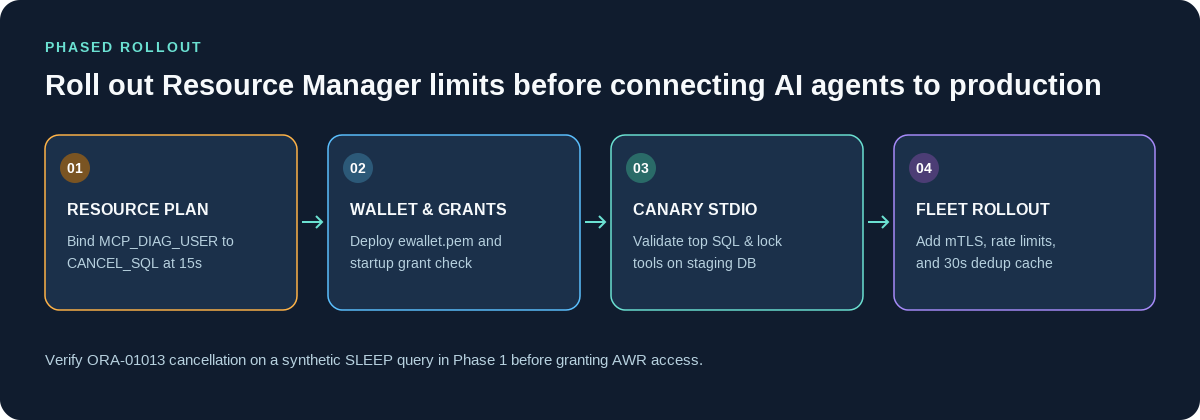
- Phase 1 — Resource Manager Plan and Read-Only User. Create
MCP_DIAG_USERwith explicitSELECTgrants onV_$SESSION,V_$LOCK,V_$SQL,V_$DATABASE,V_$ACTIVE_SESSION_HISTORY,DBA_HIST_SQLSTAT,DBA_HIST_SQLTEXT, andDBA_HIST_SNAPSHOT. Bind the user toMCP_GATEWAY_GROUPwithSWITCH_GROUP => 'CANCEL_SQL'andSWITCH_TIME => 15. Validation gate: Execute a synthetic 20-second query asMCP_DIAG_USERand confirm Oracle aborts it at 15 seconds withORA-01013. Rollback:ALTER USER mcp_diag_user ACCOUNT LOCK;. - Phase 2 — Thin-Mode Wallet and Startup Grant Verification. Deploy
ewallet.pemandtnsnames.orato the gateway host and add a startup probe that runsSELECT 1 FROM ... WHERE 1=0against every requiredV$andDBA_HIST_*view. Validation gate: Gateway refuses to start if any required grant is missing (ORA-00942). Rollback: Keep legacy read-only DBA runbooks active. - Phase 3 — Non-Production Stdio Canary. Connect Claude Desktop or an internal CLI agent via stdio transport to a staging database and validate
get_awr_top_sqlandget_blocking_sessionsagainst simulated lock contention. Validation gate: Accurate diagnosis without any SQL authored by the LLM and response sizes under 2,000 tokens. Rollback: Remove the MCP server entry from client config. - Phase 4 — Fleet HTTP/mTLS Gateway. Expose the gateway over mTLS/IAM-authenticated Streamable HTTP with per-agent rate limits, a 30-second in-flight idempotency cache, and structured audit logging of
(agent_id, tool_name, db_identifier, elapsed_ms).
In Practice
- Oracle
DBMS_RESOURCE_MANAGERCANCEL_SQLbehavior (Oracle Database PL/SQL Packages and Types Reference): SettingSWITCH_GROUP => 'CANCEL_SQL'forcesSWITCH_FOR_CALL => TRUEautomatically. UnlikeKILL_SESSION,CANCEL_SQLaborts only the offending SQL call (ORA-01013) and leaves theoracledbpooled connection intact for subsequent tool calls. You can pair it withMAX_EST_EXEC_TIMEon the same directive so Oracle’s optimizer rejects obviously catastrophic plans (ORA-07455) before they even begin consuming buffer-cache blocks. - Oracle SQLcl 25.2 MCP Server behavior (Oracle SQLcl User’s Guide): SQLcl 25.2 introduced
sql -mcpon top of saved connections (conn -save). While it protects credentials from leaking into LLM prompts, it still exposes general SQL execution—making a curated FastMCP gateway the safer boundary for production OLTP fleets. - MCP
resourcesprimitive (Model Context Protocol Specification): Beyondtools, MCP supports read-onlyresources(for example,oracle://PROD-US-EAST/awr/latest), allowing agents to fetch bounded pre-generated AWR summaries directly into context without triggering liveDBA_HIST_*scans during peak load. - AWR
ELAPSED_TIME_DELTAvs.ELAPSED_TIME_TOTAL(Oracle Database Reference):DBA_HIST_SQLSTATstores both cumulative (_TOTAL) and per-snapshot (_DELTA) counters. Any time-windowed diagnostic tool that forgetsSUM(elapsed_time_delta)or omitsinstance_numberin the snapshot join misreports long-lived cached cursors as current-hour spikes. Similarly, on RAC clusters, pairingGV$LOCKwithGV$SESSIONensures cross-instance blockers are surfaced on the first diagnostic call without requiring manual node-by-node queries. python-oracledberror-surface clarity: WhenDPY-3015(wallet/TLS failure) orDPY-4011(closed/timed-out pool connection) occurs, returning a structured[DB_ERROR]string prevents the LLM from misinterpreting an empty exception as “zero blocking sessions.”
Where It Breaks
| Condition | Breaks How | Detect | Mitigate |
|---|---|---|---|
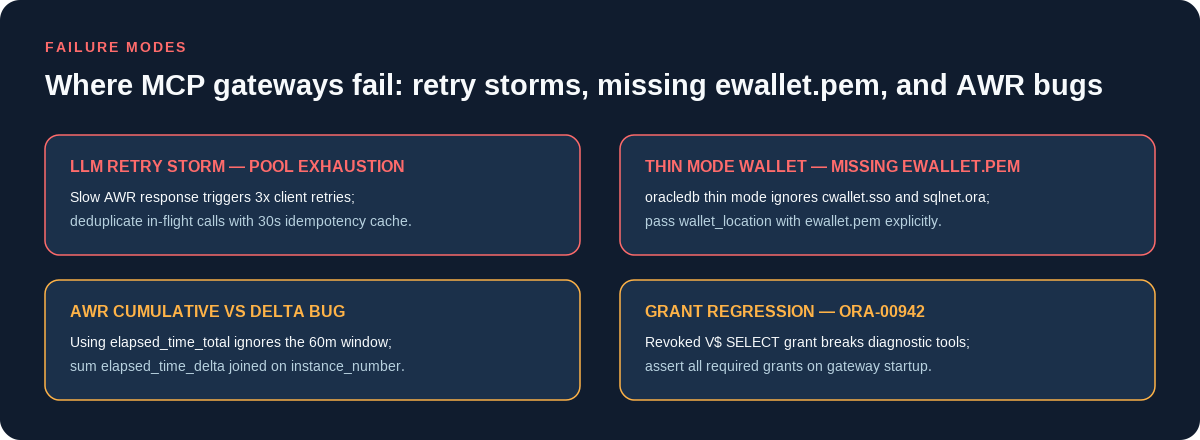
| LLM client retries slow tool calls | 8s AWR query triggers 3x client retries, tripling DB load and exhausting max=10 pool | Surge in duplicate (tool, db_identifier, args) calls and DPY-4011 / pool wait timeouts | Add a 30s idempotency/dedup cache for identical in-flight calls and cap per-agent concurrency |
python-oracledb thin mode missing ewallet.pem | Gateway points wallet_location at a folder with only cwallet.sso; thin mode fails handshake | Startup pool creation raises DPY-3015 / TLS wallet error | Export ewallet.pem into wallet_location and pass wallet_password, or switch explicitly to Thick mode |
Revoked V$ or DBA_HIST_* grant | Tool raises ORA-00942; naive error handling lets the LLM report “no blockers found” | ORA-00942 in gateway logs | Assert all view SELECT grants at gateway startup and return explicit [DB_ERROR] strings to the LLM |
AWR query uses _TOTAL instead of _DELTA | Historical cursor from 3 days ago tops the 60-minute list | Top SQL list never changes across rolling 15-minute checks | Aggregate SUM(elapsed_time_delta) and join on (snap_id, dbid, instance_number) |
| Context window blowout on wide SQL text | Unbounded sql_text across 15 rows floods the LLM context | Tool response exceeds 8K tokens | Clamp DBMS_LOB.SUBSTR(t.sql_text, 100, 1) and cap MAX_ROWS = 15 |
Wrong DBID on cloned/standby DBs | Hardcoded DBID returns empty rows or wrong incarnation metrics | Empty AWR results on cloned test environments | Resolve DBID dynamically via (SELECT dbid FROM v$database) inside each session |
Key Takeaways
- Remove arbitrary SQL from production AI paths: An LLM cannot reliably bound
DBA_HIST_ACTIVE_SESS_HISTORYpartition scans orV$SQL_PLANjoins; expose typed, pre-tuned diagnostic tools instead. - SQLcl 25.2
-mcpis a workstation tool, not a fleet guardrail: Saved connections protect passwords, but curatedFastMCPtools plus Oracle Resource Manager protect production CPU and buffer cache. - Enforce
SWITCH_GROUP => 'CANCEL_SQL'inside Oracle: Pairing Python parameter clamping withSWITCH_TIME => 15guarantees runaway calls fail withORA-01013without breaking pooled connections. - Mind
python-oracledbthin-mode wallet rules: Thin mode ignoressqlnet.oraandcwallet.sso; configureconfig_dirfortnsnames.oraandwallet_locationforewallet.pem. - Always aggregate
_DELTAAWR columns withinstance_number: JoiningDBA_HIST_SQLSTATtoDBA_HIST_SNAPSHOTon(snap_id, dbid, instance_number)and summingelapsed_time_deltaprevents stale cumulative totals and RAC double-counting.
What to Do Next
- Problem: Giving AI agents raw SQL execution—even with read-only credentials—exposes production Oracle fleets to unindexed AWR/ASH scans, buffer-cache eviction, and context-window waste.
- Solution: Deploy a
FastMCPgateway with dictionary-validated database routing,oracledbthin-mode wallet pools, delta AWR query templates, and an Oracle Resource Manager plan usingSWITCH_GROUP => 'CANCEL_SQL'. - Proof: Verify in staging that a synthetic 20-second query submitted as
MCP_DIAG_USERterminates at 15 seconds withORA-01013while the connection pool remains healthy. - Action: Create
MCP_DIAG_USERandMCP_DIAG_PLANon a non-production Oracle instance this week, then stand up a two-toolFastMCPprototype (get_awr_top_sqlandget_blocking_sessions) before exposing any production database to an AI assistant.
Interactive tools for this topic