
Replication Lag, Oplog Windows, and Multi-TB Initial Sync on EC2
When a secondary node restarts for routine maintenance and falls behind, an undersized oplog window turns a routine reboot into a multi-day initial sync that imperils cluster availability.
TL;DR
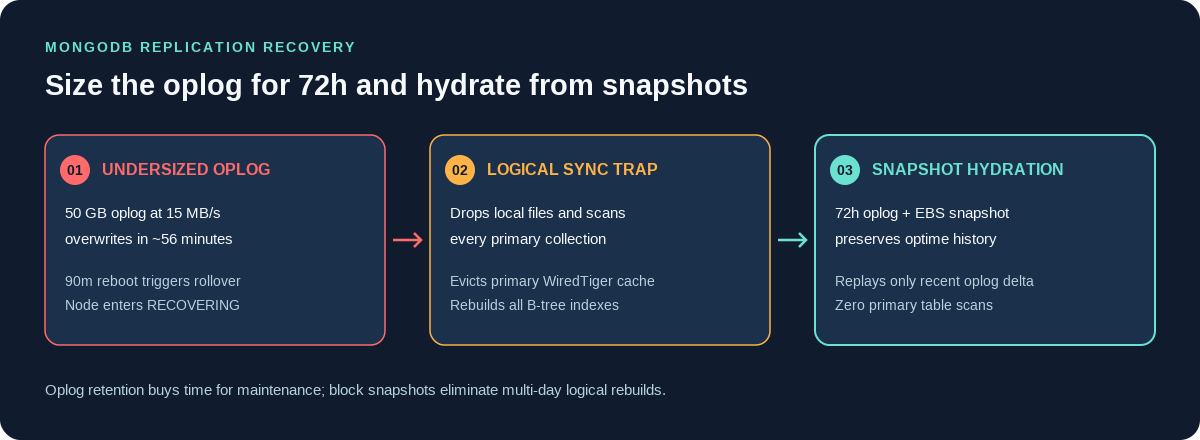
- Problem: High write bursts shrink a fixed-size
local.oplog.rsretention window to minutes; a secondary offline longer than that window falls off the oplog and triggers a multi-day logical initial sync that evicts the primary’s WiredTiger cache.- Answer: Size the oplog for at least 48–72 hours of peak write velocity using
replSetResizeOplog(andminRetentionHoursin 4.4+), enable Flow Control, and hydrate failed multi-TB nodes from block-level AWS EBS snapshots.- Watch out:
replSetResizeOplogdoes not persist across restarts without updatingmongod.conf, andminRetentionHourscan grow the oplog past itssizeceiling and fill the EBS volume during write storms.
Situation
Operating self-managed MongoDB replica sets on AWS EC2 requires maintaining multi-terabyte datasets across memory-optimized instances backed by EBS gp3 storage. In analytics, telemetry ingest, and high-velocity transactional workloads, primary nodes sustain thousands of write operations per second, generating gigabytes of mutation history per hour in local.oplog.rs.
Routine infrastructure maintenance—kernel patching, instance type upgrades, security updates, and storage volume modifications—requires taking individual secondary nodes offline sequentially. Under normal conditions, a secondary restarts, reconnects to the replica set, fetches missed operations from the primary’s oplog, and catches up within minutes.
During peak traffic or batch backfill events, however, primary write throughput outpaces the retention capacity of a small default oplog. If a secondary stays disconnected longer than the primary’s active oplog window, logical replication cannot resume because the primary has already overwritten the secondary’s last applied optime (lastAppliedOpTime).
The Problem
When a secondary node reconnects, it requests all oplog entries newer than its lastAppliedOpTime. If the primary has already truncated those entries, the cluster hits four compounding constraints:
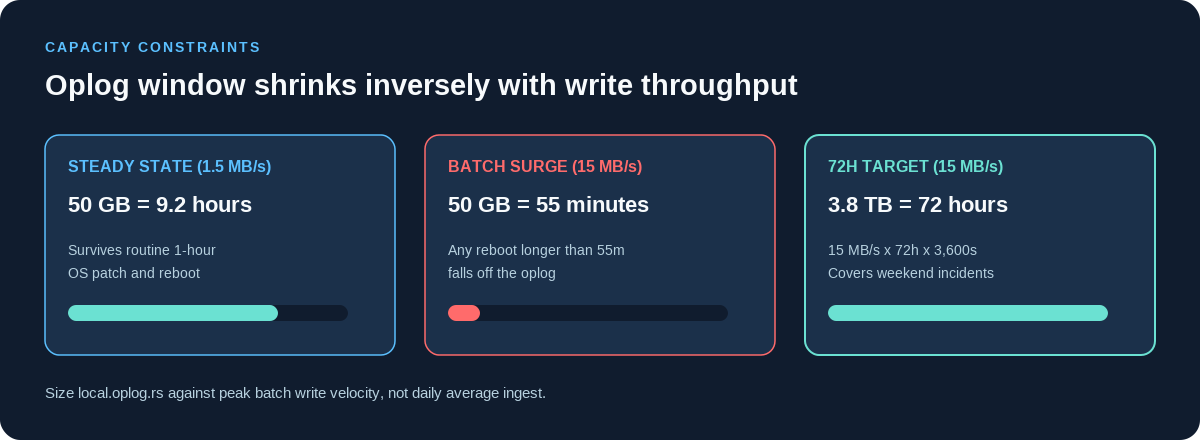
- Fixed-Size Oplog Compression Under Peak Writes: Because
local.oplog.rsis a capped collection managed as a WiredTiger B-tree, a fixed size ceiling (such as 50 GB) retains time inversely proportional to write throughput. At 1.5 MB/s of oplog generation, 50 GB holds roughly 9.2 hours; during a 15 MB/s batch surge, that same 50 GB overwrites in 55 minutes. - State Transition to
RECOVERING: A reconnecting secondary whoselastAppliedOpTimepredates the primary’s oldest oplog entry transitions toRECOVERING. It stops serving read traffic and cannot participate in election majorities, reducing a 3-node replica set’s fault tolerance to zero if another node fails. - Multi-Day Logical Initial Sync: Native logical recovery drops all local database files, streams every document from a sync source via
repl.network.getmores, and rebuilds every B-tree index from scratch using external merge sorts. On multi-terabyte collections, this saturates local CPU and EBS I/O for days. - Primary Cache Eviction and IOPS Saturation: Serving sequential collection scans to a syncing node consumes primary WiredTiger read tickets, displaces the hot working set from the primary’s cache, and competes with client queries for EBS gp3 bandwidth (125 MB/s baseline unless provisioned higher).
The core architectural question is: How can database platform engineers size replica set oplog retention against peak write velocity, bound replication lag with Flow Control, and recover multi-terabyte nodes in minutes using block-level EBS snapshots instead of multi-day logical syncs?
Options Considered
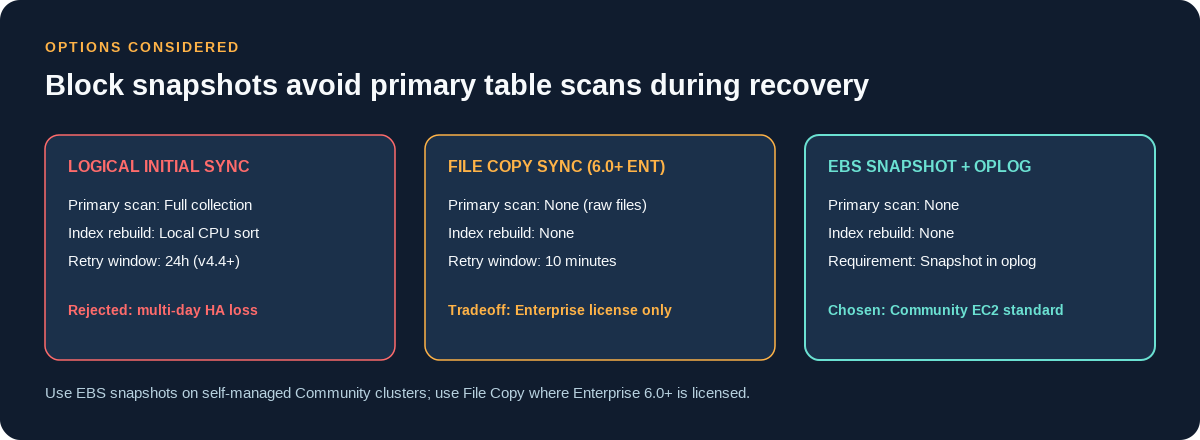
When a multi-TB secondary falls behind or needs replacement, teams typically evaluate three recovery paths and two oplog sizing strategies:
| Option | Primary Load | Index Rebuild | Availability / License Constraint | Decision |
|---|---|---|---|---|
| Logical Initial Sync | High (full collection scans) | Full CPU/disk sort | Built-in; 24h transient retry in v4.4+ | Rejected for multi-TB nodes; degrades primary cache |
| File Copy Initial Sync | Low (raw file copy) | None | MongoDB 6.0+ Enterprise / Atlas only; 10m retry window | Conditional; use only on licensed Enterprise 6.0+ |
| EBS Snapshot + Oplog | None for base data | None | Requires snapshot optime inside primary oplog window | Chosen for self-managed Community EC2 |
- Fixed
sizevs.minRetentionHours(MongoDB 4.4+): A fixedoplogSizeMBcaps disk usage predictably but shrinks in hours during write spikes. CombiningsizewithminRetentionHoursguarantees a minimum time window (MongoDB honors whichever constraint requires more space), but introduces disk-full risk if an unbounded write storm forces the oplog to expand beyond free EBS capacity. For clusters with unpredictable batch bursts, setsizeto the baseline 72-hour requirement and pair it withminRetentionHoursonly when EBS volumes carry at least 30% free headroom. - Logical Initial Sync: Even with Resumable Initial Sync (MongoDB 4.4+, which retries transient errors for 24 hours by default via
initialSyncTransientErrorRetryPeriodSeconds), logical sync still forces full table scans on the sync source and full index builds on the target. On multi-terabyte collections, index sorting alone can saturate local CPU and EBS IOPS for days, delaying the secondary’s return toSECONDARYvoting status. - File Copy Initial Sync (MongoDB 6.0+ Enterprise): Copies underlying WiredTiger files directly over the network without document-level scans or index rebuilds, but is unavailable on MongoDB Community Edition and operates with a shorter 10-minute transient error recovery window.
- Snapshot Target Selection (Primary vs. Secondary): Taking EBS snapshots from the primary adds snapshot I/O overhead during peak writes and complicates rollback if an election occurs. Capturing snapshots from a healthy secondary—or a dedicated hidden
priority: 0member—isolates snapshot I/O from client traffic while preserving an identical WiredTiger checkpoint and journal state.
The Dynamic Oplog and Snapshot Seeding Architecture
A resilient self-managed EC2 replication architecture pairs three mechanisms: mathematical oplog sizing, Flow Control write throttling, and block-level EBS snapshot hydration.
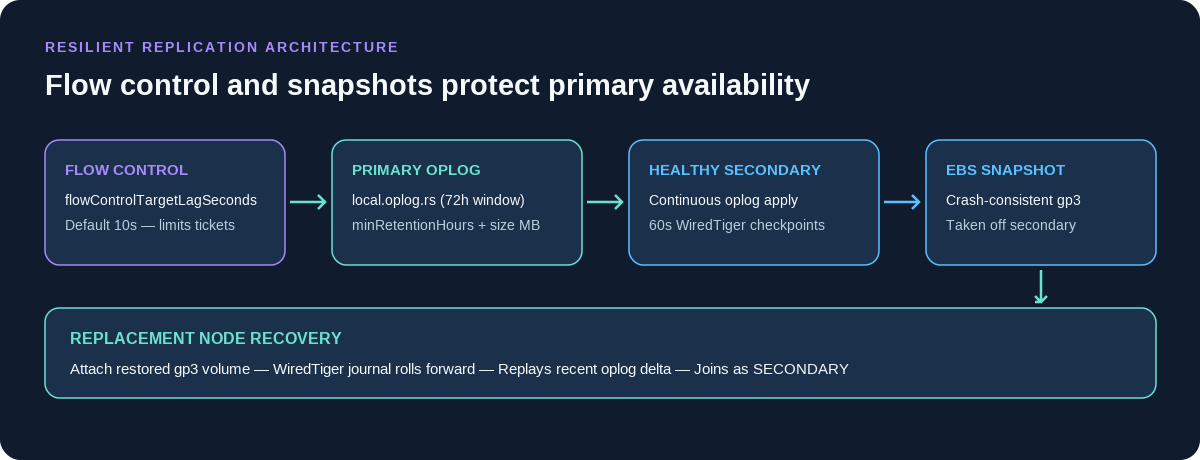
flowchart TD
    Client["Application Ingest — Write Traffic"] --> Primary["mongod Primary Node"]
    Primary --> FlowEngine{"Flow Control — 10s Default Lag"}
    FlowEngine -->|Lag Exceeds Target| Throttle["Limit Flow Control Tickets"]
    FlowEngine -->|Lag Within Margin| OplogBuffer["WiredTiger Oplog — local.oplog.rs"]
    Throttle --> OplogBuffer
    OplogBuffer -->|Continuous Fetch| SecHealthy["Healthy Secondary — EBS gp3"]
    SecHealthy -.->|Periodic Snapshot| EBSSnap["Crash-Consistent EBS Snapshot"]
    EBSSnap --> RestoreVol["New gp3 Volume"]
    RestoreVol --> SecRecovered["Replacement Secondary"]
    SecRecovered -->|Replay Delta| JoinCluster["Rejoin as SECONDARY"]
1. Mathematical Modeling of the Oplog Retention Window
The time retained in local.oplog.rs is the ratio of provisioned oplog storage to write throughput:
$$T_{\text{window}} = \frac{S_{\text{oplog}}}{\text{Throughput}_{\text{write}}}$$
Where $T_{\text{window}}$ is retention in seconds, $S_{\text{oplog}}$ is allocated oplog storage in MB, and $\text{Throughput}_{\text{write}}$ is the oplog generation rate in MB/s. To survive extended host maintenance or multi-hour batch incidents, size the oplog for 48 to 72 hours of peak write volume:
$$S_{\text{required}} = \text{PeakWriteRate}_{\text{MB/s}} \times 72\text{ hours} \times 3,600\text{ sec/hr}$$
At a peak batch ingest rate of $15\text{ MB/s}$:
$$S_{\text{required}} = 15 \times 72 \times 3,600 = 3,888,000\text{ MB} \approx 3.8\text{ TB}$$
In MongoDB 3.6+, replSetResizeOplog resizes the oplog online without restarting mongod. In MongoDB 4.4+, you can also specify minRetentionHours. Remember that replSetResizeOplog updates runtime state only; you must also update replication.oplogSizeMB and storage.oplogMinRetentionHours in mongod.conf so the setting survives restarts.
2. Flow Control Concurrency Throttling
Introduced in MongoDB 4.2 with enableFlowControl: true by default, Flow Control bounds majority-committed replication lag using flowControlTargetLagSeconds (default: 10 seconds across 4.2, 5.0, and 7.0+):
- Secondaries report their optime progress to the primary via replication heartbeats.
- When majority-committed lag approaches
flowControlTargetLagSeconds, the primary limits the rate at which it issues flow control tickets. - Incoming writes on the primary must acquire a flow control ticket before taking locks and entering WiredTiger, pacing primary ingest to match what the majority of data-bearing secondaries can sustain.
- This is distinct from
wiredTigerConcurrentWriteTransactions(default 128 prior to 7.0; dynamically probed up to 128 in MongoDB 7.0+), which bounds concurrent storage engine transactions rather than replication-lag admission.
3. WiredTiger Oplog Storage and Tombstoning
WiredTiger stores local.oplog.rs as a row-store B-tree rather than a pre-allocated contiguous ring file:
- Keys: Each entry is keyed by its cluster timestamp (
Timestamp(seconds, increment)) and term. - Trimmer Thread: An internal oplog trimmer thread periodically deletes entries older than both the configured
sizeceiling andminRetentionHoursfloor. - Space Reclamation: Shrinking an oversized oplog via
replSetResizeOplogtruncates logical entries, but WiredTiger retains freed extent blocks internally for future reuse rather than returning them to the OS filesystem.
Diagnostic Telemetry: High-Resolution Replication Forensics
Inspect oplog capacity, secondary headroom, and active initial sync progress directly via mongosh.
1. Oplog Window and Lag Margin Audit
// Execute in mongosh against the primary
(function() {
  const localDB = db.getSiblingDB("local");
  const status = rs.status();
  const primary = status.members.find(m => m.stateStr === "PRIMARY");

  if (!primary) {
    print("[CRITICAL] No PRIMARY elected in replica set!");
    return;
  }

  const oplogColl = localDB.oplog.rs;
  const oplogStats = oplogColl.stats();
  const firstEntry = oplogColl.find().sort({ $natural: 1 }).limit(1).next();
  const lastEntry = oplogColl.find().sort({ $natural: -1 }).limit(1).next();

  const windowSecs = lastEntry.ts.getTime() - firstEntry.ts.getTime();
  const windowHours = (windowSecs / 3600).toFixed(2);

  print("Configured Oplog Max   : " + (oplogStats.maxSize / 1024 / 1024).toFixed(2) + " MB");
  print("Allocated Oplog Storage: " + (oplogStats.storageSize / 1024 / 1024).toFixed(2) + " MB");
  print("Active Retention Window: " + windowHours + " hours");

  status.members.forEach(function(m) {
    if (m.stateStr === "SECONDARY") {
      const lagSecs = ((primary.optimeDate.getTime() - m.optimeDate.getTime()) / 1000).toFixed(2);
      const marginHours = (windowHours - (lagSecs / 3600)).toFixed(2);
      print("Member [" + m.name + "] Lag: " + lagSecs + "s | Margin Left: " + marginHours + "h");
      if (parseFloat(marginHours) < 4.0) {
        print("  [CRITICAL] Secondary is within 4 hours of falling off the oplog!");
      }
    }
  });
})();
2. Monitoring Active Initial Sync Progress
When a member is in STARTUP2, rs.status().initialSyncStatus exposes progress counters:
// Execute on the syncing secondary node
const syncStatus = rs.status({ initialSync: 1 }).initialSyncStatus;
if (syncStatus) {
  printjson({
    approxTotalBytesCopied: syncStatus.approxTotalBytesCopied,
    approxTotalDataSize: syncStatus.approxTotalDataSize,
    appliedOps: syncStatus.appliedOps,
    elapsedMillis: syncStatus.totalInitialSyncElapsedMillis,
    remainingEstimatedMillis: syncStatus.remainingInitialSyncEstimatedMillis,
    failedAttempts: syncStatus.failedInitialSyncAttempts
  });
} else {
  print("Node is not currently executing an initial sync.");
}
How It Rolls Out
When recovering a failed multi-terabyte secondary or expanding oplog capacity across an active EC2 replica set, follow a five-step staged rollout with explicit validation gates:
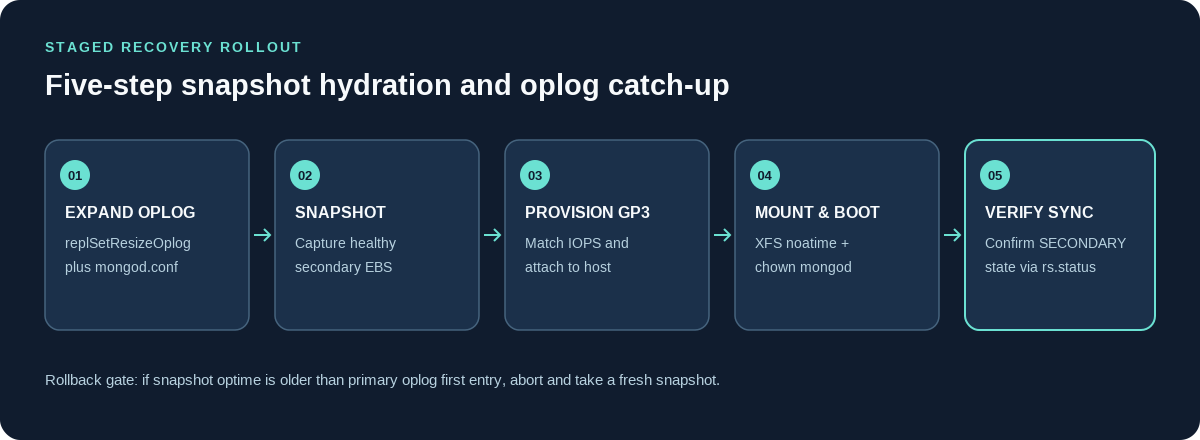
- Step 1 — Expand Oplog Online (Secondaries First, Then Primary): Verify free EBS disk space first (
df -h), then runreplSetResizeOplogon each secondary before resizing the primary, and persistreplication.oplogSizeMBinmongod.conf.
Gate: Rundb.adminCommand({ replSetResizeOplog: 1, size: 512000, minRetentionHours: 48 });rs.printReplicationInfo()and confirm the configured size and retention window on every member. - Step 2 — Capture a Crash-Consistent EBS Snapshot: Snapshot a healthy, up-to-date secondary’s data volume rather than the primary. Because WiredTiger checkpoints run every 60 seconds and the journal records writes between checkpoints, an EBS snapshot of a single volume holding both data and journal is crash-consistent. Rollback/Gate: Record the snapshot creation timestamp and verify it is strictly newer than the primary’s oldest oplog entry. If the snapshot ages out of the oplog window before restore, discard it and take a new snapshot.
- Step 3 — Provision and Attach Replacement gp3 Volume: Create a new EBS gp3 volume from the snapshot, matching provisioned IOPS and throughput to the rest of the replica set. Warm-up or pre-initialize blocks if latency-sensitive workloads will hit it immediately.
- Step 4 — Mount XFS and Start
mongod: Mount withnoatime, enforcemongod:mongodownership, and start the daemon with its standard replica set configuration.sudo mount -o noatime /dev/nvme1n1 /var/lib/mongodb sudo chown -R mongod:mongod /var/lib/mongodb - Step 5 — Verify Delta Catch-Up and
SECONDARYState: WiredTiger replays its local journal to the last checkpoint, connects to the primary, and fetches only the oplog delta since the snapshot timestamp. ConfirmstateStr === "SECONDARY"andoptimeDateconvergence inrs.status().
Automated Oplog Retention Monitor
The following Python script audits the active oplog window, flags secondaries approaching rollover, and optionally triggers replSetResizeOplog:
#!/usr/bin/env python3
"""
MongoDB Automated Oplog Retention Monitor & Capacity Alerting
Usage:
    python3 mongo_oplog_monitor.py --uri "mongodb://admin:pass@primary:27017/?replicaSet=rs0" \
      --min-window-hours 48 --target-resize-gb 500
"""

import argparse
import sys
from pymongo import MongoClient
from pymongo.errors import PyMongoError

def audit_oplog_capacity(client, min_window_hours, target_resize_gb):
    admin_db = client.admin
    local_db = client.local

    try:
        rs_status = admin_db.command("replSetGetStatus")
    except PyMongoError as e:
        print(f"[FATAL] Failed to retrieve replSetGetStatus: {e}")
        sys.exit(1)

    primary_member = next((m for m in rs_status.get("members", []) if m.get("stateStr") == "PRIMARY"), None)
    if not primary_member:
        print("[CRITICAL] No primary node identified in replica set!")
        sys.exit(1)

    oplog = local_db.oplog.rs
    first_entry = oplog.find().sort([("$natural", 1)]).limit(1).next()
    last_entry = oplog.find().sort([("$natural", -1)]).limit(1).next()

    window_secs = last_entry["ts"].time - first_entry["ts"].time
    window_hours = window_secs / 3600.0

    print(f"Primary Node         : {primary_member.get('name')}")
    print(f"Current Oplog Window : {window_hours:.2f} hours ({window_secs / 86400.0:.2f} days)")

    for m in rs_status.get("members", []):
        if m.get("stateStr") == "SECONDARY":
            lag_secs = (primary_member["optimeDate"] - m["optimeDate"]).total_seconds()
            margin_hours = window_hours - (lag_secs / 3600.0)
            print(f"Secondary [{m.get('name')}] -> Lag: {lag_secs:.1f}s | Headroom: {margin_hours:.2f}h")
            if margin_hours < 4.0:
                print(f"  [ALERT] Secondary {m.get('name')} is near oplog rollover threshold!")

    if window_hours < min_window_hours:
        print(f"\n[WARNING] Oplog window ({window_hours:.2f}h) is below policy ({min_window_hours}h)!")
        if target_resize_gb > 0:
            target_mb = int(target_resize_gb * 1024)
            try:
                res = admin_db.command({"replSetResizeOplog": 1, "size": target_mb})
                print(f"[SUCCESS] Oplog dynamically resized: {res}")
            except PyMongoError as pe:
                print(f"[ERROR] Failed to resize oplog: {pe}")
    else:
        print("\n[OK] Oplog retention window provides adequate operational headroom.")

def main():
    parser = argparse.ArgumentParser(description="MongoDB Oplog Capacity Monitor")
    parser.add_argument("--uri", required=True, help="MongoDB Primary connection URI")
    parser.add_argument("--min-window-hours", type=float, default=48.0)
    parser.add_argument("--target-resize-gb", type=float, default=0)
    args = parser.parse_args()

    client = MongoClient(args.uri, serverSelectionTimeoutMS=5000)
    audit_oplog_capacity(client, args.min_window_hours, args.target_resize_gb)

if __name__ == "__main__":
    main()
In Practice
The operational tradeoffs above follow directly from how MongoDB, WiredTiger, and AWS EBS behave under sustained write load (CARL B/C — derived from documented engine behavior, not personal benchmark claims):
- Logical Sync vs. Primary Working Set: Because WiredTiger uses an LRU-style cache eviction policy, sequential collection scans issued by a syncing secondary pull cold pages into the primary’s cache and evict hot transactional pages. On EBS gp3 volumes with finite provisioned IOPS and throughput, those concurrent sequential reads directly compete with application read/write I/O.
- Flow Control Ticket Pacing: When
enableFlowControlis active,db.serverStatus().flowControlexposesisLagged,targetRateLimit, andtimeAcquiringMicros. Under sustained bulk loads where secondaries cannot keep up with primary index writes, Flow Control trades primary write latency for bounded replication lag, keeping secondaries within the oplog window. - EBS Snapshot Consistency: Because WiredTiger flushes checkpoints every 60 seconds and writes all intervening mutations to the journal on the same volume, taking an EBS snapshot of a single-volume secondary captures a consistent recovery point without requiring
db.fsyncLock()on the primary.
Where It Breaks
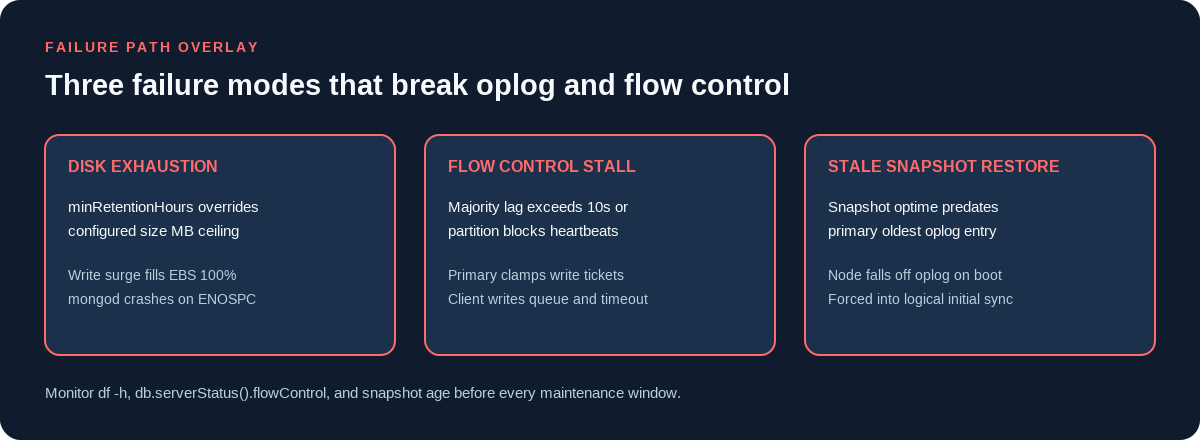
| Condition | Breaks How | Detect | Mitigate |
|---|---|---|---|
minRetentionHours Disk Exhaustion | Oplog grows past configured size MB to honor time floor, filling EBS volume to 100% | df -h and local.oplog.rs storageSize alerts | Maintain 30%+ free EBS headroom; cap minRetentionHours against peak write math |
| Flow Control Partition Stall | Primary loses contact with voting majority, assumes infinite lag, and clamps write tickets | db.serverStatus().flowControl.isLagged = true with healthy secondaries | Verify replica set network health and election majority; tune flowControlTargetLagSeconds |
| Stale Snapshot Restore | Restored EBS snapshot optime is older than primary’s oldest oplog entry | Secondary enters RECOVERING and starts initialSyncStatus | Ensure oplog exceeds snapshot age + restore time before booting replacement |
Unpersisted replSetResizeOplog | Daemon restart reverts oplog size to mongod.conf default | rs.printReplicationInfo() shrinks after reboot | Update replication.oplogSizeMB and storage.oplogMinRetentionHours in mongod.conf |
| Multi-Volume Snapshot Skew | Data and journal reside on separate EBS volumes snapshotted at different instants | WiredTiger fails journal recovery on boot | Keep data and journal on a single EBS volume, or use fsyncLock before multi-volume snapshots |
| Secondary Apply Bottleneck | Single-collection hot-key writes serialize oplog application on secondaries | High replWriterThreadCount queue wait with idle network | Tune replWriterThreadCount (default 16) and replBatchLimitOperations (default 5000) |
April 2026 Update
Modern MongoDB releases (5.0, 6.0, 7.0, and 8.0) harden replication recovery and concurrency control:
- File Copy-Based Initial Sync (MongoDB 6.0+ Enterprise / Atlas): Copies underlying WiredTiger files directly instead of scanning logical documents and rebuilding indexes, though it enforces a 10-minute transient error retry window rather than logical sync’s 24-hour window.
- Resumable Initial Sync (MongoDB 4.4+): Pauses and resumes logical initial sync across transient network or metadata errors for up to 24 hours (
initialSyncTransientErrorRetryPeriodSeconds) instead of restarting from byte zero. - Smoothed Flow Control & Dynamic Tickets (MongoDB 7.0+): Flow Control uses deterministic smoothed lag tracking to avoid abrupt throttling cliffs, while WiredTiger replaces the static 128-ticket cap with dynamic throughput probing for read and write concurrency.
Key Takeaways
- Size the oplog for peak batch velocity, not steady-state averages: A 50 GB oplog that holds 9 hours at 1.5 MB/s overwrites in 55 minutes during a 15 MB/s surge.
- Pair
replSetResizeOplogwithmongod.confupdates and disk headroom: Runtime resizes vanish on restart, andminRetentionHoursin 4.4+ will expand pastsizeMB during write storms. - Never run multi-TB logical initial syncs on Community EC2 when EBS snapshots exist: Block-level snapshot hydration restores a node by replaying only the oplog delta, avoiding primary cache eviction and multi-day index rebuilds.
- Monitor
db.serverStatus().flowControlalongsiders.status(): Flow Control defaults to a 10-secondflowControlTargetLagSecondstarget in 4.2+ and will throttle primary writes if secondaries lag or majority connectivity breaks. - Keep data and journal on the same EBS volume for crash-consistent snapshots: Taking snapshots from a healthy secondary avoids primary I/O overhead and guarantees WiredTiger recovery without
fsyncLock.
What to Do Next
- Problem: An undersized oplog retention window turns routine secondary maintenance into a multi-day logical initial sync that degrades primary cache and availability.
- Solution: Size
local.oplog.rsto retain 48–72 hours of peak write volume (persisted inmongod.conf) and standardize on single-volume EBS snapshots of healthy secondaries for multi-TB node recovery. - Proof: Run
rs.printReplicationInfo()during peak write hours to confirm the active window exceeds 48 hours, and checkdb.serverStatus().flowControlfor unexpected throttling. - Action: Deploy the
mongo_oplog_monitor.pyaudit script to your alerting pipeline, schedule automated secondary EBS snapshots, and test a snapshot-based secondary replacement in staging this week.